

SEO
SEO Report Tool: Complete Guide
A complete guide to using an SEO report tool for tracking rankings, identifying issues, and improving search visibility.
Understanding your website's search performance is essential for growth. An SEO report tool helps you gather critical data about rankings, technical health, and visibility in one place. Without proper reporting, you are making decisions based on guesswork rather than evidence. This guide covers what an SEO report tool does, why it matters, and how to use one effectively. Whether you want to check keyword position changes, identify crawl errors in Google, or track performance trends, reporting tools provide the foundation for smarter optimisation. We will explore key features, practical applications, and how UtilitySEO supports this process.
What Is an SEO Report Tool and Why Does It Matter?
An SEO report tool collects, organises, and displays data about your website's search engine performance. It pulls information from multiple sources and presents it in a format that makes analysis straightforward. Instead of logging into several platforms and piecing together insights manually, you get a unified view.
These tools typically monitor several key areas. Keyword rankings show where your pages appear in search results. Technical audits reveal issues affecting crawlability and indexation. Traffic analytics demonstrate how visitors find and interact with your site. Backlink data indicates your authority and link health.
The value lies in making informed decisions quickly. When you can see that a page has dropped ten positions for a target term, you can investigate immediately. When crawl errors in Google prevent indexation, you catch them before they impact traffic significantly.
For anyone serious about SEO, reporting is not optional. It transforms scattered data into actionable intelligence. You can learn more about foundational auditing in this Website SEO Audit: Complete Guide.
Key Features to Look for in an SEO Report Tool
Not all reporting tools offer the same capabilities. Understanding essential features helps you choose one that matches your needs.
Keyword Rank Tracker Functionality
A reliable keyword rank tracker shows where your pages rank for specific search terms. Look for tools that provide historical data so you can spot trends over time. Daily or weekly position updates give you timely insights without overwhelming you with noise.
The best trackers let you group keywords by topic, campaign, or priority. This organisation makes it easier to focus on what matters most. Device and country breakdowns add another layer of precision, showing whether your mobile rankings differ from desktop or whether performance varies by region.
Technical Health Monitoring
Technical SEO issues can undermine even the best content. Your reporting tool should identify problems like broken links, missing meta tags, slow page speeds, and indexation blockers. Crawl errors in Google specifically deserve attention because they directly prevent pages from appearing in search results.
Regular scanning catches issues before they escalate. A page that returns a 404 error today might be fixable in minutes. Left unnoticed for months, it damages user experience and wastes link equity.
Google Keyword Tracking and Search Console Integration
Google keyword tracking powered by Search Console data provides accurate, first party information. Unlike third party scrapers, GSC data reflects actual impressions and clicks from Google's own records.
Integration with Search Console unlocks valuable metrics including average position, click through rate, and query performance. You can see which terms drive traffic and which have potential but underperform. For a deeper look at monitoring rankings, read Google Keyword Tracking: How to Monitor Search Performance Accurately.
Traffic and Conversion Analytics
Rankings matter only if they translate into visits and conversions. Look for tools that connect with Google Analytics to show organic traffic trends, session duration, and goal completions. This context helps you understand whether ranking improvements produce actual business results.
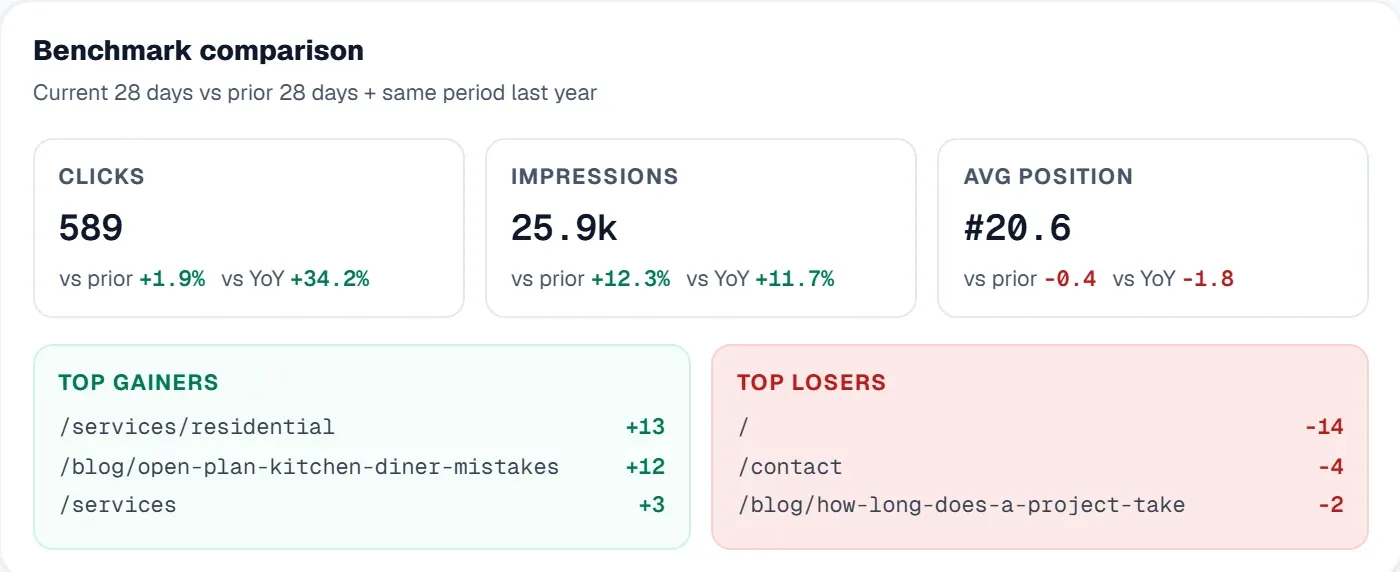
Real World Applications of SEO Reporting
Understanding features is useful. Seeing how they apply in practice makes them actionable.
Monitoring Campaign Progress
When you launch a new content campaign or site redesign, tracking progress is essential. An SEO report tool lets you set a baseline before launch and measure changes over time. You can check keyword position shifts, monitor indexation status, and watch traffic respond to updates.
This approach removes ambiguity. Instead of wondering whether your efforts made a difference, you have clear data showing outcomes.
Identifying Technical Problems Early
Imagine discovering that Google has been encountering crawl errors on your most important category pages for three weeks. During that time, those pages may have dropped from the index, costing you significant traffic.
Regular technical reporting catches these problems quickly. Automated scans flag new issues, allowing you to fix them before they cause lasting damage. This guide on fixing technical SEO issues covers common problems and solutions.
Competitive Analysis
Many reporting tools let you monitor competitor domains alongside your own. Tracking competitor visibility helps you understand market dynamics. If a competitor suddenly ranks higher for your target terms, you can investigate their changes and adapt your strategy.
Client and Stakeholder Reporting
For agencies and in house teams reporting to leadership, clear visualisations and exportable data save time. A well designed SEO report tool produces professional reports that communicate progress without requiring recipients to understand technical details.
How UtilitySEO Supports Comprehensive SEO Reporting
UtilitySEO provides a range of features that support thorough SEO reporting without unnecessary complexity.
Keyword Tracking Powered by GSC
The keyword tracking feature pulls data directly from Google Search Console, giving you accurate rankings, impressions, and clicks. You can organise keywords into groups using inline rename and move functionality. The device and country breakdown shows performance splits, helping you understand regional and platform differences clearly.
Full Site Scanning and Audit Dashboard
The full site scan crawls up to 10,000 pages (depending on plan) via sitemap and internal links, running server side for speed. Results appear in the SEO results dashboard with scores, categorised issues, and lightbulb tips suggesting fixes. This makes it straightforward to identify crawl errors in Google and other technical problems affecting your site.
Scan history saves previous scans so you can reload and compare results over time. This historical view is invaluable for tracking improvements and catching regressions.
Pages Tab with URL Inspection
The Pages tab shows GSC page performance with built in URL inspection, index status, mobile usability checks, and canonical mismatch detection. Instead of switching between platforms, you can check keyword position data and technical health in one place.
Progress Tracking and Issue Management
Beyond scanning, UtilitySEO lets you pin issues from scan results and track them through resolution. The progress dashboard displays milestones, fix rate by priority, and streaks that encourage consistent improvement. This turns reporting from passive observation into active management.
Analytics Integration
Connect Google Analytics 4 to view organic traffic, sessions, conversions, and top pages. The GA4 active users panel provides real time data with 30 second polling, useful for monitoring campaigns or content launches as they happen.
The Trends tab shows search performance over periods ranging from three days to two years, giving you flexibility in analysis timeframes.
You can explore the full Workflow to see how these features connect in practice.
Getting Started with SEO Reporting
Effective reporting requires setup and ongoing attention. Follow these steps to build a strong foundation.
Connect your data sources. Link Google Search Console and Google Analytics to your reporting tool. Without these connections, you miss essential data about rankings and traffic.
Define your key metrics. Decide what matters most for your goals. Focus on a manageable set of metrics rather than tracking everything. Common priorities include target keyword rankings, organic traffic, and technical issue counts.
Establish a reporting cadence. Weekly checks work well for most sites. High traffic or rapidly changing sites may benefit from daily monitoring. Choose a schedule you can maintain consistently.
Act on findings. Reports have value only when they prompt action. Create a process for reviewing findings and addressing problems. UtilitySEO's issue tracking and progress dashboard support this workflow directly.
For those starting fresh, a free SEO audit provides a useful baseline.
Conclusion
An SEO report tool transforms scattered data into clear insights that drive better decisions. From using a keyword rank tracker to monitor positions to catching crawl errors in Google before they harm traffic, reporting is fundamental to effective optimisation. UtilitySEO combines keyword tracking, technical scanning, analytics integration, and progress management in one platform. The GSC powered rankings, comprehensive site audits, and visual dashboards make it practical to stay informed without juggling multiple tools. Explore UtilitySEO Pricing to find a plan that fits your needs and start building a clearer picture of your search performance today.
Frequently asked questions
An SEO report tool collects, organizes, and displays crucial data about your website's search engine performance, consolidating information from various sources into one unified view.
- It gathers data on keyword rankings and technical health.
- The tool helps monitor traffic analytics and backlink profiles.
- It transforms scattered data into actionable intelligence for optimization.
An SEO report tool is crucial because it enables data-driven decision-making, moving beyond guesswork to provide clear insights into your site's search visibility and performance.
- It helps identify ranking drops and technical issues promptly.
- The tool ensures you catch critical problems like crawl errors quickly.
- It allows for smarter optimization strategies based on evidence.
When choosing an SEO report tool, prioritize features like robust keyword rank tracking, comprehensive technical audits, and detailed traffic analytics for effective insights.
- Look for historical data and daily keyword position updates.
- Ensure it provides technical health checks and identifies crawl errors.
- Backlink data and competitor analysis are also valuable features.
An SEO report tool helps identify website issues by providing technical audits that reveal problems affecting crawlability and indexation, alongside monitoring keyword performance changes.
- It flags crawl errors and broken links impacting search visibility.
- The tool shows sudden drops in keyword rankings for specific pages.
- It highlights site performance bottlenecks that hinder user experience.
Yes, a good SEO report tool includes robust keyword rank tracker functionality that provides historical data, allowing you to monitor your page positions for specific search terms over time.
- It offers daily or weekly updates on keyword performance.
- You can group keywords by topic or campaign for better organization.
- Track changes to understand trends and measure SEO campaign effectiveness.
Know what to fix next.
Scan your site for a clearer place to start.
About 30 seconds. No card needed.