

SEO
How to Monitor Keyword Position Google: A Practical Walkthrough
A comprehensive guide to monitoring keyword positions on Google, including how to resolve conflicting data, set up alerts, and connect rankings to business...
Tracking where your website ranks on Google is essential for understanding your SEO performance, but many business owners struggle to get accurate, actionable data. Whether you use Google Search Console or invest in dedicated ranking software, knowing how to monitor keyword position Google effectively can reveal opportunities, identify problems, and guide your content strategy. This guide walks you through the best methods, helps you interpret conflicting data, and shows you how to set up automated alerts so you're never caught off guard by ranking changes.
Understanding Google Search Console vs Ranking Software
When you first start to monitor keyword position Google, the most obvious starting point is Google Search Console, which is free and provides average position data for your keywords. However, GSC operates differently from dedicated ranking software. GSC shows your average position over time, not your real-time exact rank, because Google calculates this across multiple searches and locations. This gives you a broader picture but less precision.
Dedicated ranking software uses a different approach called snapshot tracking. These tools query Google directly from specific locations and devices, recording exactly where your page appears for each keyword at that moment. The trade-off is clear: GSC is free but less granular, whilst ranking software costs money but offers precise, location-specific data.
The key insight many practitioners miss is that these tools aren't contradictory. They measure different things. GSC tells you how your keywords perform overall. Ranking software tells you exactly where you rank from specific locations. For a local business targeting customers in Manchester, for instance, this distinction matters enormously.
Why Rankings Vary Across Tools and Methods
If you've ever checked your keyword position in two different tools and seen conflicting numbers, you're not alone. This happens for several reasons that directly affect how you should monitor keyword position Google.
First, personalisation. Google tailors results based on your search history, location, device, and even the time of day. When you search incognito, you're removing some personalisation, but not all. IP-based location tracking still applies. This is why manual checking in your browser is unreliable for serp tracking purposes.
Second, timing. Rankings fluctuate constantly, especially during algorithm updates. If one tool checks at 10am and another at 3pm, you might see different results. During volatile periods (such as major core updates), position data becomes less stable across all tools.
Third, sampling method. Some ranking software samples from different IP pools, data centres, or device types. A tool checking from a US data centre will see different results than one checking from Europe. This is especially relevant for international SEO.
The practical solution is to choose one primary tracking method and stick with it. GSC is excellent for long-term trend analysis. Dedicated ranking software excels at detecting sudden drops or competitive shifts. Many professionals use both in tandem: GSC for overall performance trends, and ranking software for keyword position tracking google at specific locations where your customers actually search.
Setting Up Automated Alerts for Position Changes
One critical gap in most position tracking guidance is how to actually respond to ranking changes as they happen. Without alerts, you might not notice a significant ranking drop for days or weeks, losing valuable traffic unnecessarily.
Automated alerts should work on two levels. First, you need to know when a keyword you're targeting drops below a threshold you've set. If your goal is to rank in the top 10 for a high-value keyword, you want immediate notification when it falls to position 15 or worse. Second, you need to know when a competitor's keyword suddenly ranks ahead of you, signalling a gap in your strategy.
This is where keyword position tracking google becomes proactive rather than reactive. Instead of checking your rankings manually twice a week, alerts ensure you spot problems immediately. Many ranking software platforms offer this feature, but configuration matters. Set thresholds that are meaningful for your business. A rank drop from position 1 to position 3 is usually minor and doesn't warrant an alert. A drop from position 5 to position 12 warrants investigation.
With UtilitySEO, you can configure monitoring and alerts for keyword position changes at the project level. When a tracked keyword's position shifts significantly, you receive notification immediately, allowing you to investigate the cause before traffic declines. This transforms seo monitoring from a passive reporting exercise into an active early warning system.
Diagnosing Conflicting Position Data
When your internal rank tracking tool shows different numbers than a competitor analysis tool, or when your GSC data doesn't match your ranking software, the frustration is real. Here's a troubleshooting framework to resolve these discrepancies.
Start by confirming your location settings. Are both tools checking from the same geographic region? A tool set to UK searches will show different results than one checking US data, and both are "correct" for their respective markets. This is one of the most overlooked reasons for conflicting data.
Next, verify your device type. Mobile rankings often differ materially from desktop rankings. If one tool tracks desktop and another tracks mobile, they'll report different positions. Google's algorithm now prioritises mobile, so always ensure you're tracking from the device that represents your actual audience.
Check the exact keyword strings. Even subtle differences (including variations in word order or singular versus plural forms) can produce different results. Ensure both tools are tracking identical keywords.
Examine the date and time of the checks. If your tools check at different times, especially during algorithm updates, they may capture rankings from different states of the search results.
Finally, consider the data source. GSC pulls from actual Google search data and shows averages. Rank tracking tools make simulated queries. During high-volatility periods, these diverge more noticeably.
The worst error is assuming one data source is "correct" and discarding the other. Instead, use GSC for understanding aggregate performance trends and ranking software for tracking specific keyword position tracking google at your target location. Each serves a different purpose.
Connecting Ranking Changes to Your Actions
Another critical gap in typical seo monitoring practice is the failure to correlate position changes with specific actions you've taken. Did your ranking improve because you published new content, or because a competitor's article was removed? Did your drop coincide with a technical site audit, or was it an external algorithm shift?
Without this correlation, you're gathering data without understanding the story it tells. Start by maintaining a simple log of major changes: content publications, technical updates, page restructures, and known algorithm updates. When you review your ranking software report, cross-reference it against this log.
For instance, if you published an in-depth guide on a Tuesday and your ranking for a related keyword improved on Thursday, you have a reasonable hypothesis. If you updated your page speed and rankings remained flat, you've learned that technical optimisation alone wasn't the limiting factor. This detective work is what transforms serp tracking from a vanity metric into actionable intelligence.
Choosing the Right Ranking Software for Your Situation
Not every business needs the same rank tracking setup. A startup with five target keywords has different needs than an agency managing 500 keywords across multiple client sites. Your decision should rest on several factors.
Budget constraints matter. If you're bootstrapped, GSC is genuinely sufficient for initial strategy building. You'll miss some granularity, but you'll have genuine data. As your business scales and you're targeting increasingly competitive keywords, investing in ranking software becomes justified.
Geographic scope affects your choice. A plumber targeting one city doesn't need multi-location tracking. An ecommerce business selling across five countries absolutely does. The more locations matter to your business, the more valuable location-specific keyword position tracking google becomes.
Keyword volume is another consideration. Tracking 20 keywords is easy with free tools. Tracking 500 requires automation. Beyond a certain point, manual tracking becomes impractical.
Competitive intensity matters too. In highly competitive niches, daily or weekly tracking is valuable because positions shift frequently. In less competitive areas, monthly checks might suffice.
Your business outcome also shapes your approach. If you sell high-ticket services where even one customer is significant, you care more about ranking for very specific high-intent keywords. If you run a content site monetised by advertising, you track volume of organic traffic more than individual keyword positions. These different goals suggest different ranking software configurations.
Using UtilitySEO for Comprehensive Keyword Monitoring
While many platforms offer rank tracking, integrating it with broader SEO monitoring creates a more complete picture. UtilitySEO combines keyword tracking with technical SEO audits, analytics integration, and AI-powered insights, allowing you to understand not just where you rank, but why and what to do about it.
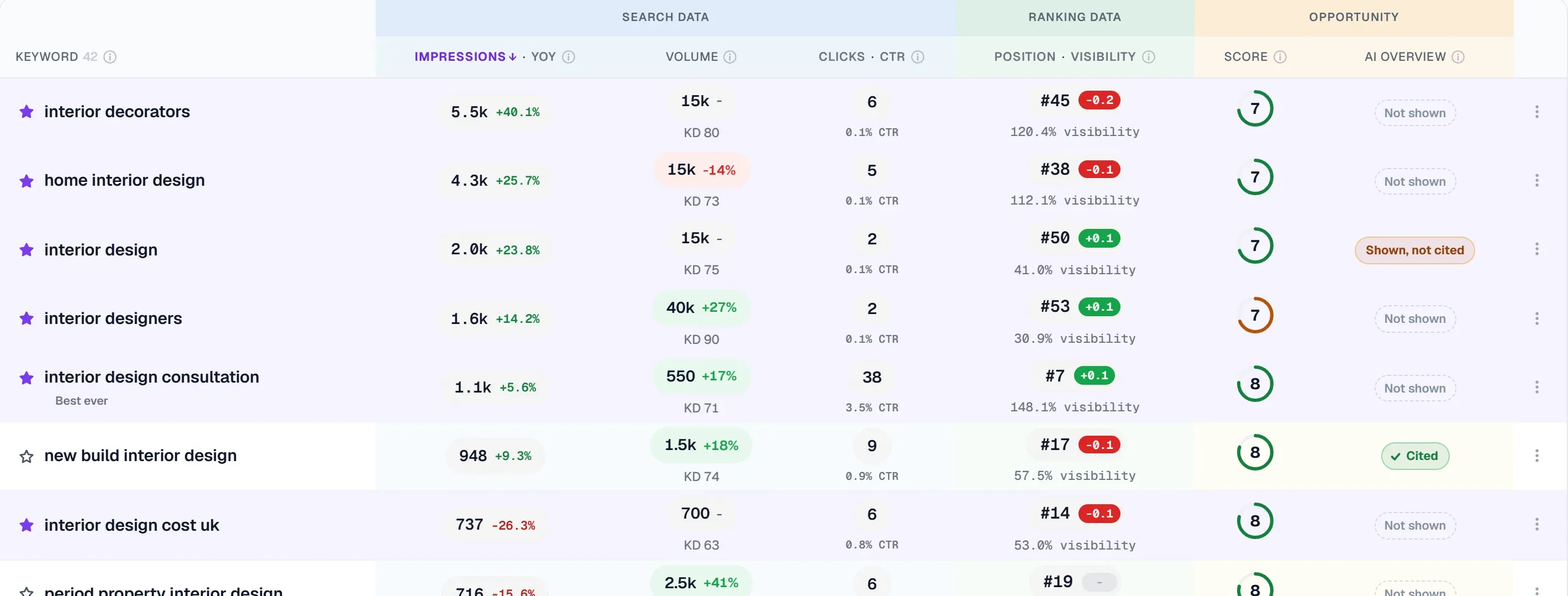
The platform's keyword tracking feature works with your Google Search Console data, pulling in impressions, clicks, and position metrics with intelligent grouping. You can organise keywords by topic, intent, or priority, and view performance broken down by device and country. This approach to keyword position tracking google goes beyond raw rank numbers to show which keywords actually drive traffic and conversions.
More importantly, UtilitySEO's Pages tab integrates GSC data with your site crawl, showing you which pages rank for which keywords, their current index status, and mobile usability issues. If a page's ranking drops, you can immediately see whether it's due to a technical issue like a canonical mismatch or a content problem.
The Trends tab lets you review search performance over extended periods, from three days to two years, so you can spot both short-term fluctuations and long-term patterns in keyword position tracking google. Combine this with the platform's monitoring and alerts feature, and you have a system that flags problems before they impact traffic significantly.
For agencies and larger teams, UtilitySEO's multi-project support and workspace management mean you can track keyword positions across multiple clients or brands without losing visibility.
Moving Beyond Raw Position Numbers
The most sophisticated practitioners recognise that keyword position alone doesn't determine success. A rank of number 3 that generates no clicks is less valuable than a rank of number 7 that attracts steady traffic. This is where understanding the relationship between position and click-through rate becomes critical.
Higher positions typically correlate with more clicks, but the relationship isn't linear. Position 1 doesn't always get 2x the clicks of position 2. Click-through rates vary by keyword intent. Informational searches see more clicks on positions 4-6 (people browse more). Commercial searches concentrate clicks at position 1-3. This is why tracking keyword position google without understanding which keywords actually convert is ultimately incomplete.
Use your analytics data alongside your rank tracking. If a keyword is ranking well but driving no traffic or conversions, investigate whether the search intent matches your content. Perhaps the keyword is less commercial than you thought, or perhaps you're ranking for the keyword but not for the specific question users are asking.
Accounting for AI Overviews and Featured Snippets
Algorithm updates and new SERP features have fundamentally changed what "position 1" means. AI Overviews at the top of search results mean users may get answers without clicking any organic result. Featured snippets above traditional rankings change click distribution. Zero-click searches are increasingly common.
Traditional position tracking still matters, but it's no longer the complete picture. Track whether your content appears in featured snippets. Monitor whether AI Overviews mention your brand or content. These elements affect whether your "position 1" ranking actually drives traffic.
This gap in typical seo monitoring is significant: most businesses still optimise entirely for traditional rankings whilst ignoring whether those rankings are actually visible to users or driving clicks. As you monitor keyword position Google, ensure you're also monitoring whether those positions produce the business results you need.
Prioritising Keywords When You Have Limited Tracking Budget
Not every keyword deserves equal attention. If your rank tracking budget limits you to tracking 100 keywords, choosing the right 100 matters enormously. Most guidance suggests tracking only "high-value" keywords, but that's vague and often applied poorly.
A better framework considers four factors: search volume, conversion likelihood, current ranking, and competitive difficulty. A keyword with 500 monthly searches where you rank 15th in a moderately competitive space is worth tracking because you have realistic opportunity to improve. A keyword with 10 monthly searches where you already rank 1st deserves minimal attention. A keyword with 5000 monthly searches where you rank 50th in an extremely competitive niche might not be trackable in the near term.
Focus your keyword position tracking google on keywords where you have genuine opportunity to move the needle within your realistic timeframe. This means tracking keywords where you currently rank 4-15 (on the edge of visibility), keywords that drive real traffic currently, and keywords aligned with your content strategy.
Revisit this priority list every quarter. As you publish new content, track new keywords. As older pieces rank better and stabilise, you can deprioritise them or check less frequently.
Conclusion
Learning to monitor keyword position Google effectively means understanding the limitations and strengths of different tools, recognising why data conflicts, and most importantly, connecting ranking changes to business outcomes. GSC provides the foundation. Ranking software adds precision. Automated alerts ensure you respond quickly. And integration with broader SEO data transforms position tracking from a vanity metric into actionable strategy.
If you're serious about making data-driven SEO decisions, consider how your current monitoring approach might be incomplete. Are you tracking without understanding causation? Are you watching ranks without checking whether they drive conversions? Are you relying on a single tool when multiple perspectives would clarify the picture?
UtilitySEO brings these elements together, combining keyword tracking with technical audits, analytics, and AI-powered recommendations. Whether you're just starting with keyword position tracking google or refining an existing monitoring system, having the right platform makes the difference. Explore UtilitySEO's workflow features to see how comprehensive monitoring can transform your SEO approach, or review pricing options to find the plan that fits your needs.
Frequently asked questions
Google Search Console shows average keyword positions over time by navigating to Performance > Queries, then sorting by Position. This free tool displays your average rank across all searches and locations.
- Click Performance tab in GSC dashboard
- Filter by query to see individual keyword positions
- Data updates daily but shows 90-day rolling average
- Compare position trends across months for long-term insights
Google Search Console shows average positions across all searches and locations, while ranking software takes exact snapshots from specific locations and devices. These tools measure different metrics, not actual conflicts.
- GSC averages data across multiple searches and regions
- Ranking tools check from fixed locations (US, Europe, etc.)
- Personalisation and search timing cause position variations
- Both are accurate-they're just measuring differently
Manual browser searches in incognito mode show approximate rankings, but aren't reliable because Google personalises results based on location, device, and history. Dedicated ranking software provides true real-time exact positions from specific locations.
- Incognito mode removes some personalisation, not all
- IP location still affects results in incognito searches
- Ranking software queries multiple locations simultaneously
- Use tools like SEMrush, Ahrefs, or Moz for live tracking
Daily position monitoring is unnecessary; weekly or bi-weekly reviews work best for most businesses unless you're tracking volatile competitive keywords or major algorithm updates. Real-time obsessive checking wastes time.
- Check rankings weekly for stable, low-competition keywords
- Monitor daily during Google core updates or competitor activity
- Set up alerts for drops over 5+ positions
- Focus on top 20 ranking keywords where changes matter most
Most dedicated ranking tools include alert features that notify you when positions drop significantly. Google Search Console lacks built-in alerts, but you can use scripts or third-party connectors to monitor changes automatically.
- Enable ranking drop alerts in SEMrush, Ahrefs, or similar tools
- Set alert thresholds (typically 5+ position drops)
- Use Google Sheets + GSC API connector for free GSC monitoring
- Receive daily emails on significant ranking volatility
Focus monitoring efforts on keywords your business depends on: those in the top 20 rankings, high-search-volume terms, and keywords with conversion intent. Tracking every keyword dilutes actionable insights.
- Prioritise keywords currently ranking positions 1-20
- Track high-intent keywords tied to revenue or leads
- Monitor competitor keywords you're not ranking for yet
- Ignore ultra-low-volume keywords with no business impact
Know what to fix next.
Scan your site for a clearer place to start.
About 30 seconds. No card needed.