

SEO
Google Search Console Alternative: Complete Guide
Learn why professionals seek Google Search Console alternatives and what features to prioritise in comprehensive SEO audit tools.
If you rely solely on Google Search Console for your SEO data, you might be missing critical insights that could transform your search performance. While GSC offers valuable information, its limitations in historical data, keyword tracking depth, and actionable recommendations leave many website owners searching for a more comprehensive Google Search Console alternative. This guide explores why professionals look beyond GSC, what features to prioritise in alternative tools, and how combining multiple data sources can dramatically improve your SEO results. Whether you run a small business site or manage multiple client projects, understanding your options is essential for staying competitive.
Why Website Owners Seek a Google Search Console Alternative
Google Search Console remains a foundational tool for understanding how Google sees your website. It provides indexing status, crawl errors, and basic search performance data. However, several limitations drive users toward alternatives.
GSC restricts historical data to 16 months, making long term trend analysis difficult. Its keyword data aggregates metrics without granular filtering options, and it lacks competitor benchmarking entirely. The platform also offers no built in recommendations for fixing issues it identifies.
For those running a WordPress site, GSC provides no specific guidance tailored to that platform. A dedicated WordPress SEO audit requires understanding plugin conflicts, theme issues, and CMS specific problems that GSC simply cannot detect.
Many professionals also find GSC's interface unintuitive when managing multiple properties. Switching between accounts and comparing data across sites becomes tedious, particularly for agencies or consultants handling numerous clients.
The reporting capabilities feel limited compared to modern expectations. While you can export basic CSV files, creating comprehensive client reports or tracking progress over time requires significant manual effort.
Key Features to Look for in SEO Audit Tools
When evaluating an SEO audit tool or Google Search Console alternative, certain features separate useful platforms from inadequate ones.
Comprehensive Technical Analysis
A quality automated SEO audit tool should crawl your entire site, not just sample pages. Look for platforms that examine on page elements, server responses, mobile compatibility, and Core Web Vitals in a single scan. The best tools categorise issues by severity and provide specific fixes rather than generic advice.
Deep technical analysis should include canonical tag verification, redirect chain detection, and schema markup validation. These elements significantly impact search visibility but require specialised tools to audit properly.
Keyword Intelligence Beyond Rankings
Basic rank tracking tells you where you appear in search results. More valuable is understanding why positions change and what opportunities exist. A robust keyword rank tracker should show impressions, clicks, and click through rates alongside position data.
Device and country segmentation matters increasingly as search behaviour differs dramatically between mobile and desktop users. Geographic breakdown helps identify markets where you perform well versus those requiring attention.
Learn more about effective monitoring in our guide on Google keyword tracking and how to monitor search performance accurately.
Actionable Recommendations
Identifying problems without solutions wastes time. The best alternatives explain each issue clearly, prioritise fixes by impact, and guide users through resolution. AI powered insights can accelerate this process by analysing patterns across your site and suggesting improvements automatically.
Historical Data and Progress Tracking
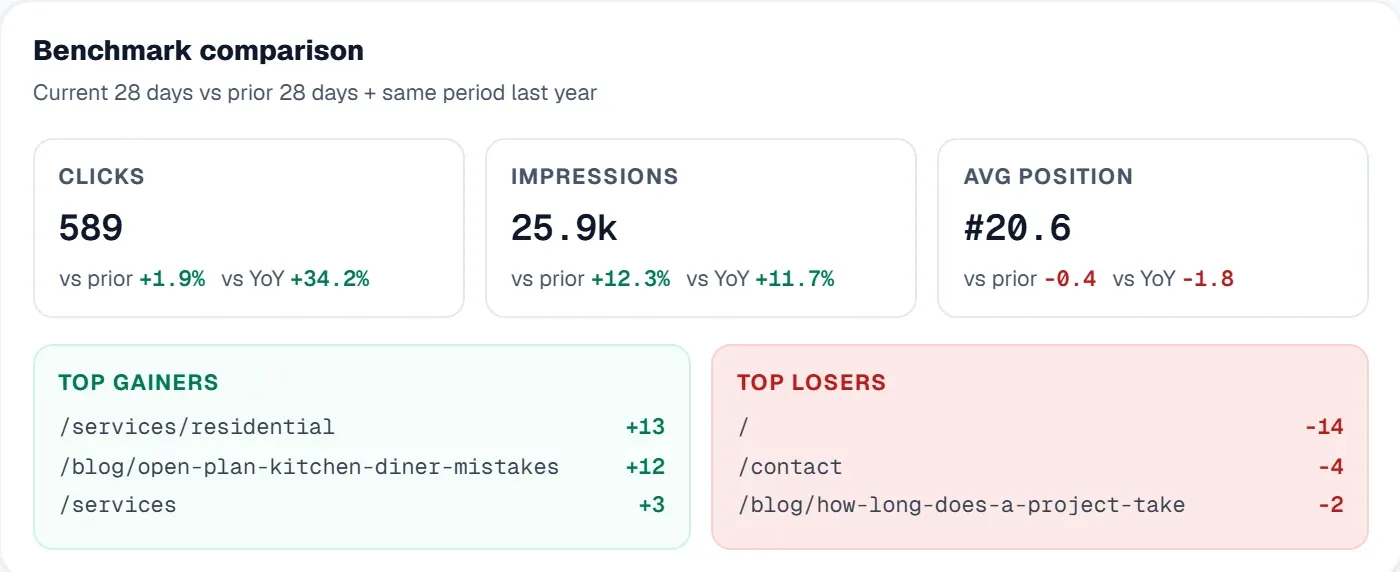
Understanding your SEO trajectory requires comparing current performance against past results. Tools that save scan history and track issue resolution over time help demonstrate ROI and maintain momentum on ongoing optimisations.
Real World Benefits of Switching to Comprehensive SEO Platforms
Businesses that expand beyond GSC typically experience several immediate benefits.
Faster Issue Identification
Running a full site scan that crawls hundreds of pages simultaneously reveals problems that manual checking or GSC's sampling approach might miss. Server side crawling identifies issues from how search engines actually experience your site, not just how it appears in a browser.
For example, a retail site discovered through comprehensive auditing that 47 product pages had accidentally been noindexed after a CMS update. GSC eventually showed declining impressions, but the dedicated seo audit tool pinpointed the exact cause within minutes of the first scan.
Better Prioritisation
Not all SEO issues carry equal weight. Duplicate title tags on low traffic pages matter less than Core Web Vitals failures on your top landing pages. Advanced platforms score and categorise issues, helping teams focus limited resources where they generate maximum impact.
Our article on how to fix technical SEO issues provides practical guidance for addressing common problems.
Competitive Context
Understanding your performance relative to competitors transforms abstract metrics into strategic insights. If your domain authority grows while competitors stagnate, that context validates your efforts. If they surge ahead, you know to investigate their tactics.
Competitor visibility scoring helps benchmark progress and identify gaps in your strategy that isolated GSC data cannot reveal.
Unified Reporting
Managing SEO data across multiple tools fragments insights and complicates reporting. Consolidated platforms that combine search performance, analytics, technical audits, and keyword tracking reduce context switching and simplify communication with stakeholders or clients.
How UtilitySEO Enhances Your SEO Workflow
UtilitySEO functions as a comprehensive Google Search Console alternative that addresses the gaps GSC leaves unfilled. Rather than replacing GSC entirely, it enhances and expands the data available to you.
Deep Site Scanning
The full site scan feature crawls up to 10,000 pages (depending on plan) via sitemap and internal links, running server side to identify issues exactly as search engines encounter them. Single URL scans provide deep PageSpeed and SEO audits with dual pass averaging for accuracy. Previous scans remain saved and reloadable, making progress tracking straightforward.
The SEO results dashboard presents your score, identified issues, recommended fixes, and category filters alongside lightbulb tips that explain why each element matters.
GSC Powered Keyword Tracking
UtilitySEO integrates directly with Google Search Console to provide keyword tracking with additional layers of analysis. You can group keywords for organised monitoring, view device and country breakdowns per keyword, and access page level performance including index status, mobile usability, and canonical mismatch detection.
The Trends tab displays search performance over customisable periods from three days to two years, overcoming GSC's data retention limitations.
Automated Insights and AI Features
AI Insights automatically generate SEO recommendations based on your scan results. The AI Content Quality Scoring feature evaluates pages against SEO best practices, while the Meta Generator creates title tags and meta descriptions with SERP previews and alternatives.
For sites struggling with image optimisation, the alt text generator produces AI generated suggestions accessible directly from affected pages in your scan results.
Progress Monitoring
Issue tracking lets you pin problems from scan results and mark them as fixed. The progress dashboard tracks milestones, maintenance streaks, and fix rates by priority. Teams can generate average turnaround PDF reports to demonstrate improvement velocity.
Multi Project and Team Support
Agencies and consultants benefit from multi project support with separate data per project. Workspace dashboards enable team management with email onboarding and role based access for restricted member support.
Explore the complete workflow to understand how these features integrate into daily SEO operations.
Choosing the Right Tool for Your Needs
Selecting a Google Search Console alternative depends on your specific requirements and technical comfort level.
Small business owners often prioritise simplicity and value. They need clear guidance without overwhelming technical jargon. For this audience, tools with issue prioritisation and step by step fixes prove most valuable. Our guide on SEO tools for small business explores options suited to limited budgets and lean teams.
WordPress users should verify platform compatibility. A proper WordPress SEO audit examines plugin interactions, theme compatibility, and CMS specific configurations that generic tools overlook.
Agencies require scalability, white label options, and robust reporting. Multi project support with team management and role based access becomes essential when handling client portfolios.
E commerce sites need tools capable of handling large page volumes efficiently. Product pages, category structures, and faceted navigation create unique challenges that require specialised scanning capabilities.
Whatever your situation, combining data from GSC with a dedicated SEO audit tool provides more complete intelligence than either source alone.
Conclusion
Google Search Console provides foundational data, but its limitations in historical access, actionable recommendations, and competitive context leave gaps that modern SEO demands you fill. A comprehensive Google Search Console alternative like UtilitySEO bridges these gaps by offering deep technical audits, enhanced keyword tracking, AI powered insights, and progress monitoring in a unified platform.
If you want to move beyond basic metrics toward genuinely actionable SEO intelligence, explore what UtilitySEO offers. Check the pricing page to find a plan matching your needs, or start your SEO journey with a free audit to experience the difference comprehensive analysis makes.
Frequently asked questions
You likely need a Google Search Console alternative if you require more than 16 months of historical data, deeper keyword insights, or competitor analysis for your SEO strategy.
- GSC limits historical data, hindering long-term trend analysis.
- Keyword data lacks granular filtering options.
- No competitor benchmarking features are available.
- It doesn't offer built-in recommendations for fixes.
For SEO professionals, Google Search Console's main limitations include restricted historical data, a lack of detailed keyword filtering, and no competitor insights, prompting the search for a robust Google Search Console alternative.
- 16-month data limit prevents comprehensive trend tracking.
- Aggregated keyword metrics obscure specific performance.
- Interface can be cumbersome for multiple properties.
- Reporting capabilities are basic, requiring manual effort.
When evaluating a Google Search Console alternative, prioritize comprehensive technical analysis, deep keyword tracking, competitor benchmarking, and actionable recommendations to enhance your SEO efforts.
- Full site crawl for technical issues.
- Granular keyword data with filtering options.
- Tools for competitor analysis and comparison.
- Specific, actionable fixes for identified problems.
Google Search Console does not effectively audit a WordPress site because it lacks specific guidance for platform-related issues like plugin conflicts or theme problems, necessitating a dedicated Google Search Console alternative.
- Cannot detect CMS-specific errors.
- Provides no insight into plugin or theme conflicts.
- Requires other tools for a complete WordPress SEO audit.
- Focuses on Google's view, not platform internals.
Long-term data analysis is crucial for SEO because it reveals enduring trends, measures the sustained impact of strategies, and extends insights beyond the 16-month limit of Google Search Console, making a Google Search Console alternative invaluable.
- Helps identify seasonal traffic patterns.
- Evaluates the success of past SEO initiatives.
- Provides context for current performance fluctuations.
- Supports strategic planning and forecasting.
Know what to fix next.
Scan your site for a clearer place to start.
About 30 seconds. No card needed.