

SEO
When You Need More Than Google Search Console (And When You Don't)
A practical guide to when Google Search Console alone is enough, and when you genuinely need additional SEO tools alongside it.
Google Search Console is free and authoritative, it is Google telling you about your site. For many smaller sites, it is genuinely all the SEO data you need. For others, it leaves real gaps. The question is not which is better but when each is appropriate. This article is a clear framework for deciding whether your situation needs more than Search Console.
When Search Console alone is enough
Sites under about 500 pages, with a single language, focused on a clear set of priority keywords, run by a small team, Search Console plus a free crawler plus PageSpeed Insights covers everything. The cost is zero, the data is authoritative, and the workflow is sustainable. Most early-stage projects fit this profile.
The signal that you are still in this zone is that Search Console's coverage report tells you everything you need to act on in any given month. If your monthly review is "look at Search Console, fix the things flagged, ship the next content piece," you do not need more tooling.
When you need supplementary tools
A few specific situations require more than Search Console. Sites larger than a few thousand pages need external crawlers because Search Console's coverage report becomes unwieldy at scale. Multilingual sites need dedicated hreflang validation. Sites with frequent content publishing need internal link analysis and content audit tools. Sites with active backlink acquisition need a backlink monitoring tool.
In each of these cases, Search Console remains useful but it is no longer sufficient. The supplementary tools fill specific gaps; they do not replace Search Console.
What Search Console does not do at all
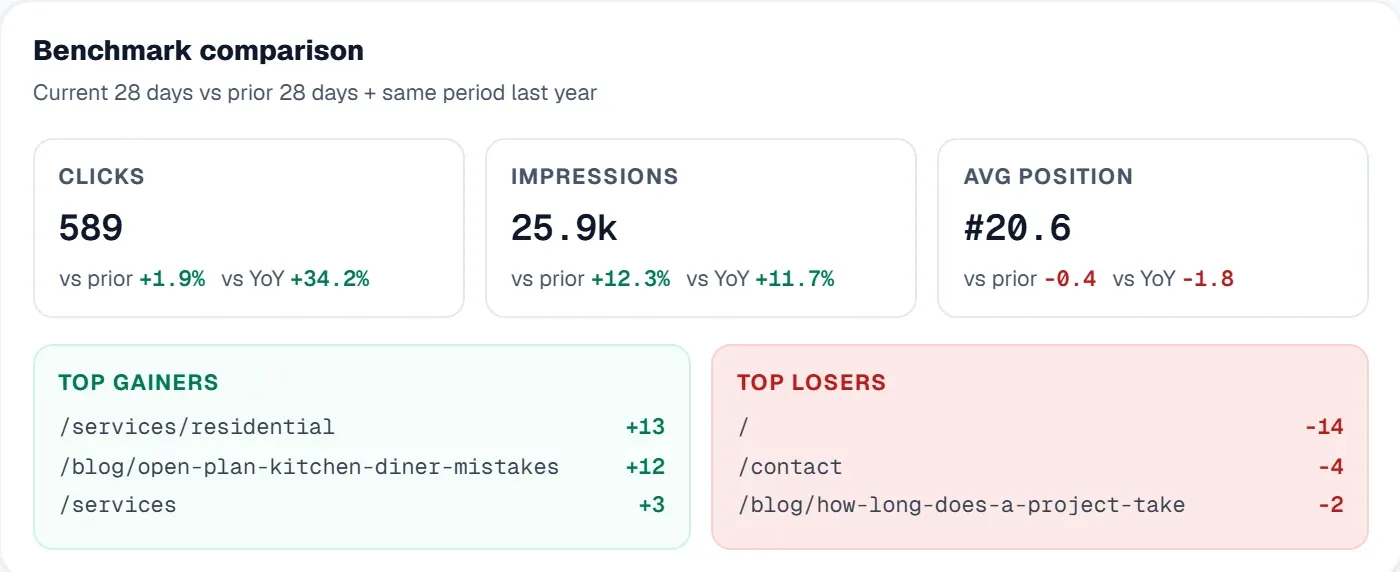
Search Console does not tell you what your competitors rank for. It does not give you ranking data at a granularity you can use for daily decisions (positions are averaged across 28 days). It does not provide complete backlink data (only top links, refreshed slowly). It does not crawl your site comprehensively (sampling, not full coverage). It does not surface content quality patterns.
These gaps are real and they get bigger as your site grows. Tools like UtilitySEO, Semrush, Ahrefs, and Screaming Frog each fill specific gaps differently.
The right addition for each gap
If your gap is competitive intelligence, what do competitors rank for, what backlinks do they have, what content do they publish, pick an all-in-one suite (Semrush or Ahrefs) or a focused tool (UtilitySEO for the audit-plus-tracking layer, dedicated backlink tools for the link layer). For more on this, read our guide to Competitor SEO Analysis.
If your gap is crawl depth and technical detail, broken links, redirect chains, schema validation across thousands of pages, pick a crawler (Screaming Frog, Sitebulb, UtilitySEO).
If your gap is granular rank tracking, up-to-date positions across hundreds of keywords across multiple locations, pick a rank tracker (most all-in-one suites include this).
The wrong way to use multiple tools
Two failure modes are common. The first is paying for an all-in-one suite and still defaulting to Search Console for everything because the suite's UI is unfamiliar. The fix is to commit to the suite for your weekly review and force yourself to use Search Console only for the things only Search Console can tell you.
The second is paying for five overlapping tools. The marginal value of the fifth tool is essentially zero because the gaps it fills are already covered. The fix is to audit your subscriptions and cut the ones whose findings duplicate what you already have.
Cost-effective combinations
For most sites past the Search Console-alone phase, the right next step is one mid-priced all-in-one tool (around £50-100 a month) plus continued use of Search Console for the things Search Console does best. Adding more than one paid tool requires specific justification, usually scale or specialisation that one tool does not handle.
When to subscribe vs free trial
Most teams know within two weeks of trial whether a paid tool is producing value. Long evaluation periods rarely produce better decisions than short ones. The signal is workflow integration, if you are checking the paid tool weekly without remembering to, it is producing value. If you are forgetting it exists, the trial result is clear.
The pragmatic stack
Total monthly cost: the all-in-one subscription. Coverage: nearly complete for typical SEO work at typical site scale.
The decision is not "Search Console or alternatives", it is which alternatives are worth adding alongside Search Console, in what order. Most sites add the alternatives sooner than they need to.
Frequently asked questions
Google Search Console is often sufficient for smaller, single-language websites with under 500 pages, especially those managed by a small team.
- It provides authoritative data directly from Google about your site's performance.
- Covers essential SEO aspects like coverage, indexing, and basic performance metrics.
- Ideal for early-stage projects with a clear set of priority keywords.
You might need additional SEO tools if your website is large, multilingual, or requires advanced features beyond what Google Search Console offers.
- It lacks comprehensive crawling capabilities for very large sites.
- Does not provide granular always-current rank tracking across many keywords.
- Misses competitor intelligence and complete backlink data.
- Cannot validate hreflang tags for multilingual setups effectively.
Google Search Console does not provide competitive intelligence, granular daily ranking positions, complete backlink data, or comprehensive site crawling.
- It won't show what keywords your competitors rank for.
- Ranking data is averaged over 28 days, not daily.
- Backlink data is limited to top links and refreshes slowly.
- It samples your site rather than performing a full, deep crawl.
To choose complementary SEO tools, identify specific gaps Google Search Console has, such as needing competitive analysis or deeper technical crawling capabilities.
- For competitor insights, consider all-in-one suites like Semrush or Ahrefs.
- For deep technical audits and crawl depth, use dedicated crawlers like Screaming Frog.
- For always-current rank tracking across many keywords, choose a specialized rank tracker.
- Multilingual sites need tools for hreflang validation.
Know what to fix next.
Scan your site for a clearer place to start.
About 30 seconds. No card needed.