
Internal Linking Audit for Sites Over 1000 Pages

Learn how to run an effective internal linking audit for large websites and fix structural issues with UtilitySEO.
Large websites accumulate thousands of pages that often suffer from poor internal connectivity. An internal linking audit reveals which pages receive authority and which remain isolated. Without regular checks, equity leaks and orphan pages multiply. This process ensures that every page participates in the site structure. Proper linking signals relevance to search engines. It also guides human visitors to related content. Neglecting this area creates crawl inefficiencies. A structured review identifies gaps in your architecture. This guide explains how to audit large sites effectively. We cover technical methods and practical tools. You will learn to map your internal link graph and fix broken chains. The result is a healthier domain with better indexation rates.
Understanding the Internal Link Graph
Every website possesses a unique topology. This structure forms an internal link graph that defines how crawlers move. Nodes represent pages while edges represent hyperlinks. A healthy graph shows a shallow depth for most content. Deeply nested pages require many clicks to reach from the homepage. Search engines may deprioritise these distant pages. Orphan pages sit outside this graph entirely. They possess no incoming internal links. These pages are invisible to crawlers that start at the root. An audit maps these connections visually. It highlights clusters of high authority. It also exposes disconnected sections. Understanding this map is the first step to optimisation. You cannot fix what you cannot see. Visualisation tools render these paths clearly. This clarity allows you to assign priority to linking tasks.
Evaluating Anchor Text Distribution
Anchor text tells crawlers what a linked page is about. Poor anchor text distribution confuses topic relevance. Exact match anchors dominate some older sites. Overuse triggers spam filters. A natural profile includes branded terms. It also uses generic phrases like read more. Navigational anchors such as home or contact appear frequently. An audit calculates the ratio of each type. It flags pages with identical anchors pointing to different URLs. This inconsistency dilutes ranking signals. You should aim for diversity. Use branded text for homepage links. Use descriptive phrases for deep content. Review your top landing pages first. Ensure their incoming anchors match their target keywords. This alignment strengthens topical authority. It reduces the risk of manual penalties.
Identifying Contextual Internal Linking Gaps
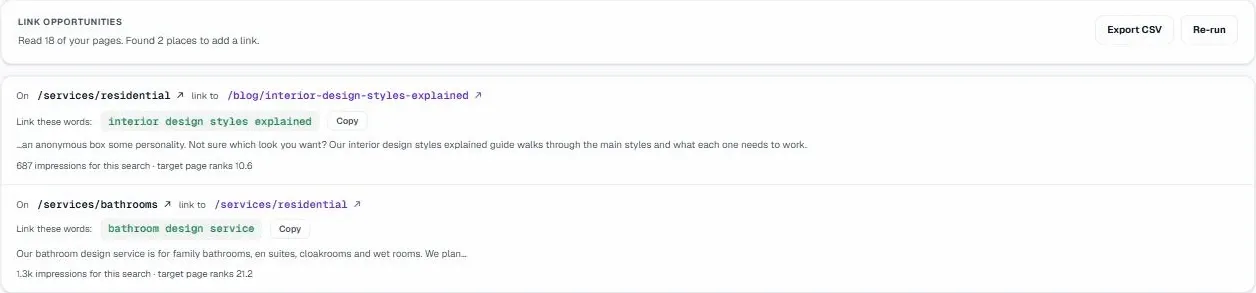
Links within body text carry more weight than footer links. Contextual internal linking places anchors near relevant keywords. This placement signals strong semantic relationships. Audit tools scan paragraph content for missed opportunities. They identify high-traffic pages that lack outgoing links. They also find low-traffic pages that need equity. For example, a popular blog post might mention a product. Linking that term to the product page passes authority. This boost helps the product page rank. Conversely, linking from a weak page to a strong one wastes potential. You must balance equity flow. Focus on linking from high-authority hubs. Target pages with high search volume potential. This strategy maximises the impact of each link. It creates a network of mutually supporting content.
Automating the Audit with UtilitySEO
Manual audits fail on sites with over 1000 pages. UtilitySEO automates this process through precise crawling. The platform performs a full site crawl up to 1000 pages per project. It uses real Chromium rendering to see JavaScript sites. This ensures React and Vue apps are not scanned as empty shells. The Site Health feature provides a grade and error breakdown. It highlights orphan page detection results immediately. You can see which pages lack incoming links. The tool also runs broken links detection to find 404 errors. It flags redirect chain detection issues where hops exceed three. These checks run automatically. You receive a clear list of fixes. The Fix Guides library offers plain-English instructions for each issue. This removes guesswork from technical SEO.
Prioritising Fixes and Monitoring Changes
Data volume requires prioritisation. Not all linking errors carry equal risk. Focus on orphan pages first. These pages waste server resources. They also hide valuable content from users. Next, address broken links on high-traffic pages. These errors hurt user experience. Then, optimise anchor text on top-ranking pages. Use the Internal link recommender feature in UtilitySEO. It suggests exact phrases, source pages, and targets. This recommendation engine analyses your internal link graph. It finds the highest-impact links first. You can export these findings via CSV. This allows you to assign tasks to your content team. Schedule weekly re-crawls to track progress. Compare snapshots to isolate changes. This continuous loop ensures your architecture remains healthy. See our guide on Internal Link Recommendations for Sites Over 1000 Pages for specific tactics.
Conclusion
A structured internal linking audit is essential for large sites. It reveals structural weaknesses and equity leaks. Regular reviews prevent orphan pages and broken chains. They ensure contextual internal linking supports your keyword strategy. UtilitySEO provides the automation needed for scale. Its crawl engine and recommendation features save time. You gain visibility into your entire site structure. Start with a full crawl today. Identify your biggest gaps. Implement the recommended fixes. Monitor the impact on your rankings. Visit UtilitySEO Pricing to explore your options.
Frequently asked questions
how do I run an internal linking audit for large websites
Run an internal linking audit using automated crawling tools to map your site's structure and identify connectivity issues efficiently.
- Crawl the entire site to generate a complete link graph.
- Identify orphan pages lacking incoming internal links.
- Analyze anchor text distribution for natural diversity.
- Prioritize fixing broken chains on high-traffic pages.
what is an internal link graph in SEO
An internal link graph is a visual map showing how pages connect through hyperlinks, defining crawler movement paths.
- Nodes represent individual pages within the website.
- Edges represent the hyperlinks connecting those pages.
- Shallow depth indicates easy access for crawlers.
- Deep nesting may cause deprioritization by search engines.
why is anchor text distribution important for internal links
Anchor text distribution signals topic relevance to crawlers, ensuring proper authority flow and preventing spam filter triggers.
- Exact match anchors can trigger spam filters.
- Branded and generic phrases create a natural profile.
- Inconsistent anchors dilute ranking signals for pages.
- Descriptive phrases strengthen topical authority for deep content.
how do contextual internal links improve SEO rankings
Contextual internal links place anchors within body text near relevant keywords, signaling strong semantic relationships to search engines.
- Links in body text carry more weight.
- High-authority pages pass equity to targets.
- Relevant keywords boost the linked page's ranking.
- Missed opportunities are identified by audit tools.
can I automate an internal linking audit for sites over 1000 pages
Yes, you can automate an internal linking audit using specialized tools that crawl large sites precisely and efficiently.
- Manual audits fail on sites with many pages.
- Automation ensures precise crawling of the entire domain.
- Tools identify gaps and broken chains quickly.
- UtilitySEO provides detailed reports for structural fixes.
Keep reading
See how your site actually scores
Free 30-second scan, real Google scores and a ranked fix list. No signup needed.
No credit card · Cancel anytime