

SEO
Internal Linking Audits for Sites Over 1000 Pages
How internal linking audits change at scale, the patterns to look for and the tooling that handles large internal link graphs.
For small sites, an internal linking audit is mostly about ensuring every important page has at least a few inbound internal links. For sites over 1000 pages, the audit becomes a graph-analysis problem with different questions and different tools. This article is the audit specifically for that scale.
The questions that change at scale
On a small site, you can manually check that the navigation links to your important pages and that contextual links exist within content. On a large site, those checks need to be automated, and additional questions become relevant. Which pages have the highest internal PageRank? Which pages have the lowest internal PageRank despite being commercially important? Which pages are orphaned entirely? What does the link graph look like cluster by cluster?
Mapping the internal link graph
A proper internal linking audit on a large site starts with a full crawl that captures every internal link as an edge in a graph. The crawler outputs a list of source-URL, destination-URL, anchor-text, link-type. From that list you can compute internal PageRank, identify clusters, find orphans, and surface the patterns that visual inspection would miss.
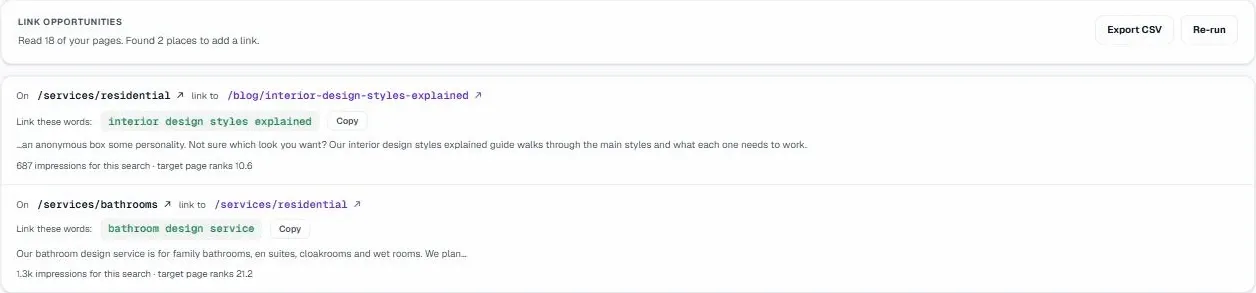
Where most large sites fall short
Three patterns are typical of large sites that have grown organically. First, navigation-only linking, important pages are reachable only through the navigation, not through contextual links within content. Second, deep-but-shallow content silos, topic clusters that link densely within themselves but rarely link to other clusters. Third, orphan accumulation, pages that exist, sometimes rank, but receive no internal links because the editorial process never added them.
Fixing the patterns
For navigation-only linking, add contextual links from related content. This is editorial work, going through a sample of pages and identifying natural places to link to important commercial pages. Done at scale through a content audit, this typically takes weeks but pays off in compounding ranking improvements.
For deep-but-shallow silos, identify the bridging content that should link across silos. Often the highest-impact internal links are the unusual cross-silo ones, a blog post that links to a related landing page in a different topic area. These bridges are what makes the link graph a network rather than a set of islands.
For orphans, decide for each whether it should be brought into the link graph or retired. Some orphans are pages that should not exist. Others are pages that should be linked from related content but were never added. The audit is a binary keep-or-retire decision per orphan.
Internal PageRank as a prioritisation tool
Computed internal PageRank correlates roughly with how much Google attention a page receives. If your commercially important pages have low internal PageRank, that is the highest-leverage internal linking issue on your site. Reallocate internal authority by adding more inbound links to those pages from other high-authority pages.
The pages that should have high internal PageRank are usually your money pages, pricing, key landing pages, comparison pages, plus a few high-traffic hub posts. If your highest internal PageRank goes to your about page or your privacy policy, the link graph is wasting authority on pages that do not need it.
Anchor text patterns
Internal anchor text is a stronger signal than people often realise. A page that receives inbound internal links with consistent, descriptive anchor text ranks better for those terms. Audit the anchor text distribution on your top priority pages and identify which receive bland anchors ("learn more," "read more") versus descriptive anchors. Move the bland anchors to descriptive ones where the surrounding context allows.
How often to re-audit
Quarterly is enough for sites that publish moderately. Monthly is appropriate for sites publishing weekly or more, the link graph changes fast enough that quarterly audits miss interim drift. Annually is enough for static sites where content rarely changes.
Tooling for graph analysis
Most general-purpose SEO tools produce internal linking reports but not graph-level analysis. Dedicated tools, UtilitySEO for the audit layer, Screaming Frog or Sitebulb for desktop graph analysis, OnCrawl for enterprise, handle the graph computations directly. For sites under 50,000 pages, desktop crawlers usually suffice. Beyond that, cloud-based tools handle the data volume better.
What good looks like
A well-structured internal link graph has: every commercially important page in the top 10% of internal PageRank, contextual links connecting topic clusters, no orphan pages over the long tail of the site, anchor text distributed naturally across descriptive variants, and a steady trickle of new internal links added with each content piece. For a deeper dive into common pitfalls, explore the Top 10 Internal Linking Strategy Mistakes to Avoid.
Most large sites are far from this state, which is good news, internal linking improvements are one of the highest-ROI SEO investments because they leverage existing content rather than requiring new content production. UtilitySEO and similar audit tools surface the highest-leverage improvements automatically; acting on them is the manual work.
Further reading
Frequently asked questions
For websites exceeding 1000 pages, an internal linking audit shifts from manual verification to a sophisticated graph-analysis problem, requiring different tools and strategic questions.
- Automated checks replace manual inspection of individual links;
- Focus shifts to internal PageRank distribution and identifying critical pages;
- Uncovers orphaned pages and deep-but-shallow content silos;
- Graph analysis tools are essential for mapping complex link structures.
To initiate an effective internal linking audit on a large website, you must conduct a comprehensive crawl that captures every internal link as an edge in a graph.
- Perform a full site crawl to gather all link data;
- Record source URL, destination URL, and anchor text;
- Use this data to compute internal PageRank;
- Identify clusters, orphans, and hidden link patterns.
Large websites frequently suffer from specific internal linking problems, including important pages only accessible via navigation, isolated content silos, and the accumulation of orphaned pages.
- Navigation-only linking to key pages, lacking contextual links;
- Deep-but-shallow content silos with poor cross-linking;
- Orphan accumulation where pages exist but receive no internal links;
- Missing editorial integration for new content.
To resolve internal linking problems on a large site, you should strategically add contextual links, create cross-silo content bridges, and make clear decisions about orphaned pages.
- Add contextual links from related content to important pages;
- Identify and build bridging content to connect disparate silos;
- Decide to integrate or retire each identified orphaned page;
- Prioritize fixes based on internal PageRank analysis.
Internal PageRank is vital for internal linking audits because it serves as a powerful prioritization tool, indicating which pages receive the most "link juice" and Google attention.
- Correlates with Google's perceived importance of a page;
- Helps identify commercially important pages with low authority;
- Guides reallocation of internal authority to key content;
- Directs where to add more inbound links for maximum impact.
Know what to fix next.
Scan your site for a clearer place to start.
About 30 seconds. No card needed.