
Orphan Page Detection for Sites Over 1000 Pages

Discover how to find and fix orphan pages on large websites using automated detection tools to improve your internal link graph.
Orphan pages sit in your website index without any internal links pointing to them. This isolation prevents search engines from understanding page relevance and stops link authority from flowing to these assets. For sites with over one thousand pages, manual detection is impossible. Automated orphan page detection identifies these disconnected nodes quickly. You can then decide whether to link to them, merge them, or remove them. This process strengthens your internal link graph and ensures every indexed page contributes to your overall SEO performance.
Understanding the Internal Link Graph
Your website functions as a network of interconnected nodes. Search engine crawlers follow internal links to discover and prioritise pages. The internal link graph maps these connections, showing how authority moves from high-level pages to deeper content. When a page lacks incoming internal links, it becomes an orphan. These pages are often discovered only through sitemaps or external backlinks.
Orphan page detection reveals gaps in this structure. It highlights content that exists but is invisible to your own navigation. This is common on large sites where content teams publish pages without updating the main menu or sidebar links. Without regular monitoring, these pages accumulate. They waste crawl budget and dilute the overall quality of your index.
A healthy internal linking audit checks for these disconnections. It ensures that every important page sits within a reasonable click distance from the homepage. This structure signals topical relevance to Google. It also improves user experience by guiding visitors to related content.
Why Orphan Pages Harm SEO Performance
Orphan pages suffer from two main issues. First, they receive no link equity from other pages on your domain. Link authority flow depends on internal links to distribute ranking power. Orphans sit outside this distribution system. Second, they often lack contextual signals. Search engines rely on anchor text and surrounding content to understand page topics. Without internal links, these pages appear isolated and less relevant.
For sites with thousands of pages, this problem scales rapidly. A single orphan might be negligible. Hundreds of orphans indicate a structural failure. They can signal thin content or abandoned projects that no longer serve a purpose. Leaving them indexed creates noise in your search results. It also confuses crawlers about your site's primary topics.
Detecting these pages allows you to take corrective action. You can add internal links to boost their relevance. You can merge them into stronger pages. Or you can return a 410 status code to remove them from the index. Each decision improves the clarity of your internal link graph.
How UtilitySEO Detects Orphan Pages
UtilitySEO automates this process through its full site crawl feature. The platform scans up to one thousand pages per project. It uses real Chromium rendering to ensure JavaScript-heavy sites are parsed correctly. This ensures that dynamic content is not missed during the audit.
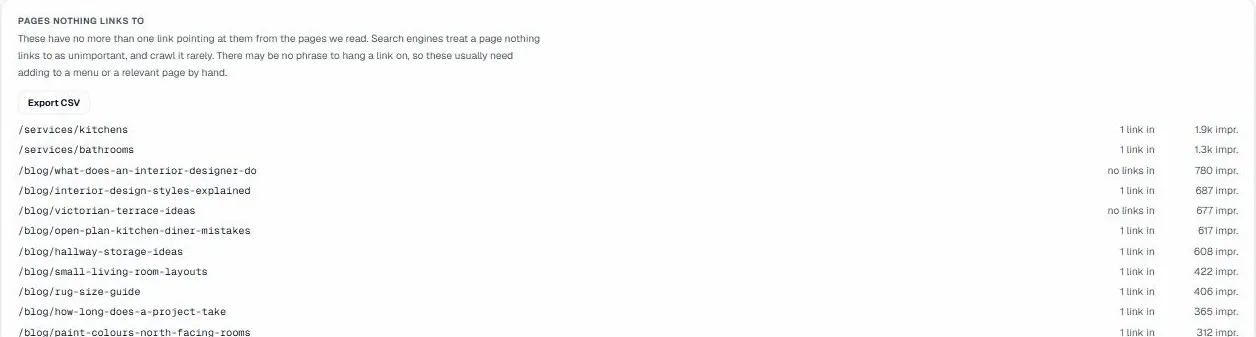
The orphan page detection feature specifically identifies pages with zero internal links pointing to them. It distinguishes between true orphans and pages linked only via scripts or iframes. The report lists each orphan alongside its URL and last modified date. You can export this data for review or integrate it into your workflow.
This tool works alongside other audit features. For example, the crawl depth analysis shows how many clicks separate a page from the homepage. The broken links detection flags any dead ends in your navigation. Together, these features provide a complete picture of your site's connectivity. You can view the results in the Site Health dashboard, which grades your overall technical SEO status.
UtilitySEO also offers scheduled weekly re-crawls. This ensures that new orphans are caught quickly. If your team publishes a new page without linking to it, the next scan will flag it. This proactive approach maintains a clean internal link graph over time.
Fixing Orphan Pages and Optimising Links
Once detected, you must decide how to handle each orphan. Do not simply delete them without analysis. Some orphans contain valuable content that deserves visibility. Others are legacy pages that should be retired.
Use the internal link recommender feature in UtilitySEO to find opportunities. This tool suggests specific anchor text and source pages for linking. It analyses your existing content to find relevant contexts. This creates natural internal link opportunities that boost both the orphan and the linking page.
If the content is weak or duplicate, consider merging it. The duplicate content detection feature helps identify pages with similar topics. You can consolidate these into a single strong page and redirect the old URLs. This preserves link equity and improves user experience.
For pages that serve no purpose, use the noindex directive or return a 410 status code. This removes them from search results and frees up crawl budget. Regularly reviewing your orphan list as part of your internal linking audit keeps your site lean and focused.
Conclusion
Orphan page detection is essential for maintaining a healthy website structure. It ensures that every page contributes to your SEO strategy rather than draining resources. For large sites, manual checks are inefficient. Automated tools like UtilitySEO provide the scale and accuracy needed to manage complex internal link graphs.
By identifying orphans, you can optimise your internal linking strategy. You can direct link authority flow to important pages. You can remove dead weight from your index. This leads to better crawl efficiency and stronger rankings.
Start your audit today by scanning your site with UtilitySEO. Identify your orphans and take action. Visit our Pricing page to see which plan fits your needs. Or explore our Workflow to understand how the platform integrates into your SEO process.
Frequently asked questions
how do I find orphan pages on a large website
Use automated orphan page detection tools to scan your site and identify pages with zero internal links pointing to them. Manual checks are inefficient for large sites.
- Run a full site crawl using SEO software.
- Filter results for pages with no inbound internal links.
- Export the list to prioritize which pages to fix.
why are orphan pages bad for SEO performance
Orphan page detection reveals isolated content that receives no link equity, preventing search engines from understanding its relevance and wasting crawl budget efficiently. This hurts overall site authority.
- No internal links means no ranking power flows to the page.
- Search engines may struggle to index or rank the content.
- Wasted crawl budget reduces efficiency for important pages.
what is the best way to fix orphan pages
After running orphan page detection, you should either add internal links to relevant content, merge the page into a stronger article, or remove it entirely if it offers no value. Choose the action that best fits your content strategy.
- Add contextual internal links from high-authority pages.
- Merge thin or outdated content into existing articles.
- Return a 410 status code for irrelevant pages.
can I use utilitySEO for orphan page detection
Yes, UtilitySEO offers automated orphan page detection through its full site crawl feature, scanning up to one thousand pages to find disconnected nodes quickly and accurately. It handles JavaScript-heavy sites effectively.
- Scans up to one thousand pages per project.
- Uses real Chromium rendering for accurate parsing.
- Exports data for easy review and workflow integration.
how often should I check for orphan pages
Regular orphan page detection should be part of your monthly SEO audit to ensure new content is properly linked and your internal link graph remains strong and efficient for crawlers. Consistency prevents accumulation.
- Schedule monthly audits to catch new orphan pages.
- Integrate checks into your content publishing workflow.
- Monitor changes after major site restructuring or updates.
Keep reading
See how your site actually scores
Free 30-second scan, real Google scores and a ranked fix list. No signup needed.
No credit card · Cancel anytime