

SEO
Google Keyword Tracking How to Monitor Rankings Effectively
Google keyword tracking helps you check keyword position and understand how your rankings change over time.
Google Keyword Tracking: How to Monitor Rankings Effectively
Google keyword tracking is essential for understanding how your website performs in search results. Without tracking keyword positions, it is difficult to know whether your SEO strategy is improving visibility or losing ground to competitors. Many businesses publish content and optimise pages but never properly measure where their keywords rank over time. This guide explains what Google keyword tracking is, why it matters, how to check keyword position accurately, and how to track Google rankings consistently so you can make informed SEO decisions.
What Is Google Keyword Tracking?
Google keyword tracking is the process of monitoring where specific keywords appear in search results over time. It allows you to measure whether optimisation efforts are improving visibility.
Tracking rankings helps answer key questions such as:
- Which keywords are moving up in search results
- Which pages are losing visibility
- Which opportunities are close to ranking on page one
When you know how to track Google rankings consistently, you gain a clearer picture of how content and technical improvements affect search performance.
Why Google Keyword Tracking Matters
SEO is a long term process. Without reliable ranking data, it becomes difficult to measure progress or identify problems early.
1. Measure SEO Progress
Tracking keyword positions shows whether your strategy is working. When you regularly check keyword position for your most important terms, you can see whether updates improve visibility.
This insight helps you prioritise content updates and technical improvements.
2. Identify Opportunities Close to Page One
Many keywords sit just outside the top ten results. Google keyword tracking reveals which terms are close to page one, making them ideal targets for optimisation.
By improving internal linking, expanding content, or refining page structure, these keywords can often move into higher positions.
3. Detect Ranking Drops Early
Search rankings change frequently. Monitoring how to track Google rankings helps identify sudden drops before they significantly affect traffic.
For example, if you check keyword position regularly and notice a decline, you can investigate technical issues or content changes affecting that page. A Website SEO Audit: How to Identify and Fix Technical SEO Problems can help uncover underlying issues.
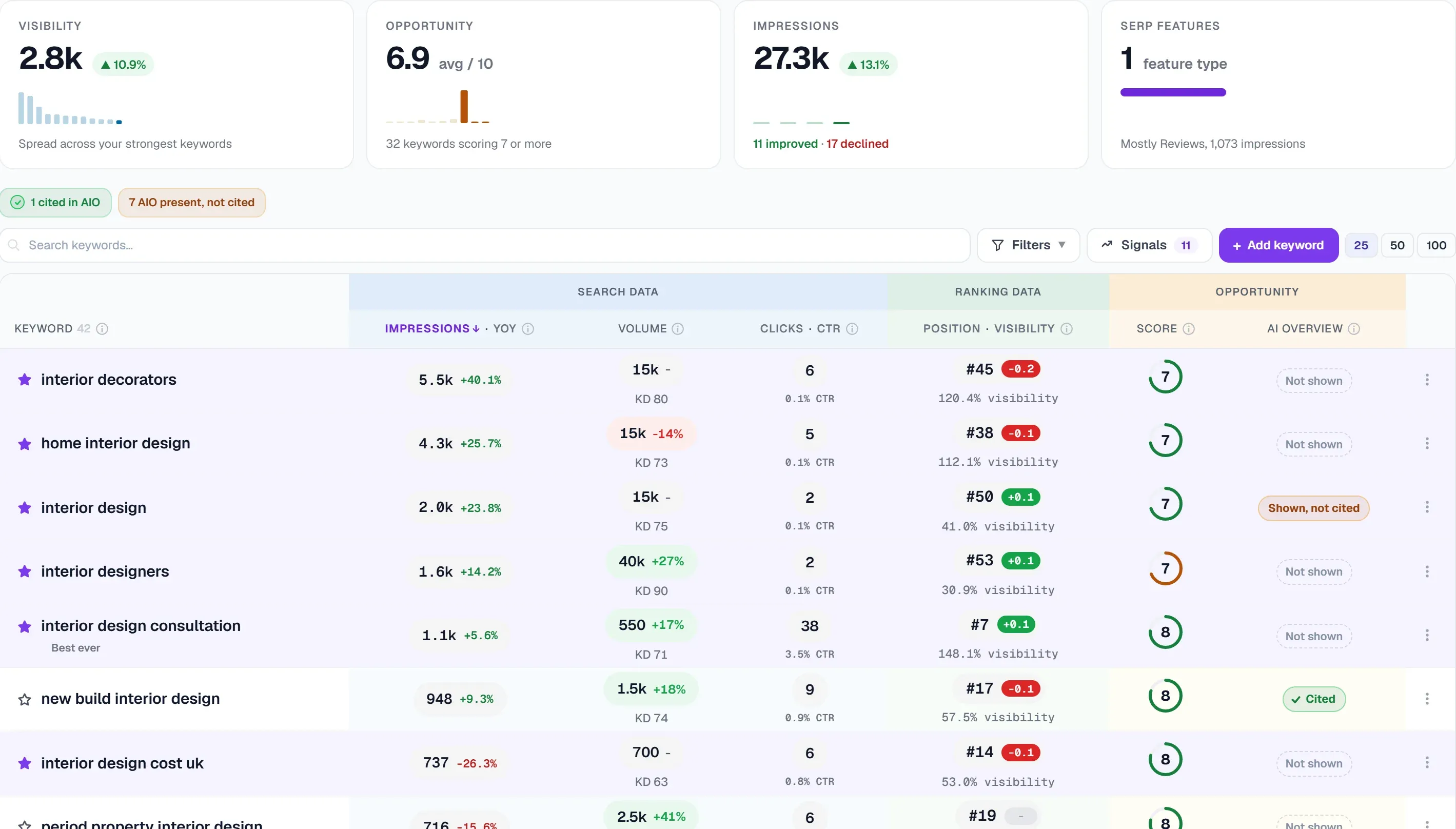 The keyword tracking panel shows visibility, an opportunity score and impressions above the full list of tracked keywords.
Key Elements of Effective Keyword Tracking
Effective Google keyword tracking requires more than occasional manual searches. A structured system helps maintain reliable data.
Consistent Ranking Monitoring
Tracking should focus on specific target keywords that reflect your content strategy. You should regularly check keyword position for pages targeting those terms.
Consistency ensures you can measure changes accurately rather than relying on guesswork.
Keyword Group Organisation
Keywords should be grouped by topic, product category, or content cluster. This allows you to understand how entire sections of your website perform.
When you track Google rankings across keyword groups, you gain a clearer view of broader SEO performance.
Historical Ranking Data
Short term ranking data provides limited insight. Long term tracking shows patterns that help guide strategy.
Reliable Google keyword tracking stores historical data so you can compare performance across weeks, months, and campaigns.
Real World Example
Imagine a SaaS company publishing detailed guides but seeing inconsistent traffic growth.
They begin tracking a list of target keywords and monitoring where each page ranks. By checking keyword position weekly, they discover several keywords ranking between positions eleven and fifteen.
After improving internal linking and expanding the content, they track Google rankings again and see multiple keywords move into the top ten.
Without Google keyword tracking, these opportunities would have remained invisible. If you're experiencing similar challenges, read Why Is My Website Not Ranking? A Practical SEO Troubleshooting Guide for detailed troubleshooting steps.
How UtilitySEO Supports Google Keyword Tracking
Many businesses attempt to check keyword position manually or rely on scattered tools. This approach is time consuming and inconsistent.
UtilitySEO simplifies Google keyword tracking by allowing you to:
- Track keyword rankings for selected terms
- Monitor ranking changes over time
- Identify pages gaining or losing visibility
- Connect ranking movement with technical site scans
Instead of manually searching to check keyword position, the platform stores historical ranking data and presents trends clearly.
By integrating ranking insights with technical monitoring, UtilitySEO helps you understand not only how to track Google rankings but also why they change. You can also explore Google Search Console Alternative: A Smarter Way to Monitor SEO for additional monitoring capabilities.
Final Thoughts
Google keyword tracking is essential for measuring SEO performance and identifying growth opportunities. When you track Google rankings consistently and check keyword position for important search terms, you gain clarity on what is working and what needs improvement.
A structured tracking system removes guesswork and turns SEO into a measurable process. Platforms such as UtilitySEO help businesses monitor keyword rankings, connect technical insights with ranking data, and maintain long term visibility growth.
Frequently asked questions
Google keyword tracking is the process of monitoring where specific keywords appear in search results over time, crucial for assessing your website's SEO performance.
- Measures whether optimisation efforts are improving visibility.
- Helps identify keywords moving up or pages losing visibility.
- Provides a clearer picture of content and technical improvements' impact.
Google keyword tracking significantly aids your SEO strategy by providing data to measure progress, identify opportunities, and detect ranking issues early.
- Shows if your current SEO strategy is effectively working.
- Reveals keywords close to page one for targeted optimization.
- Helps detect sudden ranking drops before they impact traffic.
Consistently monitoring your Google keyword rankings is important because it allows you to measure SEO progress, identify opportunities, and detect drops early.
- Provides reliable data to measure long-term SEO progress.
- Helps you prioritize content updates and technical improvements.
- Enables quick investigation of technical issues or content changes.
Yes, you can find new opportunities for your website's content using Google keyword tracking, especially for keywords nearing the first page of search results.
- Identifies terms just outside the top ten results for targeted improvement.
- Guides efforts like expanding content or refining page structure.
- Helps move these valuable keywords into higher-ranking positions.
Know what to fix next.
Scan your site for a clearer place to start.
About 30 seconds. No card needed.