

SEO
Unlock Google Search Console
Understanding Google Search Console patterns is vital for SEO success, revealing crucial shifts in website visibility and performance.
Understanding the ebb and flow of your website's visibility in search results is paramount for any SEO professional. Google Search Console GSC provides a treasure trove of data, but its true power lies in recognising and interpreting the underlying google search console patterns. These patterns can signal critical shifts in user behaviour, algorithm updates, or technical issues that directly impact your site's performance. This post will delve into identifying these crucial patterns, extracting actionable insights, and how advanced tools can enhance your diagnostic capabilities.
Understanding Google Search Console Patterns
Google Search Console offers a direct line to how Google views your website. By regularly monitoring its various reports, you can identify significant google search console patterns that demand attention. These patterns might include sudden drops or spikes in impressions or clicks, changes in average position, unexpected indexing issues, or fluctuations in Core Web Vitals scores. For instance, a consistent decline in clicks for a specific set of keywords could indicate increased competition or a drop in ranking, while a sudden surge in impressions without a corresponding increase in clicks might point to misleading titles or descriptions. Recognising these anomalies quickly is the first step towards effective problem solving.
Deciphering Search Performance Data
The Performance report within GSC is your primary tool for observing search performance. Analysing changes over different timeframes can reveal trends that are otherwise invisible. For example, comparing data year on year can highlight seasonality, while a week on week comparison might expose the impact of a recent content update or a technical fix. Pay close attention to individual page performance. A page that suddenly loses impressions or clicks, despite no direct changes on your end, might be experiencing indexing problems or facing new competition. Conversely, a page seeing increased traffic could offer insights into successful content strategies or emerging search trends.
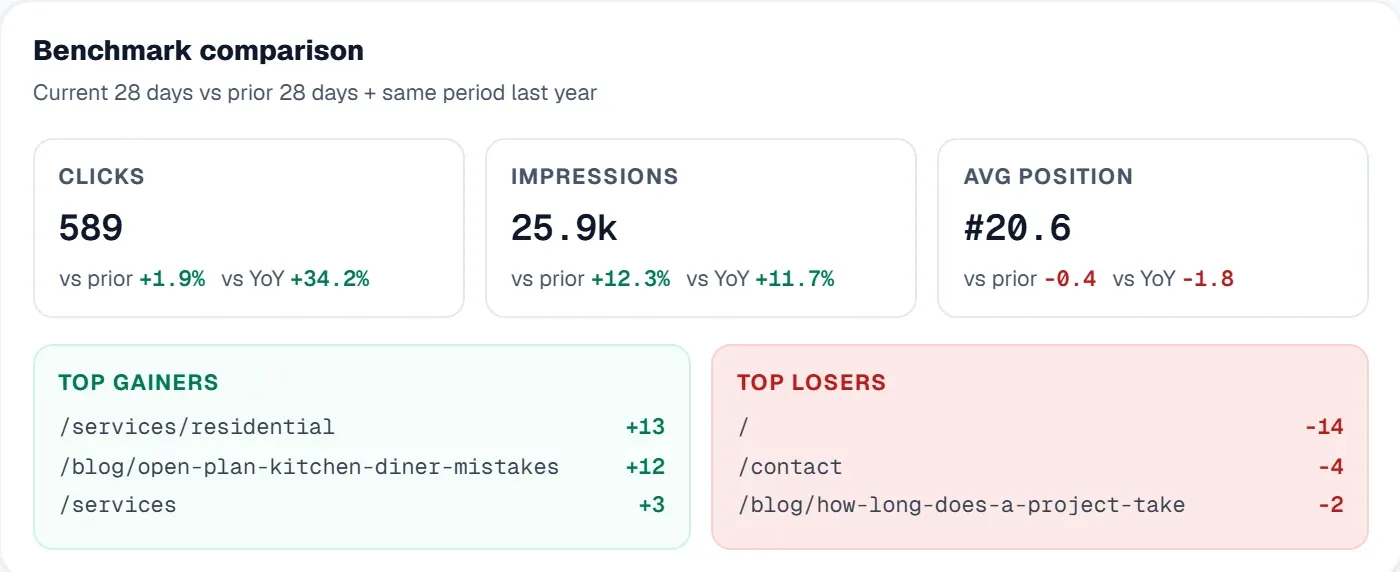
Enhancing GSC Insights with UtilitySEO
While Google Search Console provides essential raw data, external tools can significantly deepen your analysis and streamline your workflow. UtilitySEO integrates seamlessly with GSC to offer a more comprehensive view of your website's health and performance. Our Keyword tracking feature provides GSC powered rankings, impressions, and clicks, allowing you to group keywords and see breakdowns by device and country. This granular data helps in pinpointing specific search performance issues or opportunities that might be missed in GSC's broad reports.
The Pages tab within UtilitySEO presents GSC page performance data alongside critical information like URL inspection, index status, mobile usability, and canonical mismatch detection. This unified view helps you diagnose page level issues efficiently. Furthermore, our Trends tab visualises search performance over time, ranging from 3 days to 2 years, making it easier to spot long term google search console patterns and correlate them with broader SEO efforts. While UtilitySEO is not one of the typical google search console alternatives, it acts as a powerful analytical layer, allowing you to extract more actionable intelligence from your GSC data, transforming raw numbers into clear, strategic recommendations. You can learn more about our comprehensive approach to SEO by exploring our workflow.
Integrating GA4 for a Comprehensive View
For a truly holistic understanding of your website's performance, combining Google Search Console data with analytics from Google Analytics 4 GA4 is indispensable. GSC tells you how users find you and what they search for, while GA4 provides insights into what they do once they arrive on your site. UtilitySEO's GA4 analytics dashboard pulls in organic traffic, sessions, conversions, and top pages, offering a complete picture of user behaviour post click.
Connecting GSC's impression and click data with GA4's engagement metrics is crucial for effective ga4 for seo. For instance, if GSC shows high impressions but low clicks for a keyword, and GA4 reveals high bounce rates for the landing page, it suggests a disconnect between user intent and content relevance. Our integrated GA4 dashboard allows you to see these metrics side by side, helping you optimise for both visibility and user experience. Leveraging these combined insights is fundamental for a robust ga4 for seo strategy, ensuring your efforts translate into meaningful business outcomes. For further reading, explore our post on Maximizing Ga4 for SEO: A Comprehensive Guide to Data-Driven Insights.
Conclusion
Mastering the art of identifying and interpreting google search console patterns is a cornerstone of effective SEO. By diligently monitoring your GSC data and leveraging advanced platforms like UtilitySEO, you can quickly diagnose issues, capitalise on opportunities, and make data driven decisions that propel your website forward. UtilitySEO's integrated features, from detailed keyword tracking to comprehensive GA4 analytics, provide the tools you need to move beyond raw data to actionable insights. Start optimising your search performance today and unlock your website's full potential. Discover our range of features and plans on our pricing page.
Frequently asked questions
Google Search Console patterns are recurring or significant shifts in your website's performance data, indicating changes in visibility, user behavior, or technical health.
- Sudden spikes or drops in impressions or clicks.
- Changes in average search position over time.
- Unexpected indexing problems or Core Web Vitals fluctuations.
- Reveal critical shifts impacting site performance.
You can find google search console patterns by regularly monitoring GSC's Performance report and comparing data over various timeframes to spot trends.
- Analyze impressions, clicks, and average position.
- Compare week-on-week or year-on-year data.
- Look for anomalies in individual page performance.
- Identify consistent declines or sudden surges.
Understanding google search console patterns is vital for SEO success because they reveal crucial shifts in website visibility, performance, and potential underlying issues.
- Signal algorithm updates or increased competition.
- Highlight user behavior changes or technical problems.
- Enable proactive problem-solving for site health.
- Inform strategic content and optimization decisions.
Different google search console patterns indicate various things, such as a decline in clicks suggesting competition or a surge in impressions implying misleading titles.
- Consistent decline in clicks: increased competition or ranking drop.
- Sudden impression surge: misleading title/description.
- Page losing impressions/clicks: indexing issues or new competitors.
- Increased traffic: successful content or emerging trends.
Yes, external tools like UtilitySEO can significantly enhance your analysis of google search console patterns by integrating GSC data for a comprehensive view.
- Offer granular keyword tracking and device breakdowns.
- Combine page performance with index status and usability.
- Visualize search performance trends over longer periods.
- Transform raw data into actionable strategic recommendations.
Know what to fix next.
Scan your site for a clearer place to start.
About 30 seconds. No card needed.