

SEO
Top 10 Things the Best Rank Tracking Software Should Offer in 2026
Learn which features matter most when choosing rank tracking software to improve your SEO workflow.
Choosing the right rank tracking software can feel overwhelming with so many options on the market. Yet understanding what features truly matter will save you time, money, and frustration. Whether you are a solo marketer or managing multiple client sites, the tools you use directly impact your ability to track keyword rankings and make informed decisions. This guide breaks down the ten most valuable features that leading SEO platforms offer, helping you identify which capabilities deserve your attention and budget.
1. Accurate and Reliable Keyword Position Monitoring
The foundation of any rank tracking software is its ability to track keyword rankings with precision. The best platforms pull data from multiple sources, including Google Search Console integration, to provide verified position data rather than estimates.
Look for tools that offer daily or on demand tracking updates. Stale data leads to poor decisions. You should also expect historical tracking so you can spot trends over time rather than reacting to single data points.
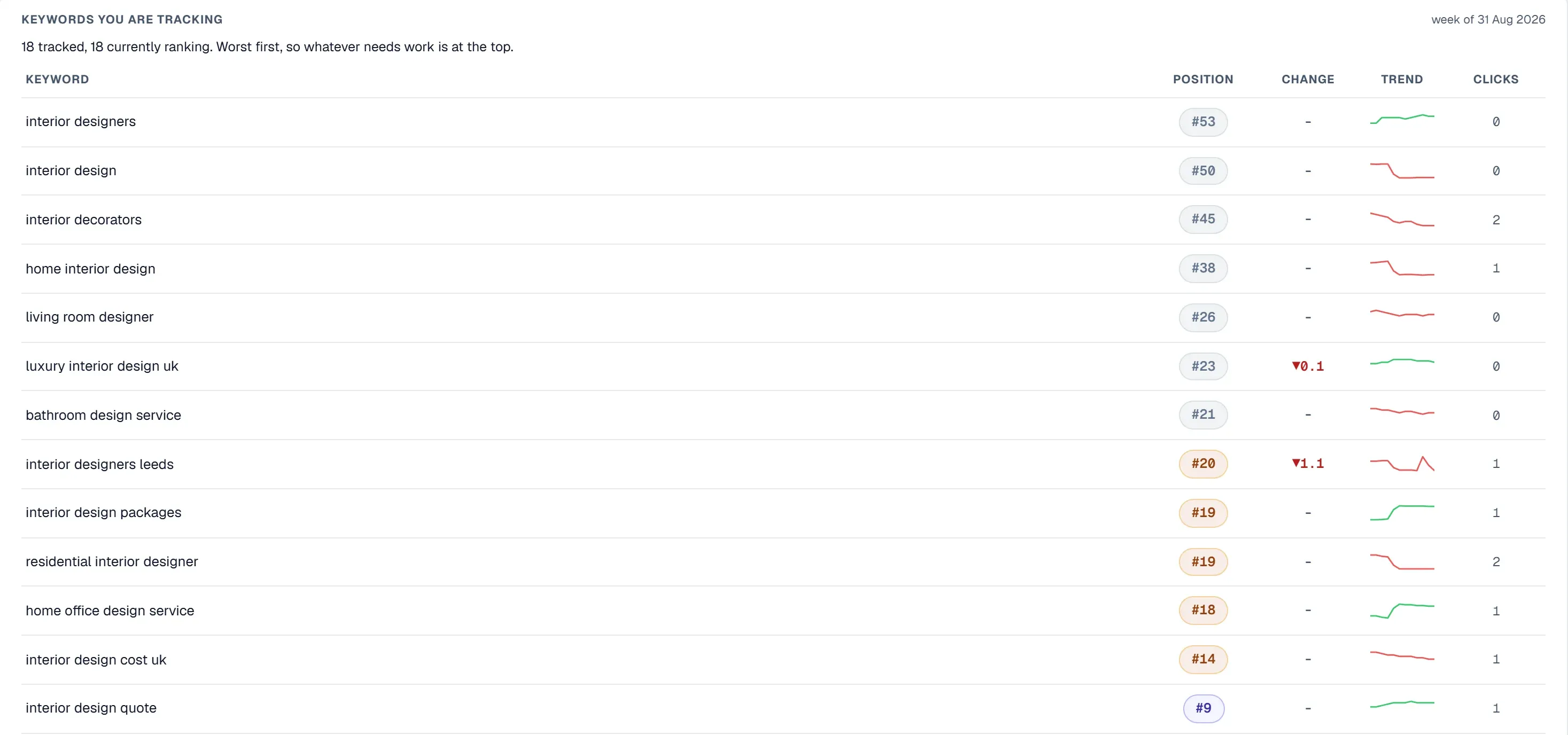
Geographic and device level breakdowns matter significantly. A keyword ranking position three on desktop in London might sit at position twelve on mobile in Manchester. Platforms that offer per keyword splits by device and country give you the granular view needed for targeted optimisation. Learn more about effective monitoring in our guide on How To Track Google Rankings: A Practical Guide for SEO Monitoring.
2. Comprehensive SEO Site Analysis Capabilities
Rank tracking alone tells only part of the story. The most valuable platforms combine position monitoring with thorough seo site analysis to connect rankings with on page factors.
This means scanning pages for technical issues, content gaps, and optimisation opportunities. When rankings drop, you need diagnostic tools that help identify whether the cause is technical, content related, or competitive.
Strong platforms categorise issues by severity and type. They highlight quick wins alongside complex fixes, allowing you to prioritise effectively. Some even provide lightbulb style tips explaining why each issue matters and how to resolve it.
3. Technical SEO Audit Functionality
A proper technical seo audit goes beyond surface level checks. It examines crawlability, indexation status, canonical tags, mobile usability, and page speed factors that search engines weigh heavily.
The best seo audit software crawls your entire site systematically. This might involve following internal links, parsing sitemaps, or running server side scans to catch issues that browser based tools miss. Expect coverage of hundreds of pages, not just your homepage.
Look for dual pass scanning that averages results for accuracy. Single scans can catch anomalies caused by temporary server issues. Platforms offering scan history let you compare audits over time, making it easy to verify that fixes actually resolved problems. For a comprehensive walkthrough of the audit process, see our Website SEO Audit: How to Identify and Fix Technical SEO Problems guide.
4. Real Time SEO Monitoring Tool Features
SEO is not a set and forget discipline. Rankings fluctuate, competitors adjust strategies, and algorithm updates can shift landscapes overnight. A reliable seo monitoring tool keeps you informed without requiring constant manual checks.
Position alerts notify you when tracked keywords move above or below thresholds you define. This early warning system lets you investigate drops before they become emergencies.
Real time analytics integration adds another layer. Seeing organic traffic, sessions, and conversions alongside ranking data creates a complete performance picture. Active user monitoring with frequent polling shows immediate impact from changes or issues.
5. Competitor Tracking and Visibility Analysis
Understanding your own performance means little without competitive context. Strong platforms let you add competitor domains and monitor their visibility alongside yours.
Visibility scores compress complex ranking data into comparable metrics. Charts showing your score versus competitors over time reveal whether you are gaining or losing ground in your market.
Some tools go further with share of voice analysis, showing what percentage of available search visibility each player captures. This helps identify opportunities where competitors are weak and threats where they are strengthening.
6. Actionable Reporting and Progress Tracking
Data without action is just noise. The best seo audit software transforms findings into clear recommendations with priority levels and fix instructions.
Issue tracking features let you pin problems from scan results and mark them as resolved. Progress dashboards showing fix rates, milestones, and even streaks gamify the improvement process and keep teams accountable.
Exportable reports matter for client communication or internal stakeholders. Look for CSV exports covering keyword data, analytics, and audit findings. PDF reports summarising average turnaround times demonstrate the value of ongoing SEO work.
7. Integration with Google Search Console and Analytics
Native integration with Google Search Console unlocks verified ranking data, impression counts, click through rates, and index status information. This is more reliable than third party scraped data. Explore why platforms that go beyond GSC can be valuable in our article on Google Search Console Alternative: A Smarter Way to Monitor SEO.
GA4 analytics integration connects rankings to business outcomes. Seeing which keywords drive actual conversions rather than just traffic helps prioritise efforts toward commercial value.
URL inspection capabilities pulled inline from GSC let you check index status, mobile usability, and canonical configurations without switching between platforms. This speeds up technical troubleshooting considerably.
8. AI Powered Insights and Content Tools
Modern seo software for startups and enterprises alike increasingly leverages artificial intelligence. AI insights can surface recommendations you might miss during manual analysis.
Content quality scoring evaluates pages against SEO best practices automatically. Meta generators create title tags and descriptions with SERP preview functionality, speeding up optimisation work.
Alt text generation helps address accessibility and image SEO at scale. Rather than manually writing descriptions for hundreds of images, AI suggestions provide starting points you can refine.
9. Brand Visibility Monitoring Across AI Platforms
Search is evolving beyond traditional results pages. AI assistants like ChatGPT, Gemini, and Perplexity now answer queries directly, often mentioning specific brands and tools.
Forward thinking platforms now track whether your brand appears in these AI responses. This includes checking neutral category prompts and extracting positions from ranked list style answers.
Share of voice analysis across AI platforms shows how you compare to competitors in this emerging visibility channel. Trend tracking reveals whether your AI presence is growing or declining, helping you adapt strategy accordingly.
10. Scalable Project and Team Management
Agencies and in house teams managing multiple sites need workspace functionality. Separate data per project prevents confusion and ensures clean reporting.
Team invites with role based access let you control who sees what. Restricted member support means you can give clients view only access without risking accidental changes.
Subscription flexibility with grace periods on payment issues prevents sudden access loss. Look for platforms offering tiered plans that scale with your needs rather than forcing enterprise pricing on small operations.
How UtilitySEO Delivers These Essential Features
UtilitySEO brings together the capabilities outlined above in a single platform designed for practical daily use. Its keyword tracking pulls GSC powered rankings with device and country breakdowns, giving you the granular data needed to track keyword rankings effectively.
The full site scan feature crawls up to 10,000 pages (depending on plan) via sitemap and internal links, running server side for thorough technical seo audit coverage. Results appear in an SEO dashboard with scores, issues, fixes, and category filters. Previous scans save automatically, making progress tracking straightforward.
For monitoring, UtilitySEO includes per project keyword position alerts and a composite health score that summarises site status at a glance. The Pages tab offers inline GSC URL inspection showing index status, mobile usability, and canonical mismatch detection without leaving the platform.
AI capabilities include automated recommendations through AI Insights, content quality scoring, and meta generation with SERP previews. The brand tracking feature monitors visibility across ChatGPT, Gemini, and Perplexity with share of voice charts, competitor comparison views, and opportunity scoring.
Multi project support with workspace dashboards and team management rounds out the platform, making it suitable seo software for startups scaling their operations or agencies handling multiple clients.
Conclusion
Selecting rank tracking software requires looking beyond basic position monitoring. The most valuable platforms combine accurate tracking with comprehensive seo site analysis, technical auditing, real time monitoring, and competitive intelligence. AI powered features and brand visibility tracking represent the next frontier of SEO tooling.
UtilitySEO offers these capabilities in an accessible package, from deep site audits and GSC integration to AI brand monitoring and team workspaces. Explore the platform to see how these features work together to simplify your SEO workflow and surface actionable opportunities.
Frequently asked questions
The best rank tracking software should fundamentally offer accurate keyword position monitoring, comprehensive SEO site analysis, and strong technical SEO audit capabilities.
- It must provide daily or on-demand keyword position updates.
- Look for historical data and granular geographic/device splits.
- Integration with Google Search Console ensures verified data.
- Comprehensive analysis links rankings to on-page factors.
To ensure your rank tracking software provides reliable and accurate data, prioritize tools integrating with Google Search Console and offering frequent, verified position updates.
- Accurate tools pull data from multiple trustworthy sources.
- Daily or on-demand updates prevent decisions based on stale information.
- Historical tracking reveals long-term performance trends.
- Granular geographic and device-specific data provides critical context.
Comprehensive SEO site analysis is vital for effective rank tracking software because it links keyword performance to underlying on-page factors and potential website issues.
- It helps identify technical problems and content gaps.
- Diagnostic tools explain causes of ranking drops.
- Categorize issues by severity to prioritize fixes efficiently.
- Some platforms offer tips for resolving identified issues.
Crucial technical SEO audit features in quality rank tracking software include examining crawlability, indexation status, canonical tags, mobile usability, and page speed.
- The best audit tools systematically crawl your entire site.
- They highlight critical factors search engines weigh heavily.
- These features help diagnose deeper site performance issues.
- Ensuring technical soundness is key for optimal ranking visibility.
Granular geographic and device-level tracking is a vital feature for effective rank tracking software, as it shows how keyword positions vary by location and device.
- A keyword's ranking can differ significantly by city or country.
- Mobile and desktop searches often yield distinct positions.
- This data helps tailor optimization efforts for specific audiences.
- It ensures you're targeting the right users in the right contexts.
Know what to fix next.
Scan your site for a clearer place to start.
About 30 seconds. No card needed.