
Client SEO Report for Agencies Managing 10+ Sites
Streamline your client seo report process for large portfolios with automated dashboards and clear team roles.
Managing ten or more websites creates a reporting bottleneck that standard spreadsheets cannot resolve. Agencies often struggle to present consistent data while maintaining high accuracy across diverse portfolios. A structured client seo report process ensures that every stakeholder receives clear, accurate, and actionable data without manual compilation errors. This approach transforms raw metrics into strategic narratives that justify retainer fees and drive further investment in search engine optimisation.
Structuring the Narrative for Client Confidence
The primary function of an seo reporting dashboard is to translate technical data into business outcomes. Clients do not care about crawl budget consumption unless it directly impacts their revenue. You must frame every metric around the client's specific goals. If a site has experienced a traffic drop, the report must explain the cause before presenting the solution.
Many agencies fail because they present data without context. A sudden drop in rankings requires an explanation of whether it stems from an algorithm update, a technical error, or seasonal trends. Using an algorithm update overlay allows you to correlate traffic changes with confirmed Google update dates. This removes blame from the agency and places it on external factors.
You must also address how to communicate negative results. Transparency builds trust. When a campaign stalls, the report should highlight the specific blockers. For example, if a site has a high number of orphan pages, the report should quantify the potential traffic loss from those pages. This turns a negative situation into a clear opportunity for improvement.
Defining Team Roles and Accountability
Clear seo team roles prevent duplication of effort and ensure accountability. In a multi-site environment, one person should own the data integrity while another focuses on the narrative. The data analyst ensures that the seo todo tickets are accurate and assigned to the correct developers. The account manager then interprets these tickets for the client.
UtilitySEO supports this separation through its multi-project workspaces. You can invite team members with role-based access. A junior technician might only see the audit findings and fix guides. A senior strategist sees the full picture including competitor gap analysis and revenue forecasts. This structure ensures that the right information reaches the right person at the right time.
The platform converts audit findings into assignable tickets automatically. This removes the need for manual handovers between technical SEOs and developers. Each ticket includes a plain-English explanation of the issue and a proposed fix. This standardisation reduces back-and-forth communication and speeds up implementation.
Turning Data into Strategic Opportunities
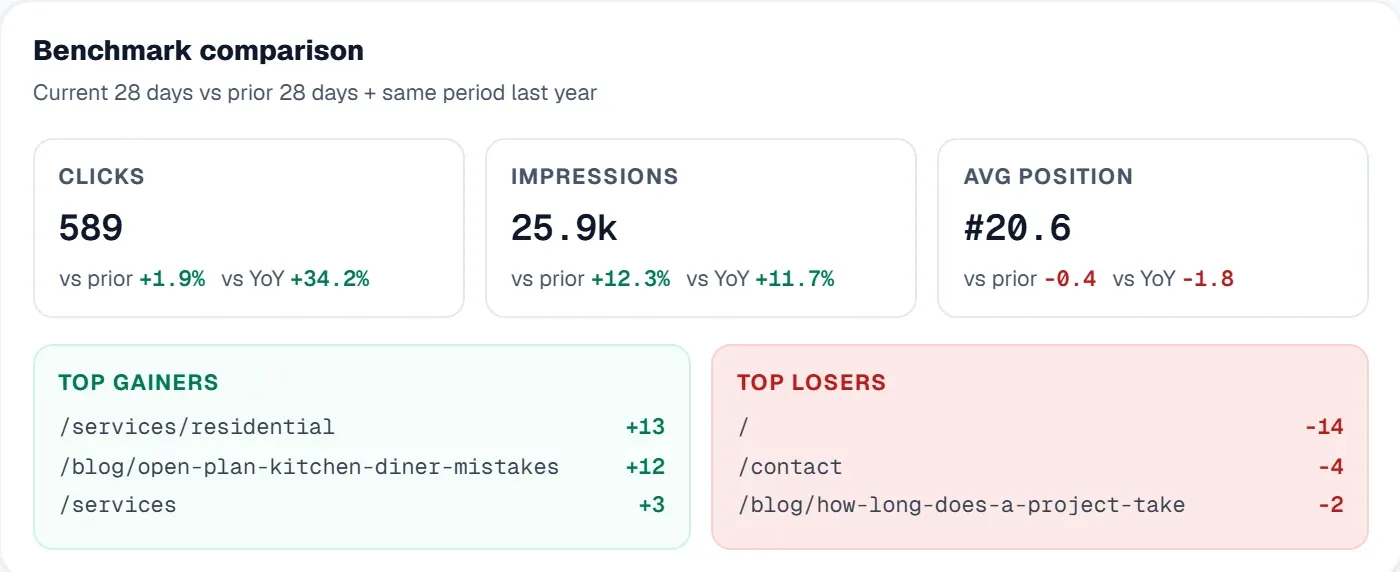
A good report answers client questions. A great report anticipates them. You should use your reporting process to identify upsell opportunities. If a client’s site has significant content decay, the report should highlight pages losing traffic year on year. This data supports a pitch for a content refresh campaign.
Use the content opportunities feature to find pages that are in striking distance of the top three positions. These are low-hanging fruit that can generate quick wins. Presenting these opportunities alongside the standard performance metrics shows the client that you are proactive. It shifts the conversation from maintenance to growth.
White label seo report features allow you to present this data under your own branding. This reinforces your agency’s value proposition. Clients see your logo on the dashboard, not the tool provider’s. This branding consistency is crucial for agencies managing large portfolios. It ensures that your agency remains the central point of contact for all SEO decisions.
Communicating Technical Issues Simply
Technical SEO issues can be confusing for non-technical clients. You must simplify complex problems like JavaScript rendering issues or canonical tag errors. UtilitySEO uses real Chromium for JavaScript rendering. This ensures that React and Vue sites are scanned accurately. The report then presents the findings in plain English.
For example, if a site has broken links, the report does not just list the URLs. It explains the impact on user experience and crawl efficiency. It also provides a direct fix guide. This reduces the cognitive load for the client. They do not need to understand the technical details to understand the business impact.
Security checks are another area where simplification is key. The platform checks for cross-site scripting, malware, and phishing signals. If a threat is detected, the report flags it immediately. This proactive approach protects the client’s brand reputation. It also demonstrates the agency’s commitment to site health beyond just rankings.
Handling Client Challenges and Questions
Clients may challenge the data presented in the report. They might question why traffic has not increased despite significant efforts. You must be prepared to defend your methodology. Use the crawl comparison feature to show exactly what has changed since the last report. This provides concrete evidence of the work done.
If a client questions the accuracy of the data, refer to the source. UtilitySEO integrates with Google Search Console and GA4. This ensures that the data is pulled directly from the authoritative sources. The one-click keyword tracking feature allows you to add new queries to the tracker instantly. This ensures that you are monitoring the terms that matter most to the client.
Legal and contractual implications must also be considered. Ensure that your reporting process complies with data privacy laws. The platform uses JWT authentication and email 2FA for security. This protects both the agency and the client. It also provides an audit trail of who accessed the data and when.
Conclusion
A structured client seo report process is essential for agencies managing multiple sites. It ensures consistency, accuracy, and clarity. By using a dedicated seo reporting dashboard, you can automate data collection and focus on strategy. Defining clear seo team roles and using seo todo tickets improves efficiency. A white label seo report reinforces your brand authority.
UtilitySEO provides the infrastructure to support this workflow. From single page scans to full site crawls, the platform handles the technical heavy lifting. You can focus on interpreting the data and communicating the value to your clients. Visit Pricing to see how the platform fits your budget. Explore the Workflow page to understand the integration process.
Frequently asked questions
how do I automate client seo report generation for multiple sites
Use automated dashboards that pull live data directly from analytics platforms to create consistent client seo report outputs without manual entry.
- Connect all website properties to a central dashboard
- Set up automated email delivery schedules for clients
- Use predefined templates to ensure brand consistency
what should be included in a client seo report
Include key performance indicators like organic traffic changes, keyword ranking movements, and conversion rates to provide a comprehensive client seo report overview.
- Highlight top-performing pages and their traffic growth
- Explain significant ranking drops with context or causes
- Show progress on technical fixes and content updates
why is structured seo reporting important for agencies
Structured reporting prevents data bottlenecks and ensures every stakeholder receives clear, actionable insights within your standardized client seo report framework.
- Reduces manual compilation errors across large portfolios
- Aligns technical data with specific business outcomes
- Justifies retainer fees through transparent performance narratives
how to handle negative results in seo reports
Maintain transparency by explaining the root causes of traffic drops or ranking losses in your client seo report to build trust.
- Correlate traffic changes with Google algorithm updates
- Identify technical blockers like orphan pages clearly
- Present negative data as opportunities for improvement
can I assign specific roles for seo reporting tasks
Yes, you can define distinct responsibilities for data analysts and account managers within your client seo report workflow to prevent duplication.
- Assign data integrity checks to technical specialists
- Let strategists interpret findings for client narratives
- Use role-based access to control information visibility
how to find upsell opportunities in seo reports
Analyze content decay and near-ranking pages in your client seo report to identify low-hanging fruit for additional service pitches.
- Highlight pages losing traffic year over year
- Show keywords in striking distance of top positions
- Propose content refresh campaigns based on data
Keep reading
See how your site actually scores
Free 30-second scan, real Google scores and a ranked fix list. No signup needed.
No credit card · Cancel anytime