
Agency SEO Workflow: What Executives Actually Read
Define clear roles and use automated tickets to build an agency seo workflow that executives actually read.
Executives do not read spreadsheets filled with keyword positions. They read narratives that connect technical effort to revenue. A clear agency seo workflow transforms raw data into strategic decisions. This post explains how to structure reporting so stakeholders understand value immediately. We will cover team structures, ticket management, and dashboard design. You will learn how to align technical audits with business goals. The focus is on clarity and speed. We examine how modern tools streamline this process. By the end, you will know how to build reports that executives actually open.
Defining Clear SEO Team Roles
Chaos begins when responsibilities overlap. A structured agency seo workflow requires distinct roles. The strategist defines the high-level goals. The technical specialist handles site architecture and crawl errors. The content writer produces pages based on briefs. The analyst measures performance and reports on ROI.
Separating these duties prevents bottlenecks. When a strategist tries to fix broken redirects, productivity drops. When a developer writes blog posts, quality suffers. Define permissions in your project management software. Assign read-only access to executives. Give edit access to specialists. This separation ensures that each team member focuses on their core competency. It also creates a clear audit trail for every change made to the client site.
Turning Audits Into SEO Todo Tickets
Audits are useless if they sit in a PDF. Executives want to see progress. An effective agency seo workflow converts findings into actionable tasks. Use seo todo tickets to assign specific fixes to developers or content writers. Each ticket should contain the error, the affected URL, and the recommended solution.
This method creates accountability. You can track how many tickets are open, in progress, or closed. It provides a visual representation of work completed. Executives can see that the team is actively fixing issues. They do not need to understand the technical details. They simply see a reduction in error counts. This transparency builds trust. It turns abstract SEO concepts into tangible project management metrics.
Building the SEO Reporting Dashboard
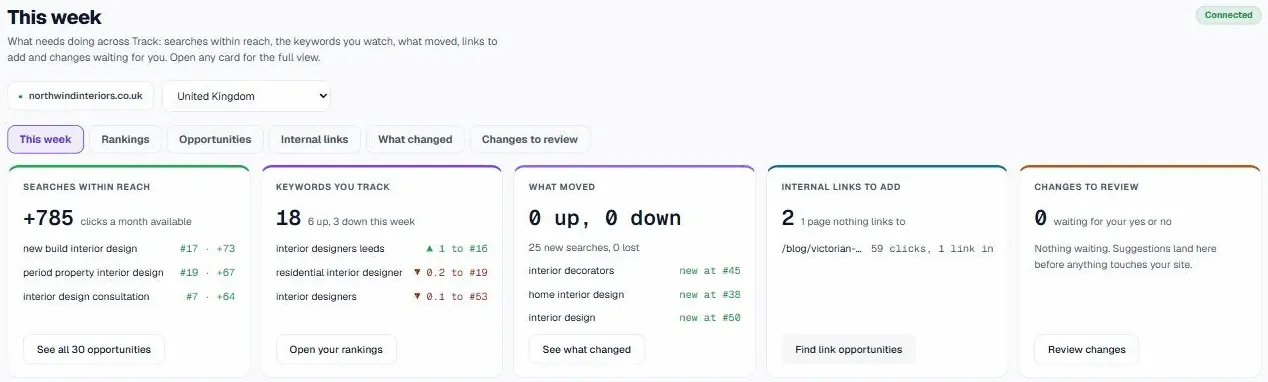
The dashboard is the face of your service. An seo reporting dashboard must answer three questions. Did traffic increase? Did conversions rise? What risks exist? Avoid cluttering the view with low-level keyword data. Place high-level KPIs at the top. Use charts to show trends over time.
Integrate data from multiple sources. Combine Search Console clicks with Google Analytics conversions. Add site health scores to show technical stability. A clean interface reduces cognitive load for the reader. Executives can grasp the situation in seconds. They can spot anomalies quickly. If a drop occurs, the dashboard should highlight it immediately. This allows for proactive communication rather than reactive explanations.
UtilitySEO: Automating the Executive View
Manual reporting is slow and prone to error. UtilitySEO automates the creation of executive-friendly views. The platform integrates with Google Search Console and Google Analytics 4. It pulls data daily to ensure accuracy. You can set up a white label seo report that matches your agency branding.
UtilitySEO turns technical crawls into seo todo tickets. When the crawler finds a broken link or a thin content page, it creates a ticket. You can assign this ticket to a team member. The platform tracks the status. When the fix is live, the ticket closes. This creates a closed loop between discovery and resolution.
The dashboard visualises this progress. It shows the site health score trend. It highlights content opportunities based on real search volume. It detects cannibalisation issues automatically. This removes the need for manual spreadsheet management. You can focus on strategy rather than data entry. The system handles the heavy lifting. You deliver polished results to your clients.
Conclusion
Executives value brevity and clarity. They need to see the link between SEO work and business growth. A disciplined agency seo workflow provides this link. Define roles clearly. Convert audits into tickets. Build dashboards that highlight key metrics. Use tools like UtilitySEO to automate data collection and reporting. This approach saves time and improves client satisfaction. Visit our Workflow page to see how the system operates. Check our Pricing to find the right plan for your agency.
Frequently asked questions
how do I structure an agency seo workflow for executives
Structure your agency seo workflow by defining clear team roles and automating task assignments to ensure clarity.
- Separate strategist, technical, and content responsibilities clearly.
- Convert audit findings into actionable project tickets.
- Assign specific fixes to developers or writers.
- Track progress with open and closed status.
why do executives ignore traditional seo reports
Executives ignore traditional reports because they lack narrative context and focus on raw keyword data instead of revenue.
- Spreadsheets fail to connect effort to business goals.
- Technical jargon creates high cognitive load for readers.
- Missing revenue impact makes strategic value unclear.
- Cluttered visuals hide critical performance trends and risks.
what should be included in an seo reporting dashboard
An effective dashboard must highlight high-level KPIs like traffic, conversions, and risks to answer core business questions.
- Place top-level metrics like clicks at the top.
- Integrate Search Console data with Google Analytics.
- Display site health scores for technical stability.
- Use charts to show trends over time.
how can I automate seo todo tickets for clients
Automate ticket creation by using tools like UtilitySEO to convert technical crawl errors into assigned tasks.
- Integrate crawler data with your project management software.
- Automatically assign broken links to developers.
- Generate tickets for thin content pages instantly.
- Track resolution rates to prove team accountability.
is white label seo reporting worth the investment
White label reporting is worth it because it builds brand authority and provides executives with consistent, branded insights.
- Customize reports to match your agency branding.
- Automate daily data pulls for accuracy and speed.
- Reduce manual reporting errors and administrative overhead.
- Deliver a professional, cohesive client experience consistently.
Keep reading
See how your site actually scores
Free 30-second scan, real Google scores and a ranked fix list. No signup needed.
No credit card · Cancel anytime