

SEO
How to Google Rank Tracking Keywords: A Practical Walkthrough
Strategic guide to tracking Google keyword rankings, connecting position data to revenue, and avoiding common rank tracking mistakes that waste resources.
Tracking your keyword rankings is fundamental to understanding whether your SEO efforts are working. But google rank tracking keywords involves far more than checking where you appear on search results. This guide walks you through the practical mechanics of rank tracking, why it matters for your business, and how to avoid the common pitfall of tracking rankings that don't move your needle. We'll explore methods, metrics, and strategies to make your rank tracking efforts genuinely productive rather than just keeping you staring at position changes that ultimately don't drive revenue.
Understanding Google Rank Tracking Keywords and Why It Matters
Google rank tracking keywords refers to the systematic monitoring of your website's search engine positions for specific keywords over time. Unlike a manual Google search, which gives personalised results based on your location, search history, and device, proper rank tracking provides objective, unbiased data about where your pages actually rank.
Many businesses still rely on manual searches to check their positions. This approach has serious limitations. Google personalises results for logged-in users, suggests corrections, and shows different results depending on your country and browsing history. What you see in an incognito window may differ from what your target audience sees. This is why automated rank tracking systems exist; they remove the human element and deliver consistent, comparable data.
The fundamental reason to monitor keyword positions is straightforward: rankings are a leading indicator of organic traffic. If your positions improve across your priority keywords, traffic typically follows within weeks. Conversely, ranking drops often precede traffic declines. By tracking early, you can identify and fix problems before they significantly impact your business.
However, not all keywords deserve equal attention. This is where strategic thinking matters. Tracking hundreds of keywords daily costs money and creates noise. The most effective approach involves tracking the keywords that genuinely drive revenue for your business, then using that data to guide content and technical SEO decisions.
The Strategic Framework for Selecting Keywords to Track
Before you begin tracking any keyword, ask yourself a critical question: what business outcome does ranking for this keyword support?
This distinction matters enormously. Imagine you sell accounting software. Ranking number one for "accounting" generates virtually no value because the search intent is informational. Someone typing "accounting" wants to understand what accounting is, not buy software. But ranking for "accounting software for small businesses" targets someone actively evaluating solutions. That keyword difference translates directly to sales.
Many businesses make the mistake of tracking vanity keywords rather than conversion keywords. Vanity keywords make your team feel good but don't drive revenue. A digital agency might rank impressively for "web design," yet their actual business comes from "web design for restaurants" and "ecommerce website development." Tracking the broad term is essentially watching a metric that doesn't influence their bottom line.
Start by identifying your highest-value keywords: those that attract search volume from your target customer with clear purchase intent. These are the keywords that deserve daily or weekly tracking. Medium-value keywords, such as informational content that builds authority but doesn't directly convert, might warrant monthly tracking. Everything else either doesn't need tracking or should be monitored in bulk through Google Search Console rather than as individual keywords.
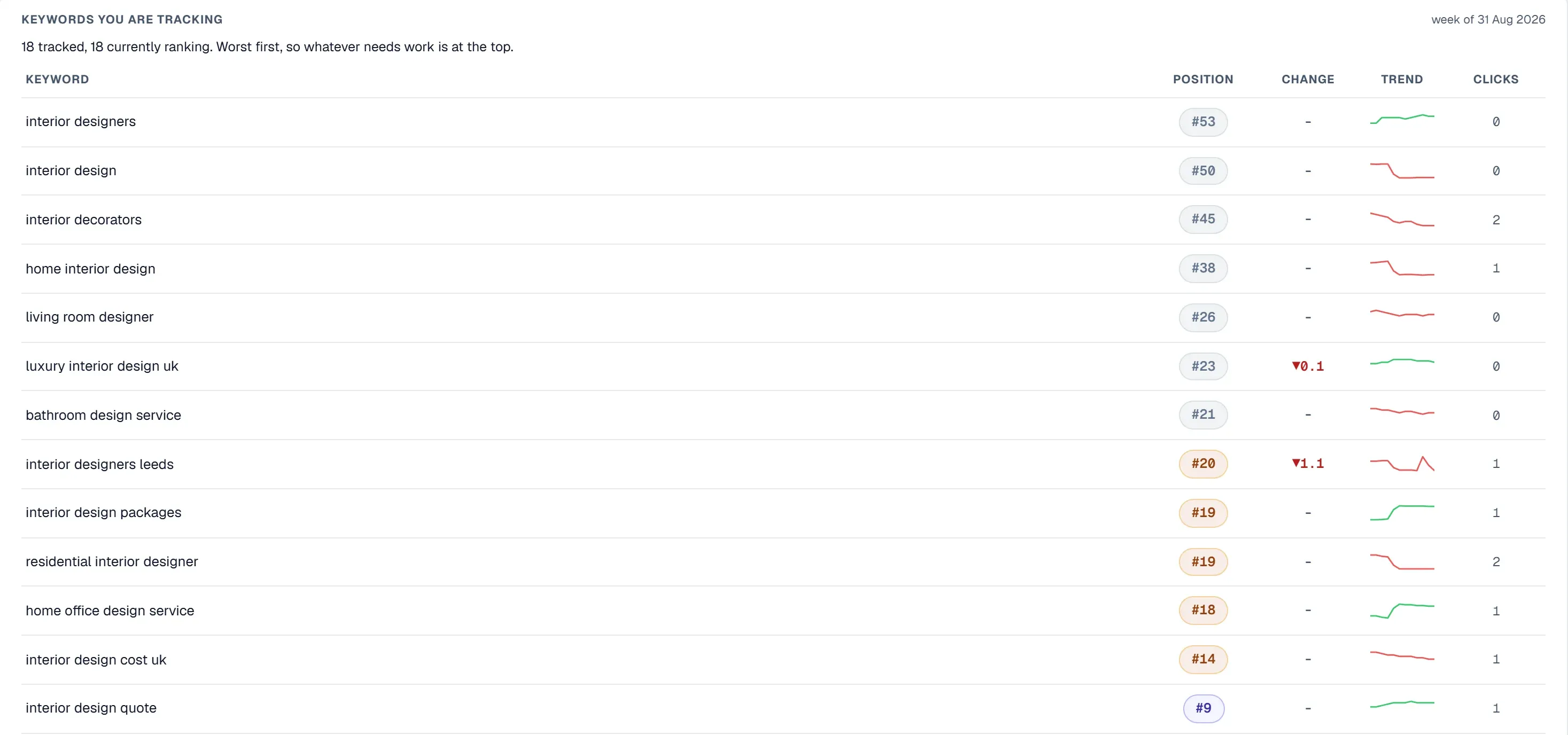
Keyword Position Tracking Google Search Console Versus Specialised Tools
Google Search Console provides native keyword position tracking data directly from Google's systems. Within Search Console, you can see average position, impressions, clicks, and click-through rate for every keyword your site ranks for. This data is unquestionably accurate because it comes from Google itself.
However, Search Console has limitations that matter for serious rank tracking:
First, Search Console reporting has a delay. Data appears with a lag, typically one to three days behind actual performance. If you need real-time monitoring, Search Console won't meet that need.
Second, Search Console only retains 16 months of historical data. If you're building a long-term picture of your keyword performance, you'll lose visibility into older trends.
Third, Search Console shows average position across all searches and devices, but doesn't track historical ranking changes the way specialised rank tracking tools do. You can see that your average position is 8.5, but you can't easily view how that position changed day by day or identify the exact moment a ranking shift occurred.
This is where specialised keyword position tracking google tools become valuable. These platforms check your rankings daily, weekly, or monthly depending on your preferences, store the historical data permanently, and alert you to significant ranking changes. They let you track rankings at granular levels: per device, per country, and even at city or state level for local SEO.
The trade-off is that specialised tools introduce a small layer of difference from Search Console. They check your rankings from their own servers rather than directly from Google's index. In rare circumstances, their results might differ slightly from what Google Search Console reports, but the difference is typically negligible and the value of historical tracking far outweighs this minor limitation.
Key Metrics to Monitor Beyond Just Position
Position is important, but it tells only part of the story. A keyword might climb from position 15 to position 6 while your traffic from that keyword stays flat. This happens when the keyword attracts low search volume or low-quality traffic. Conversely, holding position 3 for a keyword with high search volume and strong conversion rates represents genuine value.
Beyond position, track these metrics:
Search volume provides context for position changes. Ranking first for a keyword with 50 monthly searches moves your business less than ranking third for a keyword with 5,000 monthly searches. Understanding volume helps you prioritise which ranking improvements actually matter.
Click-through rate from search results reveals whether your current title tag and meta description encourage clicks. You might rank third for a keyword but receive fewer clicks than the fourth-ranked result if your snippet is less compelling. Improving your meta description can increase traffic from that keyword without improving your ranking position.
Traffic volume from organic search, particularly traffic from specific keywords, shows whether rank tracking positions translate to actual visitors. Some keywords drive far more traffic than others at the same ranking position, indicating stronger search intent and user engagement.
Conversion metrics for traffic from specific keywords, when you can track them, represent the ultimate truth. A keyword that drives one conversion is worth infinitely more than a keyword that drives 100 visits with zero conversions. Yet most businesses never connect their rank tracking to conversion data.
Competitor positions alongside your own reveal whether you're gaining or losing ground in competitive spaces. If your ranking stays flat but all competitors drop, you're actually improving relative position even though your absolute position hasn't changed.
Ranking Changes, Algorithm Updates, and Interpreting Volatility
Google runs approximately 500 to 600 algorithm updates per year. Some are major updates that affect significant portions of the search index. Others are minor tweaks affecting just a handful of results. This means ranking changes are constant.
Obsessing over every ranking fluctuation is a common mistake. A keyword might move from position 4 to position 5 on Tuesday, then back to position 4 on Wednesday. This volatility is normal and expected. It doesn't signal a problem unless the trend is directionally negative over weeks or months.
Effective rank tracking involves establishing baselines and looking for sustained trends rather than daily movements. Ask yourself: is this keyword trending up, trending down, or stable over the past 30 days? Did a ranking drop coincide with a known Google update? Did your ranking improve after you published a new page targeting that keyword?
This is where many rank tracking approaches fail. Teams obsess over position changes and take hasty actions like panicked content rewrites, when in fact the rankings are simply experiencing normal fluctuation. A keyword fluctuating between positions 3 and 6 over 30 days probably doesn't need intervention. A keyword that steadily moved from position 3 to position 15 over the same period absolutely does.
The psychology of rank obsession represents a genuine danger to SEO productivity. When teams have access to daily rank tracking, they often spend hours analysing minor fluctuations rather than doing the actual SEO work that moves rankings. Setting expectations with stakeholders about normal volatility helps keep focus where it belongs: on meaningful ranking trends and the content or technical improvements that drive them.
Google Keyword Ranking Monitor Integration with Broader SEO Strategy
Effective rank tracking doesn't exist in isolation. A google keyword ranking monitor should connect directly to your content strategy, technical SEO improvements, and competitive analysis.
When you identify a keyword where your ranking is declining or stagnant, the next step is diagnosis. Why isn't the page ranking higher? Sometimes the issue is technical: the page might be poorly crawled, lack proper internal linking, or have indexation problems. Sometimes it's content-related: the page might not address the search intent as thoroughly as competing results. Sometimes it's authority-related: the page might need stronger backlinks to compete.
This is where integrated SEO platforms become valuable. You can track your ranking position in one section, then move to a site audit to identify technical issues affecting the same page. You can review your backlink profile to understand whether link authority is constraining your rankings. You can analyse competitor pages ranking above you to identify content gaps or structural improvements needed.
UtilitySEO provides keyword tracking powered by Google Search Console data, showing your impressions, clicks, and average positions alongside historical trends. The platform's keyword grouping feature lets you organise keywords by business objective or content pillar, making it easy to focus on what matters. Device and country breakdowns reveal whether your ranking varies significantly across different user segments.
The distinctive advantage of integrating rank tracking with technical analysis is speed. Rather than jumping between three different platforms to investigate a ranking drop, you can see your keyword position, identify that the underlying page has a crawlability issue, and fix it within one workflow. You can also connect ranking data to your analytics to confirm that ranking improvements actually translated to increased traffic.
How Rank Reporting Connects to Business Value
Most rank reporting falls into a trap: it reports rankings without connecting them to business outcomes. A report showing that your average position improved from 12 to 9 creates a false sense of progress if that ranking change drove zero additional traffic or revenue.
Meaningful rank reporting should answer business questions:
Which keywords are driving the most conversions, and what do those keywords have in common? This reveals your actual customer acquisition channels so you can protect and expand them.
Where are your biggest ranking opportunities? If you rank seventh for a keyword with high conversion value, moving to third could significantly impact revenue.
How much traffic and revenue did ranking changes actually drive? This connects rank tracking back to business metrics.
Which competitors are stealing your traffic, and what can you learn from their content or backlink profiles?
When you frame rank tracking around business value rather than just position metrics, the entire exercise becomes more strategic. You'll track fewer keywords because you'll only track keywords that matter. You'll interpret ranking changes more rationally because you'll see whether they actually drive business outcomes. You'll make smarter decisions about where to invest your SEO effort.
Setting Up Your Rank Tracking Workflow
Begin by defining your tracking scope. Identify your priority keywords: the ones with clear commercial intent and potential business impact. Start conservatively. Tracking 20 truly important keywords is more valuable than tracking 200 keywords indiscriminately.
Establish your tracking frequency based on keyword competitiveness and your budget. Highly competitive keywords where you're battling for top positions might warrant daily or three-times-weekly tracking. Less competitive keywords or keywords where you already rank well might only need monthly monitoring.
Set up rank reporting to align with your business decisions. Daily rank tracking data typically exists for monitoring purposes. Monthly or quarterly reports should be the mechanism for strategic decision-making, showing trends over time rather than daily noise. Show ranking changes alongside traffic and conversion data so stakeholders see the actual business impact.
Create alerts for significant ranking changes. Rather than manually checking rankings daily, set up notifications when a priority keyword drops more than three positions or when a page stops ranking in the top 50. This lets you respond to genuine problems without obsessing over normal volatility.
Document the ranking data you collect alongside the content changes and technical improvements you implement. Over time, this creates a learning system showing you which types of changes move your rankings for different keyword categories.
Conclusion: Making Rank Tracking Work for Your Business
Google rank tracking keywords is a necessary part of SEO management, but only when done strategically. The goal isn't to track every keyword or obsess over daily position changes. The goal is to monitor the keywords that genuinely drive your business, connect ranking performance to traffic and revenue, and use that data to guide continuous improvement.
Start by identifying which keywords matter most to your business. Track those with appropriate frequency. Report on ranking changes in the context of actual business outcomes. Use ranking drops as diagnostic signals to investigate technical or content issues. And maintain perspective about normal ranking volatility; not every position change requires action.
If you're ready to move beyond manual ranking checks or unwieldy spreadsheets, explore how UtilitySEO's keyword tracking integrates with site audits, analytics, and competitive analysis to create a complete picture of your SEO performance.
Frequently asked questions
Google rank tracking keywords uses automated systems to monitor your website's search positions objectively, while manual searches show personalized results based on your location, login status, and history.
- Manual searches deliver biased, inconsistent data tied to your account
- Rank tracking tools provide unbiased position data across locations
- Automated tracking removes human variables for accurate comparison
- Personalization makes manual searches unreliable for SEO decisions
Select keywords for google rank tracking keywords based on business value and conversion potential, not search volume alone or brand vanity.
- Focus on keywords with clear purchase intent from target customers
- Avoid vanity keywords that rank well but don't drive revenue
- Prioritize keywords directly tied to your products or services
- Track medium-value informational keywords separately from priority keywords
Google rank tracking keywords serves as a leading indicator of organic traffic changes, helping you identify and fix problems before traffic declines occur.
- Rankings predict traffic changes weeks in advance
- Early ranking drops signal issues requiring investigation
- Position improvements typically precede traffic increases
- Tracking reveals SEO strategy effectiveness before revenue impact
Yes, tracking excessive keywords wastes money and creates noise without actionable insights in your google rank tracking keywords efforts.
- Focus tracking on keywords with genuine business value
- Narrow daily tracking to high-priority conversion keywords
- Monitor medium-value keywords weekly or monthly instead
- Excessive tracking dilutes signal and increases tool costs
Google rank tracking keywords connects directly to revenue by measuring positions for keywords your target customers actually use to find solutions.
- High-intent keywords like "accounting software for small businesses" drive sales
- Broad vanity keywords like "accounting" have minimal conversion value
- Rank improvements for commercial keywords typically increase customer inquiries
- Tracking conversion-focused keywords reveals true SEO ROI
Google rank tracking keywords frequency depends on keyword priority: daily for high-value conversion keywords, weekly or monthly for informational content keywords.
- High-priority keywords warrant daily or weekly tracking
- Medium-value keywords need monthly or quarterly reviews
- Daily tracking for all keywords wastes resources and budget
- Adjust frequency based on how positions impact your business
Know what to fix next.
Scan your site for a clearer place to start.
About 30 seconds. No card needed.