

SEO
GA4 Integration: What Every SEO Should Know
Unlock powerful SEO insights by mastering secure and cost effective GA4 integration, unifying your analytics data for strategic advantage.
Understanding robust GA4 integration is paramount for any SEO professional navigating the modern digital landscape. This process moves beyond simply connecting platforms; it involves creating a seamless data flow that unlocks deeper insights into user behaviour, content performance, and conversion paths. A well executed GA4 integration allows for a unified view of your digital ecosystem, enabling more informed strategic decisions. This blog post will delve into the critical aspects of integrating GA4, highlighting advanced techniques, security considerations, and how to leverage this powerful data for superior SEO outcomes.
The Strategic Importance of GA4 Integration for SEO
Effective GA4 integration is not merely a technical task; it is a strategic imperative for SEO. By connecting Google Analytics 4 with other vital platforms, SEOs gain a comprehensive understanding of the user journey, from initial search query to conversion. This holistic view allows for precise optimisation efforts, targeting areas that genuinely impact business goals. Without robust integration, data remains siloed, leading to incomplete analyses and missed opportunities. It is about moving beyond basic data collection to building a secure, integrated data pipeline that supports informed decision making and helps to understand the full impact of your SEO work.
Beyond Basic Setup: Advanced GA4 Integration Techniques
While standard GA4 setup is a good starting point, advanced GA4 integration demands a deeper technical understanding to unlock its full potential. Security and authentication best practices are non negotiable. Implementing secure OAuth flows, managing API key access, and carefully defining permission scopes are crucial for protecting sensitive data across all integrated systems. Neglecting these aspects can expose your data to vulnerabilities and compromise compliance.
Cost analysis and pricing implications also come into play, particularly with high volume data processing. Understanding API call limits, potential quotas, and how these might lead to overages is essential for budget management. Performance benchmarks between server side versus client side integration methods offer significant insights. Server side Google Tag Manager for GA4, for instance, can reduce client side script load, improve data accuracy, and enhance privacy compliance, though it requires more complex setup and monitoring.
For organisations migrating from Universal Analytics, a well planned migration strategy for existing integrations to their GA4 equivalents is vital to ensure minimal disruption. This involves mapping old data structures to new ones and reconfiguring API connections. Custom integration development becomes necessary for proprietary internal tools or uncommon platforms, requiring bespoke solutions that adhere to GA4's data model.
Furthermore, robust data governance frameworks are essential for managing GA4 integrations across enterprise organisations. This includes defining multi team access, establishing clear data ownership, and ensuring consistent data quality. Monitoring and alerting strategies are also critical; these systems help detect when integrations break or data quality degrades, allowing for prompt intervention. Techniques for data transformation and enrichment between source systems and GA4 can provide more valuable and actionable insights for your ga4 reports and overall ga4 dashboard analysis.
GA4 Data and Search Console: A Holistic View
Combining insights from GA4 and Google Search Console offers an unparalleled holistic view of your website's performance. While Google Analytics 4 focuses on user behaviour on your site, Search Console provides data on how your site performs in Google Search results. The synergy between google [analytics 4 vs search](/blog/top-10-things-to-know-about-google-analytics-4-vs-search-console) console is powerful. For example, you can identify pages with high impressions but low clicks in Search Console, then use GA4 to understand user behaviour on those pages, such as engagement rates or bounce rates, once they arrive.
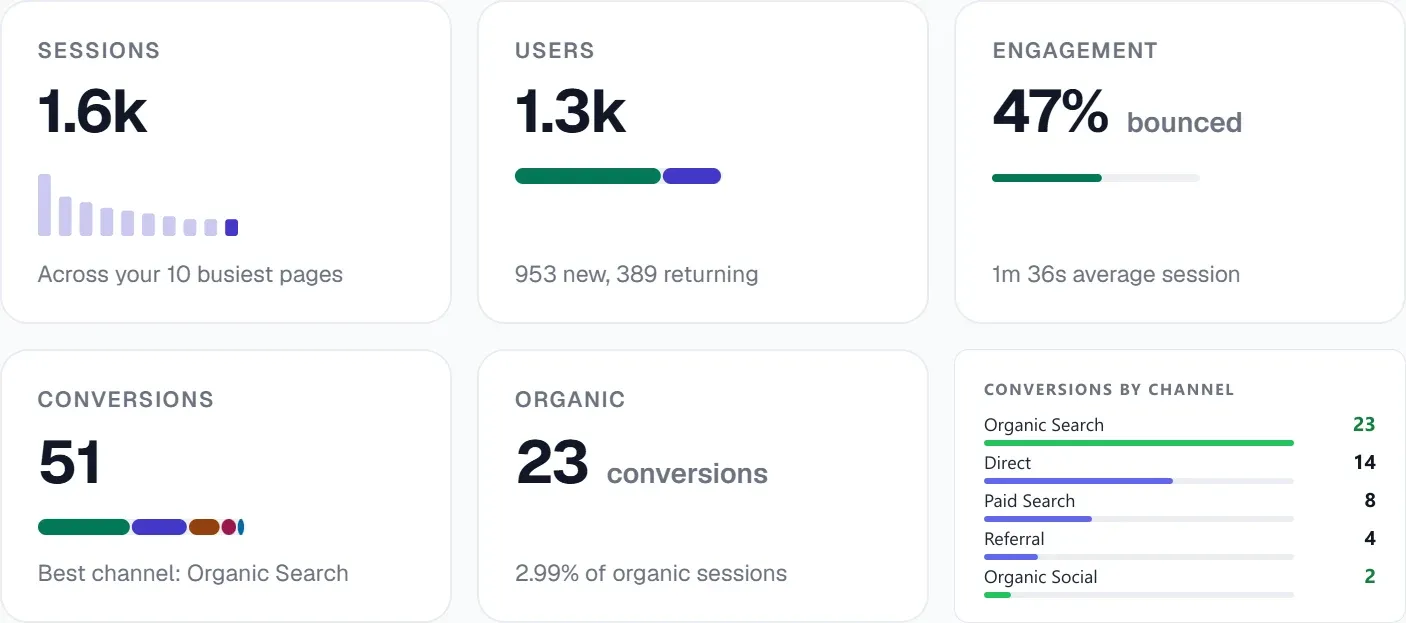
UtilitySEO facilitates this unified analysis directly. Our platform offers a Pages tab that displays GSC page performance, including URL inspection results, index status, mobile usability, and canonical mismatch detection. This allows you to quickly identify technical issues that might be affecting your search visibility. By integrating this with your GA4 analytics data, which tracks organic traffic, sessions, conversions, and top pages, you gain a complete picture. You can see how search performance translates into on site engagement and conversions. Our keyword tracking feature, powered by Search Console data, shows rankings, impressions, and clicks, which can then be correlated with GA4's user flow data to understand the full journey. Effectively leveraging gsc filters within Search Console data, alongside GA4 insights, allows for precise segmentation and analysis, helping you pinpoint specific optimisation opportunities.
UtilitySEO: Streamlining Your GA4 and SEO Workflow
UtilitySEO is designed to bring clarity and efficiency to your SEO efforts, especially when dealing with complex GA4 integration data. Our platform centralises key metrics, providing a single source of truth for your digital performance. The GA4 analytics feature directly integrates your organic traffic, sessions, conversions, and top pages data, making it readily accessible for analysis. You can also monitor GA4 active users in real time, with a panel that updates every 30 seconds.
Beyond analytics, UtilitySEO helps you act on these insights. Our SEO results dashboard provides a clear overview of your site's health, highlighting issues and suggested fixes. When you conduct a single URL scan or a full site scan, the results can be cross referenced with your GA4 data to understand the impact of technical SEO on user engagement. For instance, if GA4 shows high bounce rates on certain pages, a technical audit might reveal PageSpeed issues that UtilitySEO's scan can identify.
Our AI Insights feature provides automated SEO recommendations, drawing on a wide range of data, including what a well integrated GA4 setup can provide. This helps you translate complex data into actionable steps. For comprehensive data management and analysis, UtilitySEO offers an Export CSV function for GA4, Ads, and keyword data, enabling further custom reporting. This integrated approach ensures that your GA4 integration efforts directly contribute to measurable improvements in your SEO strategy. Our pricing plans are designed to scale with your needs, offering robust features for every stage of your SEO journey.
Conclusion
Mastering GA4 integration is no longer optional for SEOs; it is a fundamental requirement for comprehensive digital strategy. By focusing on secure, cost effective, and performance optimised integrations, and by understanding how to unify this data with insights from tools like Google Search Console, you unlock a powerful advantage. UtilitySEO empowers you to consolidate these critical data points, providing the tools needed to analyse, act, and ultimately achieve superior SEO results. Explore how UtilitySEO can streamline your data analysis and enhance your SEO workflow today.
Know what to fix next.
Scan your site for a clearer place to start.
About 30 seconds. No card needed.