

SEO
Keyword Position Tracking in Google: 16 Tools Compared
Keyword position tracking is crucial for SEO success, and various tools are available to help you monitor your rankings in Google.
Keyword position tracking in Google shows where your pages rank for the searches you care about, and whether they are moving up or down. This post explains how to accurately monitor keyword positions in Google, then compares 16 tools for Google position tracking so you can see which one fits your site.
UtilitySEO
UtilitySEO is a powerful tool that enables you to track your keyword positions with ease, providing you with valuable insights to inform your SEO strategy. By utilising UtilitySEO, you can boost your online visibility, drive more traffic to your website, and ultimately increase your conversions. With its comprehensive range of features, UtilitySEO is the perfect solution for businesses looking to take their SEO to the next level.
* Single URL scan: provides a deep PageSpeed and SEO audit, using dual-pass averaging to give you a comprehensive understanding of your website's performance
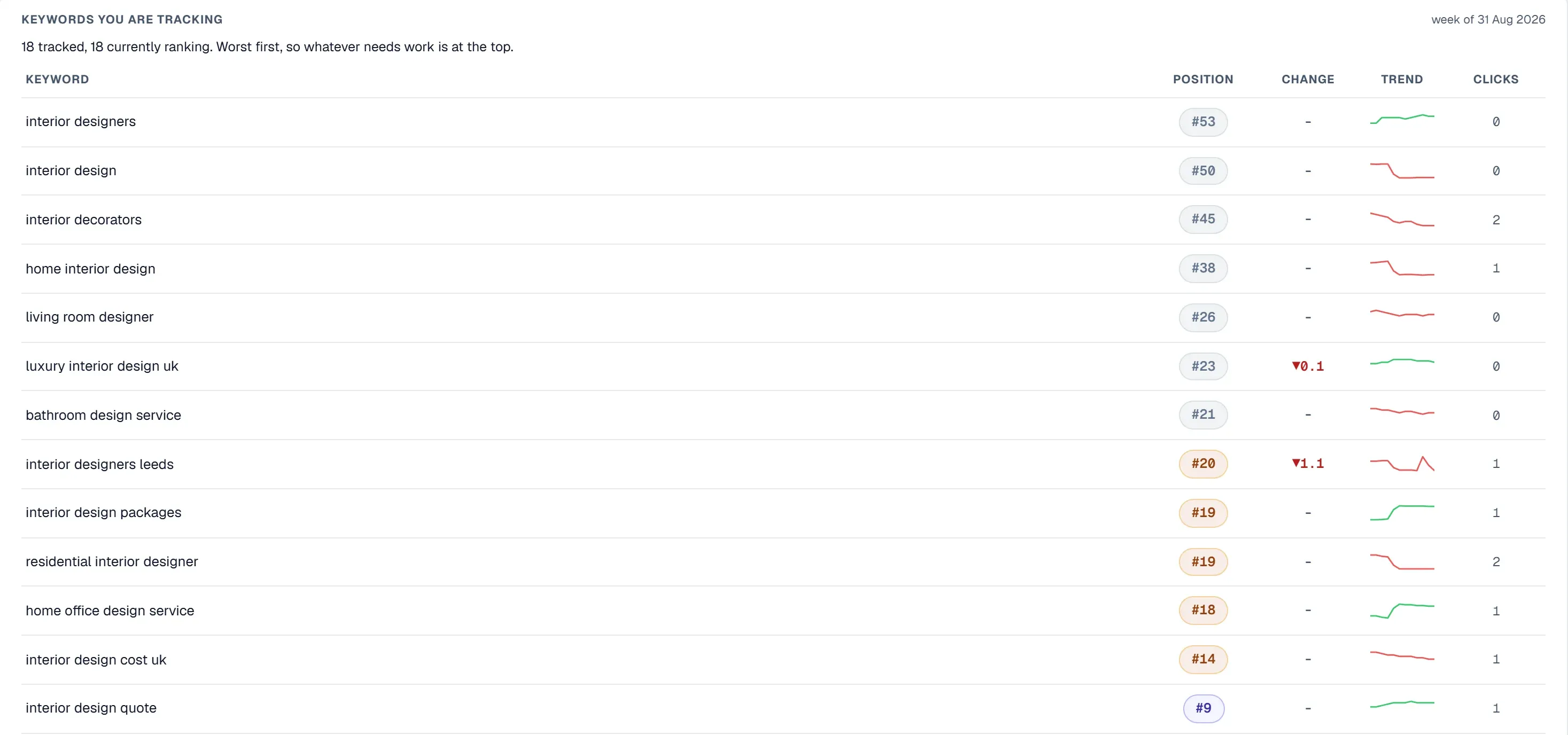
* Keyword tracking: uses GSC-powered rankings, impressions, and clicks, with grouping capabilities to help you track your keywords and identify areas for improvement
* Device and country breakdown: offers a per-keyword split by device and country, allowing you to tailor your SEO strategy to specific regions and devices
* GA4 analytics: provides organic traffic, sessions, conversions, and top pages data, giving you a clear picture of your website's performance
* Keyword explorer: is a seed keyword research tool that helps you identify new keyword opportunities and expand your SEO strategy
* Site audit: performs a technical SEO audit with issue categorisation, enabling you to identify and fix technical issues that may be hindering your website's performance
SEMrush
Semrush offers a free plan with one demo project and 10 reports per day across its main tools, and no credit card is required. Semrush's knowledge base states that its Business SEO Toolkit can crawl up to 1,000,000 pages per month and up to 100,000 pages in a single Site Audit.
Ahrefs
Ahrefs says its plans are powered by the world's second-most active crawler and more than 10 years of web-scale data. Ahrefs describes its Standard plan as aimed at freelance SEOs and marketing consultants, and its Advanced plan as aimed at lean in-house marketing teams.
Moz
Moz describes its Moz Pro Medium plan as intended for growing businesses that need both SEO and AI search or GEO tools. Moz offers a free Moz Community account that gives limited access to MozBar, Keyword Explorer and Link Explorer for backlink research.
Screaming Frog
Screaming Frog SEO Spider with a paid licence has no fixed crawl limit beyond the computer's memory and storage, whereas UtilitySEO crawls up to 10,000 pages per crawl (depending on plan). Screaming Frog SEO Spider connects to the Google Analytics 4, Google Search Console and PageSpeed Insights APIs to pull their data into a crawl.
Google Search Console
Google Search Console offers a platform for monitoring keyword positions, providing insights into search engine rankings and impressions, the data is sourced directly from Google and offers a unique perspective on search engine performance.
Sitebulb
Sitebulb's Lite plan is capped at 10,000 URLs per audit for a single user, and audit comparisons and scheduled audits are listed as Pro features. Sitebulb Pro checks more than 300 prioritised Hints explaining SEO issues, compared with more than 100 Hints on the Sitebulb Lite plan.
Mangools
Mangools free plan is limited in KWFinder to 5 lookups per 24 hours, with 15 related and 5 competitor keywords per lookup. Mangools states that all of its tools are included in every subscription plan, rather than being sold as separate products.
SE Ranking
SE Ranking's Core plan includes 250,000 audit pages per month, and its Growth plan includes 2 million audit pages per month. SE Ranking's Core plan keeps six months of historical data, while historical data across the project lifetime is included only on the Growth plan.
Serpstat
Serpstat's Rank Tracker includes daily updates, competitor rankings, organic and paid keyword rankings, and desktop and mobile rankings on every plan. Serpstat's LLM Brand Monitor tracks how ChatGPT, Claude, Gemini and other AI models talk about a brand and how competitors are presented.
Ubersuggest
Ubersuggest rank tracking is listed as updating weekly on the Individual, Business and Enterprise plans, rather than daily. Ubersuggest Enterprise plan lists site audits of up to 10,000 pages per report, with weekly crawling, across up to 15 projects.
Rank Math
Rank Math is built for WordPress, and its WordPress.org listing states that it requires WordPress version 6.7 or higher. Rank Math describes its PRO plan as for bloggers, individuals and solopreneurs, and its Business plan as for freelancers, business and agency owners.
Woorank
WooRank Premium plan includes unlimited white-label PDF reports with customised branding and a Lead Gen tool for generating leads for an agency. WooRank describes its Premium plan as for professionals, teams and agencies working on multiple websites, and its Enterprise plan as for agencies and enterprises.
Seobility
Seobility's paid plans include a JavaScript crawling option that lets users choose whether to execute JavaScript during a website crawl. Seobility's paid plans include PDF reports that users can create with their own logo, according to Seobility's pricing page.
Majestic
Majestic's Historic Index, available on its Pro and API plans, spans back to 2006 for analysing the past link history of any site. Majestic's Lite and Pro plans each include a single user, and full API access is available only on its API plan.
Raven Tools
In conclusion, various tools are available for tracking keyword positions in Google, each with its own methodology and approach. The most effective tool will depend on specific needs and requirements. For more information on keyword position tracking and SEO tools, consider visiting Mastering Keyword Position Tracking Google for Improved Search Rankings or Essential Daily SEO Tracking Software for Data-Driven Decision Making.
Google position tracking, and why the engine matters
Most position tracking is Google position tracking, and the tools rarely say so out loud. It is worth knowing what that assumption costs you, because keyword tracking in Google behaves differently from every other engine in three ways that change the number you see.
Results are personalised and localised by default. Two people searching the same term from the same city can be served different orderings. A Google position tracking tool handles this by fixing a location and a device and reporting that simulated search, which is precise about one search rather than true of all of them.
Google shows more above the results than anyone else. AI Overviews, ads, People Also Ask and video carousels routinely push the first organic result below the fold. Google keyword tracking tools that report only the integer are hiding the half that explains your click-through rate.
Google gives you its own data, and no other engine does. Search Console reports the positions Google actually served real people, averaged across every one of those personalised searches. It is messier than a scraped number and considerably truer.
If you are choosing between Google keyword tracking tools, the question that separates them is which of those two sources they use, and whether they are honest about which one you are looking at.
Keyword position monitoring: how to accurately monitor positions in Google
Every tool above is some form of keyword position monitor, but they do not all measure the same thing, and the difference decides whether you can trust the number.
Two ways to monitor search engine positions. A rank tracker checks Google from a chosen location on a schedule and records where your page appeared. Search Console records where your page actually appeared for real people, averaged over every search. The first is a controlled sample; the second is the real thing, but averaged. Good SEO position monitoring uses both, and knows which one it is looking at.
Accurately monitor keyword positions in Google by fixing the variables. Positions change with location, device and personalisation. If a keyword tracker reports a position without saying where and on what device it checked, the number cannot be compared from one week to the next. Pick one location and one device per keyword and keep them fixed.
What Google position tracking software should show you. Not just the position, but the page that ranks, the searches it ranks for, and when it moved. A position change with no date and no ranking URL tells you something happened without telling you what to do about it.
How can I monitor keyword positions daily?
Use a tracker that checks every day, and read the result weekly. Daily checks are useful for catching a sudden drop, such as a page falling out of the index. Daily decisions are not: positions move a few places day to day for reasons that have nothing to do with you, and reacting to every move wastes time. Set an alert for large drops on the keywords that bring you customers, and review the trend once a week.
UtilitySEO does both: a daily keyword tracker position check for the keywords you choose, alongside the Search Console positions for every search you already appear in.
Frequently asked questions
Keyword position tracking google helps monitor rankings.
- Increases online visibility
- Drives website traffic
- Improves SEO strategy
Use keyword position tracking google tools.
- UtilitySEO
- SEMrush
- Ahrefs
Keyword position tracking google boosts online visibility.
- Identifies areas for improvement
- Increases conversions
- Enhances SEO strategy
Some keyword position tracking google tools offer free trials.
- Google Search Console
- UtilitySEO
- Limited features
Keyword position tracking google is essential for SEO success.
- Increases website traffic
- Improves search engine rankings
- Enhances online visibility
Monitor keyword positions regularly with keyword position tracking google.
- Daily updates
- Weekly reports
- Monthly analysis
Know what to fix next.
Scan your site for a clearer place to start.
About 30 seconds. No card needed.