
Plötzlicher Ranking-Einbruch: die ersten 48 Stunden
So diagnostizieren Sie einen plötzlichen Ranking-Einbruch in den ersten 48 Stunden und erholen sich davon, mit praktischen SEO-Triage-Schritten.
Ein plötzlicher Ranking-Einbruch ist beunruhigend. Er weist auf ein gravierendes Problem hin, das die Sichtbarkeit und den organischen Traffic Ihrer Website beeinträchtigt. Dieser abrupte Rückgang verlangt schnelles Handeln und ein strukturiertes Vorgehen bei Diagnose und Wiederherstellung. Wer die ersten Schritte in den ersten 48 Stunden kennt, begrenzt langfristige Schäden. Dieser Leitfaden zeigt, wie Sie eine grundlegende SEO-Triage durchführen, mögliche Ursachen eingrenzen und die Erholung nach einem Traffic-Einbruch einleiten, gerade wenn Ihre Ressourcen begrenzt sind.
SEO-Triage zu Beginn: den Einbruch bestätigen
Der erste Schritt bei Verdacht auf einen plötzlichen Ranking-Einbruch ist, zu bestätigen, dass er real ist und wie weit er reicht. Panik kommt schnell auf, aber methodisches Vorgehen ist wirksamer. Prüfen Sie zuerst Ihre wichtigsten Datenquellen.
Die Google Search Console (GSC) ist Ihr wertvollstes kostenloses Tool. Sehen Sie im Leistungsbericht nach, ob Impressionen und Klicks wirklich eingebrochen sind. Filtern Sie nach Datum, um aktuelle Daten mit früheren Zeiträumen zu vergleichen. Eine Traffic-Einbruch-Diagnose in Ihren SEO-Tools kann zudem Termine von Algorithmus-Updates einblenden und so helfen, Einbrüche mit bestätigten Google-Änderungen in Verbindung zu bringen. Prüfen Sie den Abdeckungsbericht auf neue Fehler oder Warnungen, etwa einen plötzlichen Anstieg bei „Durch noindex-Tag ausgeschlossen“ oder „Gecrawlt, zurzeit nicht indexiert“. Wer mehrere Websites betreut, grenzt die Untersuchung ein, indem er schnell erkennt, welche Seiten oder Bereiche betroffen sind.
Prüfen Sie über die GSC hinaus Analyseplattformen wie GA4 auf einen entsprechenden Rückgang beim organischen Traffic. Zeigt die GSC einen Einbruch, GA4 aber nicht, kann ein Reporting-Problem vorliegen statt eines echten Ranking-Problems. Diese erste SEO-Triage bestätigt, wie schwer der Einbruch ist, und liefert einen Ausgangspunkt für tiefere Untersuchungen.
Häufige Ursachen und schnelle Checks
Ist ein plötzlicher Ranking-Einbruch bestätigt, geht es als Nächstes um mögliche Ursachen. Viele Probleme können einen solchen Rückgang auslösen, von technischen Pannen über Content-Probleme bis zu Algorithmus-Änderungen. Für kleine Unternehmen kommt es darauf an, die Checks zu priorisieren.
Technische Probleme:
* Robots.txt und Noindex-Tags: Eine falsch konfigurierte robots.txt oder ein versehentlich gesetztes Noindex-Tag kann Ihre ganze Website oder wichtige Bereiche aus dem Index nehmen. Prüfen Sie Ihre robots.txt sofort. Nutzen Sie den Robots.txt-Tester und das URL-Prüftool der GSC, um den Indexierungsstatus einzelner Seiten zu kontrollieren.
* Server-Verfügbarkeit: Ist Ihre Website erreichbar? Ausfallzeiten wirken sich direkt auf Rankings aus. Nutzen Sie einen kostenlosen Uptime-Monitoring-Dienst.
* Defekte Weiterleitungen oder Ketten: Eine plötzliche Änderung der URL-Struktur ohne passende Weiterleitungen oder eine Kette mehrerer Weiterleitungen kann Crawler verwirren. Die Erkennung von Weiterleitungsketten in UtilitySEO meldet Ketten ab drei Schritten, die die Indexierung deutlich verlangsamen oder verhindern können.
* Manuelle Maßnahmen: Prüfen Sie den Bereich Sicherheit und manuelle Maßnahmen in der GSC. Eine manuelle Maßnahme ist ein klares Signal von Google über einen Verstoß.
Content und Algorithmus-Änderungen:
* Algorithmus-Updates: Google spielt häufig Updates aus. Oft sind sie unauffällig, einige verursachen aber deutliche Verschiebungen. Achten Sie auf Ankündigungen von Google oder vertrauenswürdigen SEO-Nachrichtenquellen.
* Content-Qualität: Hat sich Ihr Content zuletzt verändert? Die Erkennung von dünnem Content oder ein Content-Audit zeigt Seiten, die wegen geringer Qualität oder zu geringer Wortzahl schwächeln könnten.
* Veränderte Suchintention: Googles Verständnis der Nutzerintention entwickelt sich weiter. Was gestern gerankt hat, passt heute vielleicht nicht mehr genau zur Intention.
Externe Faktoren:
* Zugewinne der Wettbewerber: Haben Wettbewerber plötzlich zugelegt? Ein Tool zur Wettbewerberbeobachtung zeigt Keywords, für die sie ranken und Sie nicht, und hilft, Lücken zu finden.
* Verlorene Backlinks: Der plötzliche Verlust hochwertiger Backlinks kann die Autorität beeinträchtigen.
Fixes priorisieren und die Rolle von UtilitySEO
Mehrere mögliche Probleme auf einmal zu erkennen, kann überfordern, besonders bei begrenzten Ressourcen. Fixes zu priorisieren ist für eine wirksame Erholung nach einem Traffic-Einbruch entscheidend. Beginnen Sie mit den kritischsten und am leichtesten überprüfbaren Problemen.
Ein Noindex-Tag auf der ganzen Website oder eine robots.txt, die alles blockiert, ist zum Beispiel ein P1-Notfall. Oft ist das ein unbeabsichtigtes Ergebnis eines SEO-Audits nach einer Migration oder von Änderungen, die ein neuer Entwickler eingespielt hat. Prüfen Sie das zuerst. Auch ein Serverausfall muss sofort behoben werden.
UtilitySEO bietet einen schlanken Weg, viele dieser Probleme zu diagnostizieren und zu beheben. Ein Einzelseiten-Scan prüft schnell über 100 Ranking-Faktoren und liefert Ihnen einen Gesundheitswert und verständliche Fixes für akute Probleme. Bei größeren Problemen findet ein Crawl der ganzen Website (bis zu 1.000 Seiten) Probleme auf der gesamten Website, darunter Erkennung defekter Links, Erkennung verwaister Seiten und Erkennung doppelter Inhalte.
Das Site-Health-Dashboard zeigt Score, Note und Trend-Sparkline, dazu eine Aufschlüsselung nach Fehlern, Warnungen und Hinweisen. Für konkrete Probleme bieten die Fix Guides eine durchsuchbare Bibliothek mit Anleitungen. Brauchen Sie einen Code-Fix, erzeugt die Funktion Fix with AI den Code direkt für erkannte Probleme. So handeln kleine Unternehmen schnell, ohne tiefes technisches Know-how zu brauchen. Der Crawl-Vergleich ist besonders nach einer vermuteten Änderung nützlich: Sie vergleichen zwei Snapshots der Website und sehen genau, was sich zwischen den Scans geändert hat.
Nachhaltige Erholung und Monitoring
Nachdem die dringendsten Probleme behoben sind, geht die Erholung nach einem Traffic-Einbruch mit laufendem Monitoring und strategischen Anpassungen weiter. Das ist kein einmaliger Fix, sondern ein schrittweiser Prozess.
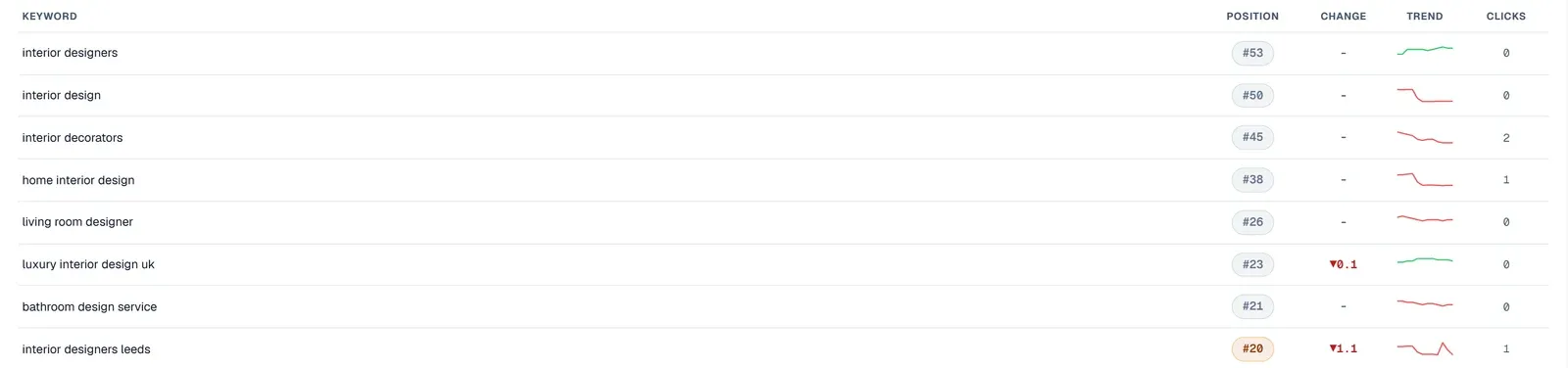
Planen Sie wöchentliche erneute Crawls ein, um die Gesundheit Ihrer Website zu überwachen und sicherzustellen, dass die Fixes halten. Nutzen Sie den Scan-Verlauf, um frühere Leistungswerte anzusehen und Verbesserungen zu bestätigen. Behalten Sie Ihre GSC-Leistungsberichte im Auge und verfolgen Sie mit der GSC-Integration von UtilitySEO täglich Keywords, Seiten, Positionen, Klicks und Impressionen. Das Rank-Tracking liefert tägliche Positionen und Sparklines und zeigt schnell weitere Schwankungen oder den Beginn der Erholung.
Denken Sie über die akuten Fixes hinaus an breitere Verbesserungen bei Content und Technik. Mit Content Opportunities finden Sie Seiten in Reichweite der ersten Plätze und Seiten mit niedriger CTR, die von Optimierung profitieren könnten. Der Internal Link Recommender schlägt genaue Formulierungen, Quellseiten und Ziele vor, um die Seitenarchitektur zu verbessern und Autorität zu verteilen. Bei Metadaten erstellt der Meta Generator Titel, Beschreibungen und Alt-Texte, und mit Bulk Meta Rewrite aktualisieren Sie viele Seiten effizient. So erholt sich Ihre Website nicht nur, sondern bekommt auch ein stärkeres Fundament für künftiges organisches Wachstum.
Fazit
Ein plötzlicher Ranking-Einbruch verlangt sofortige Aufmerksamkeit und eine klare Strategie. Wer sich auf die SEO-Triage zu Beginn konzentriert, häufige Ursachen systematisch prüft und Fixes priorisiert, kommt auch als kleines Unternehmen gut durch solche schwierigen Situationen. Mit Tools wie UtilitySEO erkennen Sie Probleme schnell und setzen Lösungen effizient um, sodass aus einem möglichen Desaster eine kontrollierte Erholung wird. Einen vollständigen Überblick über unsere Möglichkeiten finden Sie auf den Seiten Preise und Workflow.
Frequently asked questions
Wie bestätige ich einen plötzlichen Ranking-Einbruch auf meiner Website?
Um einen plötzlichen Ranking-Einbruch zu bestätigen, prüfen Sie zuerst den Leistungsbericht der Google Search Console und sehen nach, ob Impressionen und Klicks wirklich eingebrochen sind.
- Filtern Sie nach Datum, um aktuelle Daten mit früheren Zeiträumen zu vergleichen.
- Suchen Sie in Ihrer Analyseplattform nach einem entsprechenden Rückgang beim organischen Traffic.
- Prüfen Sie den Abdeckungsbericht der GSC auf neue Fehler oder Warnungen.
Welche technischen Probleme verursachen am häufigsten einen plötzlichen Ranking-Einbruch?
Zu den häufigsten technischen Ursachen eines plötzlichen Ranking-Einbruchs zählen falsch konfigurierte robots.txt-Dateien, versehentlich gesetzte Noindex-Tags, Website-Ausfälle und defekte Weiterleitungsketten.
- Prüfen Sie Ihre robots.txt und nutzen Sie das URL-Prüftool der GSC.
- Stellen Sie sicher, dass Ihr Server erreichbar ist und schnell antwortet.
- Kontrollieren Sie die Weiterleitungen bei kürzlichen Änderungen der URL-Struktur.
Wie prüfe ich schnell, ob eine manuelle Maßnahme von Google vorliegt?
Ob eine manuelle Maßnahme von Google vorliegt, sehen Sie schnell im Bereich „Sicherheit und manuelle Maßnahmen“ Ihres Google-Search-Console-Kontos.
- Dieser Bereich zeigt alle von Google verhängten manuellen Maßnahmen deutlich an.
- Eine manuelle Maßnahme ist ein direktes Signal für einen Verstoß.
- Beheben Sie gemeldete Probleme zügig, damit die Erholung gelingt.
Welche Rolle spielen Google-Algorithmus-Updates bei einem plötzlichen Ranking-Einbruch?
Google-Algorithmus-Updates können die Sichtbarkeit Ihrer Website stark beeinflussen und führen oft zu einem plötzlichen Ranking-Einbruch, wenn Ihre Website nicht mehr zu den neuen Ranking-Faktoren passt.
- Google spielt häufig Updates aus, manche mit großen Verschiebungen.
- Verfolgen Sie Ankündigungen von Google und SEO-Nachrichtenquellen.
- Prüfen Sie, ob kürzliche Content-Änderungen oder Qualitätsprobleme mit einem Update zusammenhängen.
Keep reading
See how your site actually scores
Free 30-second scan, real Google scores and a ranked fix list. No signup needed.
No credit card · Cancel anytime