
GA4-Integration: Wichtige SEO-Erkenntnisse und Analysen
Warum die GA4-Integration für SEO entscheidend ist, wie Sie ihre Erkenntnisse mit der Google Search Console kombinieren und wie UtilitySEO Ihren Analytics-Workflow vereinfacht.
Die Leistung Ihrer Website zu verstehen, ist die Grundlage jeder erfolgreichen SEO-Strategie. Mit dem Wechsel zu Google Analytics 4, kurz GA4, hat sich die Datenerfassung und -analyse grundlegend verändert. Die GA4-Integration ist damit für SEO-Profis zur Pflichtaufgabe geworden. Dieser Beitrag zeigt, warum GA4 unverzichtbar ist, wie seine Daten andere Tools wie die Google Search Console ergänzen und wie Sie mit seinen Erkenntnissen Ihre SEO-Arbeit deutlich verbessern. Wir gehen auf praktische Anwendungen ein, vom Verständnis des Nutzerverhaltens bis zum Finden wichtiger Wachstumschancen, damit Sie diese leistungsstarke Analytics-Plattform sicher nutzen.
Die Stärke von GA4 für SEO-Profis
GA4 verändert grundlegend, wie wir Nutzerinteraktionen erfassen und auswerten. Anders als der Vorgänger arbeitet GA4 ereignisbasiert und zeigt die Customer Journey über verschiedene Plattformen und Geräte hinweg detaillierter. Für SEO heißt das: ein besseres Verständnis, wie Nutzer mit Ihren Inhalten umgehen, nachdem sie aus der organischen Suche kommen. Mit dem Fokus auf Ereignisse wie Seitenaufrufe, Scrollen, Klicks und Conversions liefert GA4 tiefere Einblicke in Nutzerintention und Wirksamkeit von Inhalten. Eine solide GA4-Integration lässt Sie über reine Traffic-Zahlen hinausblicken und zeigt den wahren Wert Ihrer organischen Besucher.
Google Analytics 4 und Search Console: ein sich ergänzendes Duo
Beide, Google Analytics 4 und Google Search Console, sind wichtig, erfüllen aber unterschiedliche Zwecke und liefern sich ergänzende Daten. Die Google Search Console (GSC) zeigt, wie Nutzer Ihre Website in den Suchergebnissen finden: welche Suchanfragen sie verwenden, auf welchen Positionen Sie ranken und wie hoch die Klickraten sind. Sie ist unverzichtbar, um die Suchleistung zu verstehen und technische SEO-Probleme zu finden. GA4 dagegen zeigt, was Nutzer tun, nachdem sie auf Ihrer Website gelandet sind.
Wer die Daten aus Google Analytics 4 und Search Console zusammenführt, erhält ein ganzheitliches Bild. Die GSC zeigt zum Beispiel viele Impressionen für ein bestimmtes Keyword, aber wenige Klicks. GA4 kann dann offenlegen, ob Nutzer, die doch klicken, sich mit der Seite beschäftigen, konvertieren oder schnell wieder abspringen. Diese kombinierte Sicht ist entscheidend, um Sichtbarkeit und Nutzererfahrung gleichermaßen zu optimieren. Wer dieses Zusammenspiel versteht, kann die Google Search Console freischalten und seine Analysen voll ausschöpfen.
Erkenntnisse aus GA4-Berichten und Dashboards gewinnen
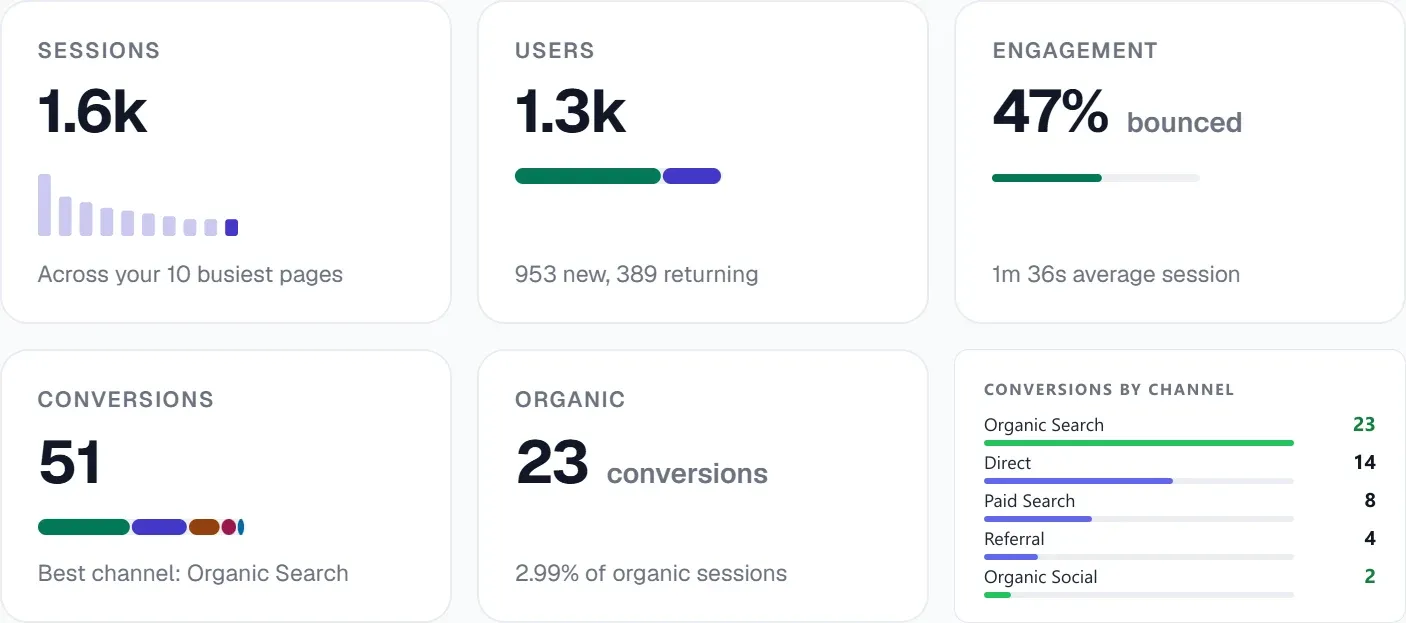
GA4 wirksam zu nutzen, hängt davon ab, wie sicher Sie sich in der Berichtsoberfläche bewegen und daraus aussagekräftige Erkenntnisse ziehen. Die Standard-GA4-Berichte liefern eine Fülle von Informationen, von demografischen Nutzerdaten und technischen Details bis zu Engagement- und Monetarisierungsdaten. Zu den wichtigsten Berichten für SEO gehören der Bericht zur Traffic-Akquisition, der zeigt, wie Nutzer auf Ihre Website kommen, und die Engagement-Berichte, die die Aktivität auf einzelnen Seiten aufschlüsseln.
Mit einem individuellen GA4-Dashboard bündeln Sie die wichtigsten SEO-Kennzahlen in einer übersichtlichen Ansicht. Sie können Trends beim organischen Traffic verfolgen, die stärksten Seiten aus der organischen Suche, Conversion-Raten für wichtige Ereignisse und Engagement-Kennzahlen wie die durchschnittliche Engagement-Zeit. Solche Dashboards zeigen schnell, wo Verbesserungsbedarf besteht, wie sich SEO-Änderungen auswirken, und helfen, Ergebnisse gegenüber Stakeholdern klar zu vermitteln. Für tiefere Analysen einzelner Seiten können Sie außerdem GSC-Filter nutzen, um Ihre Suchleistungsdaten zu segmentieren.
SEO verbessern mit der integrierten Analytics von UtilitySEO
UtilitySEO kennt die Herausforderungen und Chancen der GA4-Integration. Unsere Plattform bündelt Ihre wichtigsten SEO-Tools und gibt Ihnen einen umfassenden Blick auf die Leistung Ihrer Website. Mit unseren GA4-Analytics-Funktionen behalten Sie organischen Traffic, Sitzungen, Conversions und Top-Seiten direkt in Ihrem UtilitySEO-Dashboard im Blick. Außerdem gibt es ein Panel für aktive GA4-Nutzer, das in Echtzeit zeigt, wer sich gerade auf Ihrer Website befindet.
Neben GA4 bietet UtilitySEO ein leistungsstarkes Keyword-Tracking, das GSC-Daten für Rankings, Impressionen und Klicks nutzt, mit Aufschlüsselung nach Gerät und Land. Unser Tab „Seiten“ bindet GSC-Seitendaten ein und bietet URL-Prüfung, Indexierungsstatus und die Erkennung abweichender Canonicals. Sie können in der Plattform sogar GSC-Filter verwenden, um Ihre Analyse der Suchleistung zu verfeinern. Dieser einheitliche Ansatz, der GA4-Daten mit GSC und weiteren SEO-Tools verbindet, hilft Ihnen, datenbasierte Entscheidungen zu treffen, Ihren Workflow zu straffen und letztlich bessere SEO-Ergebnisse zu erzielen. Unsere Funktion KI-Insights kann auf Basis dieser integrierten Daten sogar automatisierte SEO-Empfehlungen geben.
Fazit
Die GA4-Integration zu beherrschen ist für SEO-Profis nicht mehr optional, sondern Pflicht. Wenn Sie das ereignisbasierte Modell verstehen, seine Erkenntnisse mit Daten der Google Search Console kombinieren und Berichte und Dashboards effektiv nutzen, verstehen Sie Ihre Zielgruppe besser und können Ihre digitale Strategie gezielt optimieren. UtilitySEO stellt die Werkzeuge bereit, um diesen Prozess zu vereinfachen: eine zentrale Plattform, auf der GA4-Analysen, GSC-Daten und weitere wichtige SEO-Funktionen zusammenlaufen. Entdecken Sie, wie UtilitySEO Ihren Ansatz bei der Analyse verändern und Ihre SEO-Arbeit schon heute voranbringen kann.
Frequently asked questions
Warum ist GA4 wichtig für SEO?
GA4 ist für SEO entscheidend, weil es ereignisbasiert und detailliert zeigt, wie sich Nutzer verhalten, nachdem sie aus der organischen Suche auf Ihre Website gekommen sind.
- Erfasst Nutzerinteraktionen wie Scrollen, Klicks und Conversions.
- Liefert tiefere Einblicke in Nutzerintention und Wirksamkeit von Inhalten.
- Zeigt den wahren Wert organischer Besucher.
- Unverzichtbar für eine moderne, datenbasierte SEO-Strategie.
Was ist der Unterschied zwischen GA4 und der Google Search Console?
GA4 zeigt, was Nutzer tun, *nachdem* sie auf Ihrer Website gelandet sind, während die Google Search Console (GSC) zeigt, wie Nutzer Ihre Website in den Suchergebnissen finden.
- Die GSC konzentriert sich auf Keywords, Rankings und Klickraten.
- GA4 erfasst Engagement, Conversions und Nutzerpfade auf der Website.
- Zusammen ergeben ihre Daten ein ganzheitliches Bild der Leistung.
- Beide sind wichtig, erfüllen aber sich ergänzende analytische Zwecke.
Wie nutze ich GA4-Berichte für SEO?
Mit GA4-Berichten verstehen Sie für SEO die Quellen des organischen Traffics, das Nutzer-Engagement und die Conversion-Pfade auf Ihrer Website.
- Der Bericht zur Traffic-Akquisition zeigt, wie Nutzer ankommen.
- Engagement-Berichte schlüsseln die Aktivität auf einzelnen Seiten auf.
- Erkennen Sie leistungsstarke Inhalte und Verbesserungspotenzial.
- Verfolgen Sie die Wirkung von SEO-Änderungen im Zeitverlauf.
Kann ich ein eigenes GA4-Dashboard für SEO erstellen?
Ja, mit einem individuellen GA4-Dashboard bündeln Sie die wichtigsten SEO-Kennzahlen in einer übersichtlichen Ansicht für schnelle Analysen.
- Verfolgen Sie Trends beim organischen Traffic und die stärksten Seiten.
- Behalten Sie Conversion-Raten für wichtige Ereignisse aus der organischen Suche im Blick.
- Erkennen Sie Verbesserungspotenzial und vermitteln Sie Ergebnisse klar.
- Sie sehen schnell, wie sich Ihre SEO-Arbeit auswirkt.
Keep reading
See how your site actually scores
Free 30-second scan, real Google scores and a ranked fix list. No signup needed.
No credit card · Cancel anytime