
Orphan-Page-Erkennung: Der Anchor-und-Target-Workflow
Orphan-Page-Erkennung mit einem Anchor-und-Target-Workflow: So verbessern Sie interne Verlinkung und PageRank-Verteilung.
Orphan Pages (verwaiste Seiten) sind Webseiten, auf die keine andere Seite derselben Website intern verlinkt. Suchmaschinen-Crawler und Nutzer finden sie deshalb über die normale Navigation kaum. Eine wirksame Orphan-Page-Erkennung ist entscheidend für eine gesunde Seitenstruktur, damit alle wertvollen Inhalte auffindbar sind und der PageRank sinnvoll verteilt wird. Wer diese isolierten Seiten anbindet, verbessert Crawlbarkeit, Indexierung und die Autorität der gesamten Website spürbar und damit auch die Sichtbarkeit in Suchmaschinen. Dieser Artikel zeigt einen Anchor-und-Target-Workflow, mit dem Sie diese versteckten Seiten finden und beheben.
Orphan Pages und ihre Auswirkungen verstehen
Eine Orphan Page existiert ohne jeden internen Link, der auf sie zeigt. Diese Isolation hat mehrere negative Folgen für die SEO. Erstens haben Suchmaschinen Mühe, solche Seiten zu finden und zu crawlen, sodass wertvolle Inhalte unter Umständen nicht im Index landen. Das wirkt sich direkt darauf aus, ob eine Seite für relevante Suchanfragen ranken kann. Zweitens erhalten Orphan Pages keinerlei interne Link-Power, was ihren PageRank-Fluss bremst. Das kann ihre Autorität und ihr Ranking-Potenzial schwächen. Drittens sind diese Seiten über die normale Navigation oft nicht erreichbar, was zu einer schlechten Nutzerführung und verpassten Chancen auf Interaktion führt.
Ein Beispiel: Eine alte Produktseite in einem Onlineshop, die von keiner Kategorieseite mehr verlinkt wird, oder ein Blogbeitrag, der nie in einen Content-Hub eingebunden wurde, kann zur Orphan Page werden. Diese Seiten zu erkennen ist der erste Schritt, um solche Probleme zu beheben und die Struktur der Website zu verbessern.
Der Anchor-und-Target-Workflow zur Erkennung
Beim Anchor-und-Target-Workflow für die Orphan-Page-Erkennung werden alle bekannten URLs einer Website systematisch mit den URLs verglichen, die über interne Verlinkung gefunden werden. So erkennen Sie Seiten, die auf dem Server oder in Sitemaps vorhanden sind, aber keinen einzigen eingehenden internen Link haben.
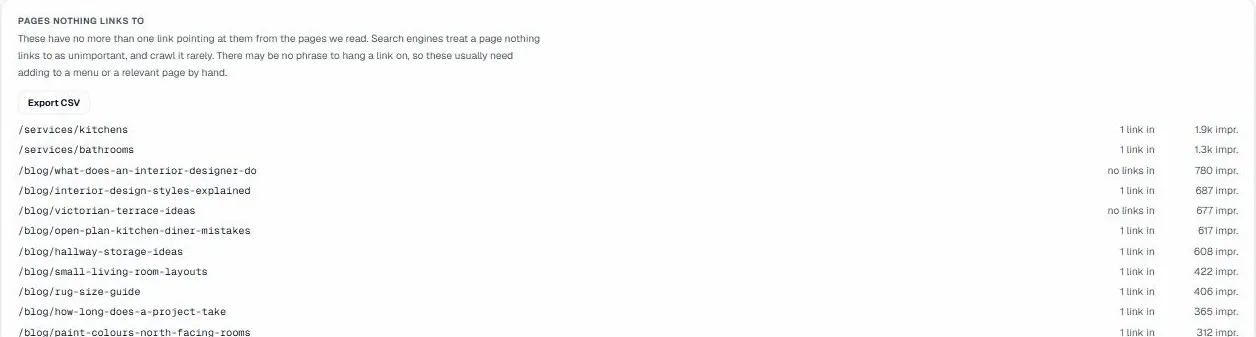
Erstellen Sie zunächst eine umfassende Liste aller URLs Ihrer Website. Das gelingt mit einem Crawl Ihrer Seite, durch die Auswertung von XML-Sitemaps und mit dem Bericht „Seiten“ der Google Search Console. Ermitteln Sie anschließend alle URLs, auf die intern tatsächlich verlinkt wird. Dafür braucht es einen gründlichen Crawl, der jeden internen Link erfasst und dabei Quellseite (Anchor) und Zielseite (Target) festhält.
Wenn Sie beide Listen abgleichen, ist jede URL, die in der Gesamtliste steht, aber nicht unter den intern verlinkten Zielen auftaucht, eine Orphan Page. Dieser methodische Vergleich zeigt klar, welche Seiten faktisch vom Rest Ihrer Seitenstruktur abgeschnitten sind.
Orphan Pages priorisieren und beheben
Nicht alle Orphan Pages sind gleich wichtig. Gerade bei großen Websites ist es entscheidend, zu priorisieren, welche Sie zuerst angehen. Prüfen Sie zunächst den potenziellen Wert jeder Seite. Hohes Traffic-Potenzial, hochwertige Inhalte oder strategische Bedeutung sollten eine Seite für die sofortige Bearbeitung markieren. Ein Onlineshop priorisiert zum Beispiel verwaiste Produktseiten mit Keywords mit hohem Suchvolumen, eine Nachrichtenseite eher aktuelle, nicht verlinkte Artikel.
Sobald die Prioritäten stehen, besteht die wichtigste Lösung darin, eine kontextbezogene interne Verlinkung aufzubauen. Dazu suchen Sie passende bestehende Seiten Ihrer Website, von denen aus Sie mit geeignetem Ankertext auf die Orphan Page verlinken. Ziel ist es, die Seite natürlich in das Content-Gefüge Ihrer Website einzubinden. Denken Sie an Seiten im selben Themencluster oder an solche, die weiterführende Informationen bieten.
Für Seiten mit niedrigerer Priorität oder solche, die absichtlich verwaist sind (zum Beispiel bestimmte Kampagnen-Landingpages, die nicht öffentlich auffindbar sein sollen, oder sehr alte Inhalte mit geringem Wert), kommen andere Strategien infrage. Dazu gehört ein noindex-Tag, um die Indexierung zu verhindern, oder sogar eine Weiterleitung auf eine passendere Seite, wenn der Inhalt veraltet ist. Entscheidend ist, für jede verwaiste URL eine bewusste Entscheidung zu treffen.
Die Rolle von UtilitySEO bei Erkennung und Management von Orphan Pages
UtilitySEO bietet gezielte Werkzeuge, die die Orphan-Page-Erkennung vereinfachen und die Behebung unterstützen. Der umfassende Full-Site-Crawl erfasst bis zu 1.000 Seiten pro Projekt und bildet so die gesamte Struktur Ihrer Website ab. Während dieses Crawls führt UtilitySEO die Orphan-Page-Erkennung durch und findet Seiten, auf die keine internen Links zeigen.
Sobald diese identifiziert sind, schlägt der Interne-Links-Empfehler von UtilitySEO die genaue Formulierung, die Quellseite und das Ziel für neue interne Links vor. Diese Funktion ist Gold wert für kontextbezogene interne Verlinkung, denn sie sorgt dafür, dass neu verlinkte Seiten einen passenden Ankertext erhalten. Bei Websites mit vielen Orphan Pages spart diese automatische Empfehlung viel Zeit und Aufwand bei der Suche nach den besten Verlinkungsmöglichkeiten.
Außerdem liefern der Site-Health-Wert von UtilitySEO und die zugehörigen Berichte eine klare Aufschlüsselung nach Fehlern, Warnungen und Hinweisen, einschließlich Problemen mit Orphan Pages. So behalten Sie den Verlauf der Website-Gesundheit im Blick und verfolgen, wie Sie diese Probleme abarbeiten. Mit geplanten wöchentlichen erneuten Crawls und dem Crawl-Vergleich überwachen Sie dauerhaft, ob neue Orphan Pages entstehen, und prüfen, ob Korrekturen erfolgreich umgesetzt wurden. So bleibt Ihre interne Verlinkung stabil. Dieser integrierte Ansatz unterstützt starke Empfehlungen für interne Links und ein wirksames PageRank-Sculpting.
Fortgeschrittene Strategien und Vorbeugung
Über die reine Erkennung hinaus zielen fortgeschrittene Strategien darauf ab, Orphan Pages gar nicht erst entstehen zu lassen. Bei dynamischen Websites oder solchen mit häufigen Inhaltsänderungen ist es wichtig, Prüfungen der internen Verlinkung in den Veröffentlichungsprozess einzubauen. Zum Beispiel können Sie vorschreiben, dass neue Inhalte vor der Veröffentlichung mindestens einen internen Link erhalten.
Betrachten Sie, wie unterschiedliche Website-Typen ihre interne Verlinkung handhaben. Ein umfangreicher Onlineshop verlässt sich zum Beispiel stark auf automatisierte Kategorie- und Produktverlinkung, sodass fehlende Links leichter auffallen. Ein Blog dagegen braucht oft mehr Handarbeit, um kontextbezogene interne Verlinkung in den Artikeln aufzubauen.
Für absichtlich verwaiste Seiten stellen Sie sicher, dass sie korrekt mit noindex-Anweisungen versehen oder nicht in Sitemaps enthalten sind, damit Suchmaschinen kein Crawl-Budget für sie verschwenden. Auch eine regelmäßige Prüfung Ihrer Inhalte auf Relevanz und die Aktualisierung interner Links, wenn sich Inhalte weiterentwickeln, beugt vor, dass Seiten mit der Zeit verwaisen. Werkzeuge wie die Crawl-Tiefen-Analyse zeigen außerdem Seiten, die zu viele Klicks von der Startseite entfernt sind. Das deutet auf Verlinkungsschwächen hin, die zum Orphan-Status führen können.
Fazit
Eine wirksame Orphan-Page-Erkennung gehört zu jeder umfassenden SEO. Mit einem systematischen Anchor-und-Target-Workflow finden Website-Betreiber isolierte Inhalte und binden sie wieder in die Seitenstruktur ein. UtilitySEO vereinfacht diesen Prozess mit eigenen Funktionen für Orphan-Page-Erkennung und Empfehlungen für interne Links. So setzen Sie starke interne Verlinkungsempfehlungen um und verbessern die SEO-Gesundheit Ihrer Website insgesamt. Wer Orphan Pages regelmäßig angeht, profitiert von besserer Crawlbarkeit, einer besseren PageRank-Verteilung und einer überlegenen Nutzererfahrung.
Frequently asked questions
Was ist Orphan-Page-Erkennung?
Orphan-Page-Erkennung ist der Prozess, Webseiten einer Website zu identifizieren, auf die keine internen Links zeigen und die deshalb für Suchmaschinen und Nutzer schwer zu entdecken sind.
- Sie verbessert Crawlbarkeit und Indexierung.
- Sie stellt sicher, dass alle wertvollen Inhalte auffindbar sind.
- Sie optimiert die PageRank-Verteilung auf Ihrer Website.
Wie finde ich Orphan Pages auf meiner Website?
Orphan Pages finden Sie mit einem Anchor-und-Target-Workflow: Sie vergleichen eine umfassende Liste aller URLs der Website mit denen, auf die intern aktiv verlinkt wird.
- Tragen Sie alle bekannten URLs aus Crawls, Sitemaps und der Search Console zusammen.
- Ermitteln Sie alle URLs, die interne Links erhalten.
- Gleichen Sie die Listen ab, um nicht verlinkte Seiten zu finden.
Warum sind Orphan Pages schlecht für die SEO?
Orphan Pages sind schlecht für die SEO, weil Suchmaschinen sie nur schwer finden und crawlen, was Indexierung, PageRank-Fluss und Ranking-Potenzial beeinträchtigt.
- Sie erhalten keine interne Link-Power.
- Sie schwächen die Autorität einer Seite.
- Sie beeinträchtigen die Nutzererfahrung, weil sie nicht erreichbar sind.
Können Orphan Pages in Google trotzdem ranken?
Orphan Pages können zwar ranken, aber es ist deutlich schwieriger, weil Suchmaschinen sie ohne interne Links nur schwer entdecken und crawlen.
- Sie bleiben oft unindexiert.
- Ihnen fehlt PageRank für die Autorität.
- Nutzer kommen kaum auf diese Seiten.
Wie behebe ich eine erkannte Orphan Page?
Um eine erkannte Orphan Page zu beheben, bauen Sie kontextbezogene interne Links von passenden bestehenden Seiten Ihrer Website auf und verwenden dabei geeigneten Ankertext.
- Priorisieren Sie Seiten nach ihrem potenziellen Wert.
- Suchen Sie verwandte Inhalte, von denen aus Sie verlinken.
- Binden Sie die Seite natürlich in die Struktur Ihrer Website ein.
Keep reading
See how your site actually scores
Free 30-second scan, real Google scores and a ranked fix list. No signup needed.
No credit card · Cancel anytime