

SEO
GA4 for SEO
Learn what every SEO should know about GA4 for SEO, including its key benefits, synergy with Search Console, and practical dashboard insights.
Understanding GA4's Value for SEO
GA4 provides a comprehensive, event driven view of user interactions, moving beyond traditional page views to focus on engagement. For SEO, this means gaining a richer understanding of how users interact with your content after arriving from search engines. You can track specific events like scrolls, clicks on outbound links, video engagement, and file downloads, all of which paint a more accurate picture of user intent and content effectiveness. Analysing organic traffic within GA4 allows you to see not just how many users land on your site, but what they do once they are there. This includes identifying top performing pages, understanding conversion paths, and spotting areas where users might be dropping off, all vital for refining your SEO strategy.
Bridging the Gap: GA4 and Search Console Synergy
While both Google Analytics 4 and Google Search Console are indispensable for SEO, they offer distinct yet complementary perspectives. The discussion around google analytics 4 vs search console often misses the point that they are designed to work together. Search Console provides data on how users find your site, including keywords, impressions, clicks, and technical health issues. It answers "how do users get here?" GA4, on the other hand, tells you "what do users do once they are here?" By combining insights from both, you gain a holistic view of your organic performance. For instance, you can identify google search console patterns in queries that lead to high engagement in GA4, or conversely, pinpoint pages with high impressions in GSC but low engagement in GA4, indicating a need for content optimisation. Regular review of search console reports alongside GA4 data empowers SEOs to make truly data driven decisions. You can learn more about optimising your use of Search Console by reading our guide on Unlock Google Search Console.
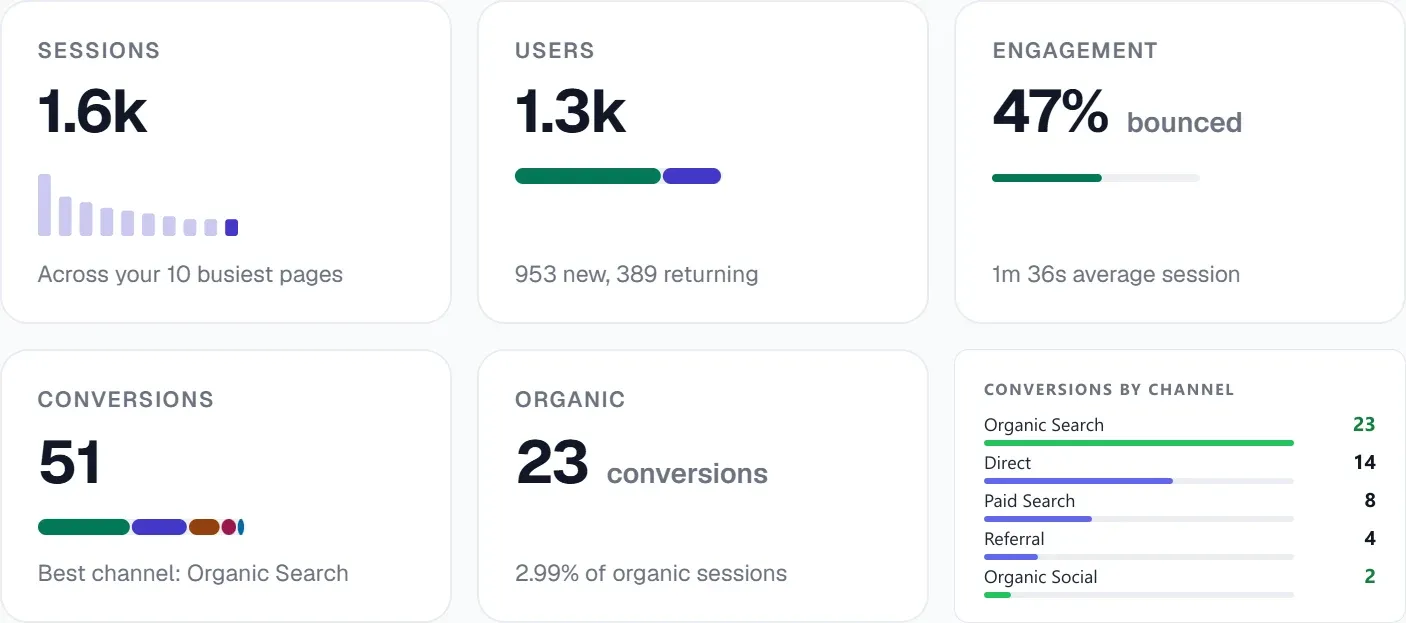 The GA4 view shows sessions, users and conversions, with conversions broken down by channel.
Practical SEO Insights from Your GA4 Dashboard
Navigating the ga4 dashboard can unlock powerful insights for SEO professionals. Focus on reports that highlight user engagement and conversion from organic channels. The "Engagement" and "Monetisation" sections are particularly valuable. By segmenting your audience to show only organic traffic, you can analyse metrics such as engaged sessions, average engagement time, and event counts for specific actions. For example, if you notice a particular blog post attracting significant organic traffic but low scroll depth or conversion events, it might indicate a mismatch between search intent and content delivery. Similarly, identifying top performing organic landing pages and analysing their user journeys can reveal patterns to replicate across other content. This granular data helps you to refine content strategies, improve calls to action, and enhance overall user experience, directly contributing to better SEO outcomes.
Enhancing GA4 SEO with UtilitySEO
Integrating your GA4 data with a comprehensive SEO platform like UtilitySEO streamlines your workflow and amplifies your insights. UtilitySEO provides dedicated GA4 analytics features, offering a clear view of your organic traffic, sessions, conversions, and top pages directly within your project dashboard. This centralisation means you are not constantly switching between tools. Our real time panel for GA4 active users allows you to see the immediate impact of your SEO efforts or content updates.
Beyond GA4, UtilitySEO complements these analytics with robust Search Console integration. Our keyword tracking feature, powered by GSC, shows your rankings, impressions, and clicks, allowing you to correlate keyword performance with on site behaviour. The Pages tab presents GSC page performance, including URL inspection and index status, while the Trends tab visualises search performance over time. When GA4 reveals a page underperforming, you can use UtilitySEO's single URL scan or full site scan to identify technical SEO issues. The SEO results dashboard then provides actionable fixes. Furthermore, UtilitySEO's AI Insights can offer automated SEO recommendations based on your combined data, and the Meta Generator can help create optimised title tags and meta descriptions to improve click through rates from search results, directly impacting the traffic seen in GA4. This integrated approach allows you to move seamlessly from data analysis to actionable optimisation, ensuring your SEO strategy is always data driven and effective.
Conclusion
The evolution to GA4 presents a powerful opportunity for SEO professionals to gain deeper, more actionable insights into user behaviour. By understanding and leveraging ga4 for seo, combined with the robust data from Google Search Console, you can build a more resilient and effective organic strategy. Tools like UtilitySEO further empower this process by centralising your analytics and SEO data, providing a unified platform for analysis, issue identification, and implementation of optimisations. Embrace GA4, integrate your data sources, and propel your website to new heights of organic visibility and performance. Discover how UtilitySEO can transform your SEO workflow by exploring our workflow.
Questions fréquentes
GA4 for SEO is crucial because it provides a deeper, event-driven understanding of user behavior after they arrive from search engines.
- It moves beyond simple page views.
- Tracks engagement like scrolls and video plays.
- Helps refine content strategies effectively.
- Improves overall website performance.
GA4 for SEO offers detailed insights into user engagement by tracking specific interactions users have with your content after arriving organically.
- Monitors scrolls and outbound link clicks.
- Records video engagement and file downloads.
- Reveals what users do beyond just landing on a page.
- Identifies content effectiveness for better optimization.
The synergy between GA4 and Google Search Console for SEO provides a holistic view, combining how users find your site with what they do on it.
- Search Console shows search queries and impressions.
- GA4 reveals post-click user behavior and engagement.
- Together, they identify high-performing content opportunities.
- Helps pinpoint pages needing content optimization.
For GA4 for SEO analysis, focus on the "Engagement" and "Monetisation" sections within your dashboard, especially for organic traffic.
- Segment data to show only organic users.
- Analyze metrics like engaged sessions.
- Review average engagement time.
- Track event counts for specific user actions.
Sachez quoi corriger ensuite.
Analysez votre site pour savoir clairement par où commencer.
Environ 30 secondes. Sans carte bancaire.