

Comparisons
Google Analytics 4 vs Search Console: A Deep Dive for SEO Data
Unpack the distinct yet complementary functionalities of Google Analytics 4 and Search Console for robust SEO data analysis and website optimisation.
Understanding the distinct roles of two primary website performance platforms is crucial before deciding which numbers to trust for which question.
UtilitySEO
UtilitySEO empowers businesses to master their online presence, providing unified insights that transform raw data into actionable strategies. Our platform seamlessly integrates your essential SEO and analytics tools, offering a crystal clear view of your performance and growth opportunities. Gain unparalleled control over your digital marketing efforts with our comprehensive suite of features.
* Keyword tracking: GSC powered rankings, impressions, clicks with grouping
* Keyword groups: inline rename, move keywords between groups
*Device and country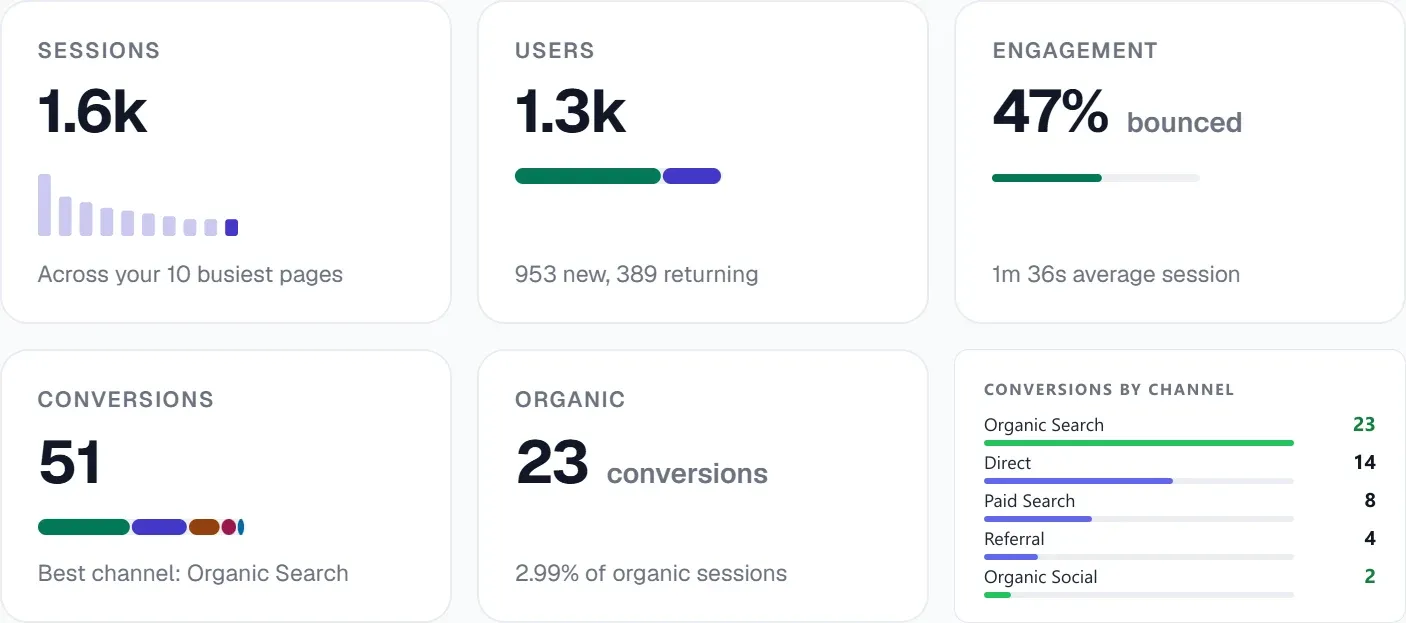 The GA4 view shows sessions, users and conversions, with conversions broken down by channel.
Google Analytics 4
Google Analytics 4 operates on an event driven data model, fundamentally shifting from its predecessor's session centric paradigm to a user and event focused methodology. This architectural change facilitates comprehensive cross platform data unification, enabling a more granular understanding of user journeys across disparate touchpoints. Its predictive capabilities leverage machine learning to forecast user behaviour such as churn probability and purchase intent, providing a proactive dimension to analytics. The data stream concept consolidates web and app data, presenting a unified view of engagement, whilst its integration with BigQuery allows for advanced data warehousing and bespoke querying beyond the standard reporting interface.
Search Console
Search Console provides proprietary data directly from Google’s search index, offering critical insights into a website's organic search performance and technical health. It delineates impression volume, click through rates, and average position for specific query sets, enabling granular keyword performance analysis. The platform furnishes comprehensive diagnostic reports on indexing status, crawl errors, mobile usability, and structured data implementation, directly impacting a site’s visibility within the SERPs. Its core functionality is geared towards identifying and rectifying technical SEO impediments, ensuring optimal discoverability and adherence to Google’s webmaster guidelines, thereby acting as a primary conduit for site owners to interface with Google's indexing infrastructure.
These distinct platforms, whilst often perceived as disparate, offer complementary data sets crucial for a holistic digital strategy. Google Analytics 4 elucidates user behaviour post click, providing deep engagement metrics, whereas Search Console illuminates pre click organic search performance and technical indexing status. Leveraging both tools concurrently enables a comprehensive understanding of user acquisition, onsite interaction, and overall search engine visibility, driving informed optimisation decisions. Maximizing Ga4 for SEO: A Comprehensive Guide to Data-Driven Insights and Unlocking Insights: A Deep Dive into GA4 Reports and Their Impact on SEO Strategies offer further exploration into leveraging these powerful analytics frameworks.
Questions fréquentes
The primary distinction in **GA4 vs** Search Console lies in their data focus: GA4 tracks post-click user behavior, while Search Console monitors pre-click organic search performance.
- GA4 uses an event-driven model to understand user interactions on your site.
- Search Console provides data on how your site appears in Google search results.
- One focuses on user engagement, the other on search visibility and technical health.
When considering **GA4 vs** Search Console for SEO, GA4 offers insights into user engagement and conversion paths post-click, complementing Search Console's pre-click data.
- GA4 reveals which content keeps users engaged and leads to conversions.
- It helps optimize user journeys and improve on-site experience.
- Search Console focuses more on keyword rankings, impressions, and technical SEO issues.
Yes, integrating both **GA4 vs** Search Console provides a comprehensive view of your website's performance, from organic search acquisition to on-site user behavior.
- Search Console shows how users find your site through Google.
- GA4 then tracks what those users do once they land on your pages.
- Combining data helps optimize both visibility and user experience for SEO.
Understanding the nuances of **GA4 vs** Search Console reveals that GA4 provides detailed event-driven data on user engagement, conversions, and cross-platform journeys.
- GA4 tracks specific user actions like scrolls, video plays, and downloads.
- It offers predictive metrics, such as churn probability and purchase intent.
- Search Console primarily focuses on search queries, impressions, clicks, and indexing status.
For assessing your website's technical SEO health, Search Console is superior in the **GA4 vs** comparison, offering proprietary data directly from Google’s index.
- Search Console provides comprehensive reports on indexing status and crawl errors.
- It identifies mobile usability issues and structured data problems.
- GA4 focuses on user behavior metrics rather than technical site diagnostics.
Sachez quoi corriger ensuite.
Analysez votre site pour savoir clairement par où commencer.
Environ 30 secondes. Sans carte bancaire.