

SEO
Top 10 Keyword Tracking Tools and Platforms
Effective keyword tracking requires a strategic approach that focuses on business outcomes rather than rankings alone.
Keyword tracking is essential for measuring online performance. This blog explores the importance of moving beyond vanity metrics to focus on business outcomes. By tracking keywords strategically, businesses can avoid common pitfalls and focus on what drives revenue, ultimately informing data driven decisions to boost online visibility and sales.
UtilitySEO
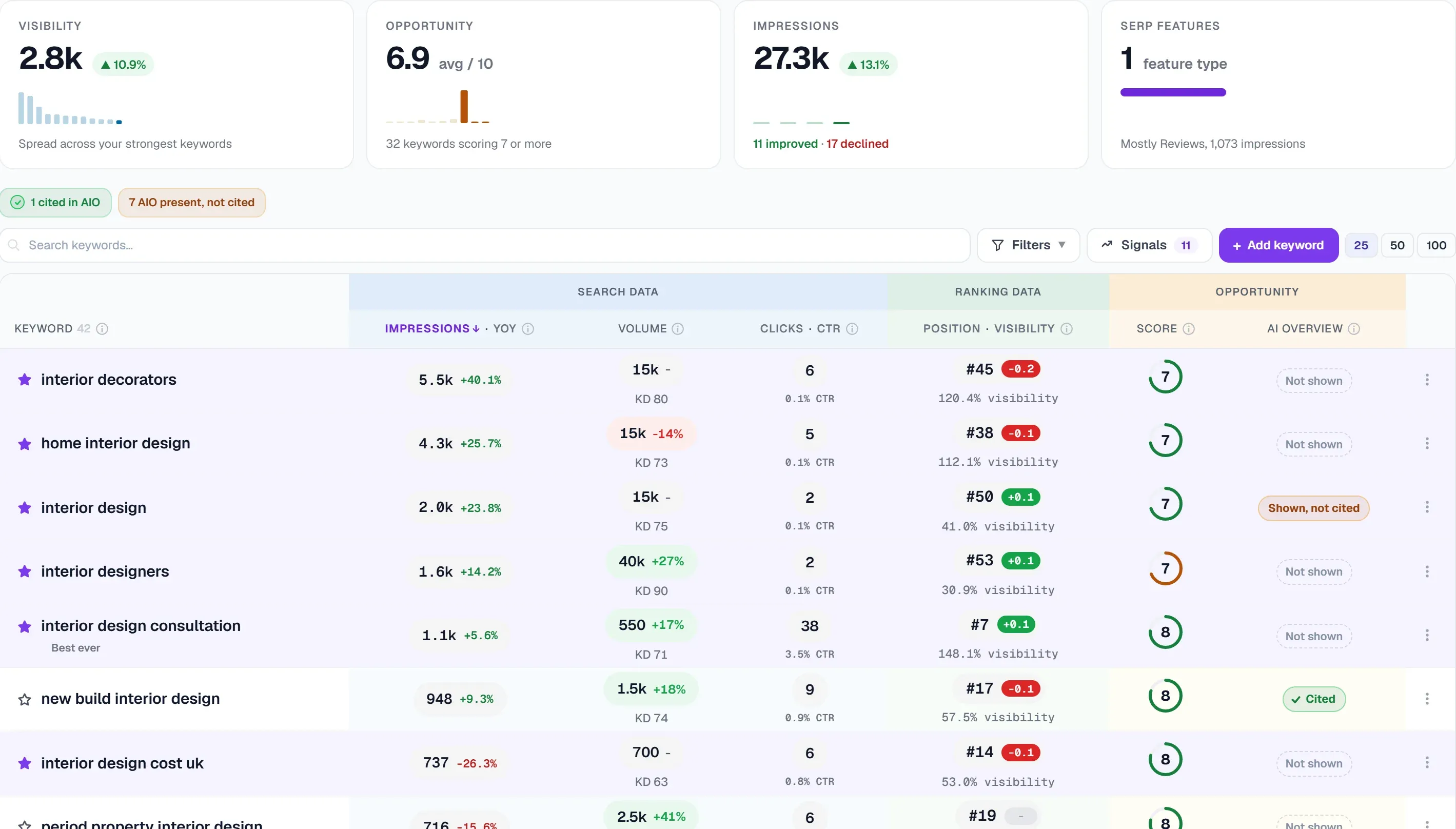
UtilitySEO offers a comprehensive set of tools to help businesses improve their online presence, with its advanced features enabling users to make data-driven decisions and drive more traffic to their websites. By utilising UtilitySEO, users can gain a deeper understanding of their website's performance and identify areas for improvement, ultimately leading to increased conversions and revenue. With its robust set of features, UtilitySEO provides users with the insights they need to stay ahead of the competition and achieve their online goals.
* Single URL scan: provides a deep PageSpeed and SEO audit, with dual-pass averaging for accurate results, allowing users to identify and fix issues on individual pages
* Keyword tracking: uses GSC-powered rankings, impressions, and clicks with grouping, enabling users to monitor their keyword performance and make informed decisions
* Device and country breakdown: offers a per-keyword split by device and country, giving users valuable insights into how their content is performing across different regions and devices
* SEO results dashboard: provides a score, issues, fixes, category filters, and lightbulb tips, making it easy for users to track their progress and identify areas for improvement
* Trends tab: displays search performance over time, allowing users to monitor their progress and make data-driven decisions to improve their online presence
* GA4 analytics: provides organic traffic, sessions, conversions, and top pages, giving users a comprehensive understanding of their website's performance and helping them to identify opportunities for growth
* Keyword explorer: is a seed keyword research tool, enabling users to find new keywords and topics to target, and expand their online reach.
SEMrush
Semrush's SEO and Starter plans do not list historical SEO data, which its pricing page includes only from the Pro+ plan upwards. Semrush's Starter plan adds AI visibility tracking, with 50 prompts tracked daily and 300 AI visibility reports per day alongside its SEO tools.
Ahrefs
Ahrefs describes its Standard plan as aimed at freelance SEOs and marketing consultants, and its Advanced plan as aimed at lean in-house marketing teams. Ahrefs Site Audit allows up to 25,000 pages per project even on its Lite plan, whereas UtilitySEO's full-site crawl covers up to 10,000 pages per crawl (depending on plan).
Moz
Moz Pro's Standard plan allows 100,000 pages crawled per week, whereas UtilitySEO's full-site crawl covers up to 10,000 pages per crawl (depending on plan). Moz's help documentation says on-demand site recrawls require a Medium Moz Pro plan or above, with scheduled crawls otherwise running once a week.
Screaming Frog
Screaming Frog SEO Spider is built for running technical SEO crawls on your own computer, where a paid licence's crawl size depends on the machine's allocated memory and storage. Screaming Frog SEO Spider's documentation lists JavaScript rendering, Google Search Console integration, Google Analytics integration and scheduling among the advanced features that require a paid licence.
Google Search Console
Google Search Console offers a basic level of keyword tracking, providing insights into search queries and impressions, however its data is limited to Google search only, neglecting other search engines and potential revenue streams.
Sitebulb
Sitebulb Pro adds audit comparisons, scheduled audits, advanced configuration and customised PDF reports on top of the features in the Sitebulb Lite plan. Sitebulb Cloud supports crawls of up to 10 million URLs per audit, with no project limits and automated recurring crawls, according to Sitebulb.
Mangools
Mangools lists API and MCP access as included on its Basic, Premium and Agency plans. Mangools free plan is limited in KWFinder to 5 lookups per 24 hours, with 15 related and 5 competitor keywords per lookup.
SE Ranking
SE Ranking's backlink checker can compare a backlink profile against up to five competitors and helps users build a list of bad links to disavow. SE Ranking positions its Growth plan for automation and collaboration across multi-client SEO and GEO work, with 30 projects and three manager seats.
Serpstat
Serpstat's Individual plan does not include JavaScript rendering in Site Audit and caps each scan at a maximum of 5,000 pages. Serpstat's free 7-day trial requires a credit card for verification, and the plan renews automatically after seven days unless it is cancelled.
Ubersuggest
Ubersuggest Enterprise plan lists site audits of up to 10,000 pages per report, with weekly crawling, across up to 15 projects. Ubersuggest Enterprise lists site audits of up to 10,000 pages per report, whereas a UtilitySEO full-site crawl covers up to 10,000 pages per crawl (depending on plan).
Rank Math
Rank Math's WordPress.org listing says a post can be optimised for multiple focus keywords, 5 by default, entered in the WordPress post editor. Rank Math Content AI features require a connected Rank Math account and draw on usage credits, according to its WordPress.org external services disclosure.
Woorank
WooRank Pro plan covers one website and 50 tracked keywords, and lets users compare a site against 3 competitors. WooRank describes its Premium plan as for professionals, teams and agencies working on multiple websites, and its Enterprise plan as for agencies and enterprises.
Seobility
Seobility's free Basic plan covers one website project and tracks 10 keywords, according to Seobility's pricing page. Seobility offers a free Basic plan for one website project and paid Premium, Professional and Agency plans covering three, seven and twenty website projects respectively.
Majestic
Majestic's Lite plan includes the Fresh Index only, with Historic Index access, raw data exports and custom reports reserved for Pro and above. Majestic describes its Pro plan as for agencies, domain traders and SEO consultants who need to query its Fresh and Historic Index at higher volume.
Raven Tools
In conclusion, effective keyword tracking requires a strategic approach that focuses on business outcomes rather than rankings alone. By avoiding common pitfalls and tracking only what actually drives revenue, businesses can make informed decisions and improve their online presence.
Further reading
Frequently asked questions
Keyword tracking is essential for measuring online performance.
- Improves website visibility
- Boosts online sales
- Drives data-driven decisions
Effective keyword tracking requires a strategic approach focusing on business outcomes.
- Uses advanced tools
- Avoids vanity metrics
- Monitors revenue-driven goals
Keyword tracking tools like UtilitySEO enable users to make data-driven SEO decisions.
- Improves website rankings
- Increases conversions
- Enhances online presence
Keyword tracking is worth it for businesses to inform data-driven decisions.
- Drives revenue growth
- Enhances online visibility
- Optimizes marketing strategies
Keyword tracking provides valuable insights into online performance and revenue growth.
- Identifies areas for improvement
- Monitors competitor analysis
- Informes business-oriented objectives
Know what to fix next.
Scan your site for a clearer place to start.
About 30 seconds. No card needed.