

SEO
Top 10 Internal Linking Audit Tools and Platforms
Compare leading SEO audit tools for internal linking analysis. Detailed assessment of Screaming Frog, Ahrefs, Google Search Console, Sitebulb and Moz...
An internal linking audit is essential for maximising your website's SEO performance and user experience. Rather than simply reviewing basic technical metrics, a robust audit framework should integrate user behaviour analytics such as click-through rates, navigation paths and engagement data. By combining traditional SEO indicators with real user interaction patterns, you can identify which internal links truly drive value and which represent missed opportunities. This data-driven approach ensures your internal linking strategy aligns with both search engine requirements and actual visitor needs, ultimately improving rankings and conversions.
UtilitySEO
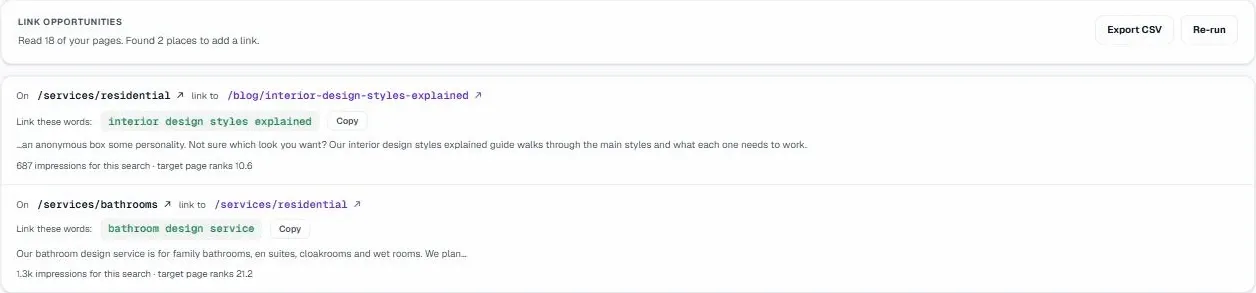
UtilitySEO transforms internal linking audits from manual spreadsheet exercises into data-driven intelligence. By combining technical site crawling with real user behaviour from Google Analytics and Search Console performance data, you can identify which internal links actually drive traffic and conversions-not just which ones technically exist. This integrated approach reveals the gap between SEO theory and what your audience actually clicks, enabling you to prioritise internal linking changes that deliver measurable ROI.
- Full site scan: Crawls up to 10,000 pages (depending on plan) via sitemap and internal links to map your complete linking architecture, identifying orphaned pages, excessive link depth, and dead-end content that receives no internal link equity-all processed server-side for comprehensive analysis.
- Pages tab: GSC page performance with URL inspection reveals which pages rank but receive minimal internal link support, showing you exactly where strategic internal links could capitalise on existing authority and which high-value URLs are buried too deep in your site structure.
- GA4 analytics: Organic traffic, sessions, conversions, and top pages data integrated with your internal linking audit exposes the performance gap-pages with strong internal linking but poor user engagement versus hidden gems with high conversion rates that deserve more internal visibility.
- Site audit: Technical SEO audit with issue categorisation flags redirect chains, broken internal links, and nofollow attributes that leak link equity, providing the technical foundation for an internal linking strategy that actually passes authority effectively.
- Backlinks and crawl: Site crawl and backlink analysis identifies your most authoritative pages (those with external backlinks) so you can audit whether you're internally linking from these high-authority hubs to your commercial and conversion pages, maximising the distribution of earned link equity.
- Keyword tracking: GSC-powered rankings, impressions, and clicks with grouping allows you to measure the before-and-after impact of internal linking changes on specific keyword groups, quantifying the ROI of your audit rather than hoping structural changes eventually improve rankings.
- Progress dashboard: Milestones, streaks, and fix rate by priority transforms your internal linking audit into an actionable roadmap, tracking which technical issues you've resolved and measuring your improvement velocity over time rather than treating audits as one-off exercises.
Competitor Tools for Internal Linking Audits
Screaming Frog
The software generates tabular exports of anchor text distribution, link equity flow calculations, and orphaned URL identification through its PageRank algorithm simulation. Users must interpret raw crawl data manually to assess link graph efficiency, requiring familiarity with regex filtering for anchor text taxonomy and custom extraction for identifying underlinked conversion pathways. The tool lacks native integration with analytics platforms for correlating internal link performance against user navigation patterns or engagement metrics, necessitating external data pipelines for behavioural overlay analysis. Crawl speed limitations on larger inventories can extend audit completion timelines significantly.
Ahrefs
The platform surfaces orphaned pages and quantifies inlink counts per URL whilst flagging nofollow attributes that interrupt authority flow through site architecture. Link intersection analysis requires navigation across multiple report interfaces without unified dashboards for cross-referencing technical link issues against actual user traversal data from analytics systems. The toolset emphasises backlink profile metrics over granular internal linking optimisation, with limited functionality for establishing industry-specific benchmark comparisons or measuring incremental ranking impacts attributable to internal link modifications deployed post-audit.
Google Search Console
Google Search Console provides URL inspection functionality and coverage reporting that indirectly surfaces internal linking deficiencies through crawl accessibility diagnostics and indexation status indicators. The Index Coverage report identifies pages Google cannot discover due to insufficient internal link pathways, whilst the Links report quantifies top linked pages and anchor text distribution from Google's perspective. The platform lacks proactive internal link opportunity identification, requiring manual cross-analysis with sitemaps to detect orphaned content or suboptimal crawl depth configurations. Real-time data latency spans several days, preventing immediate validation of internal linking structure changes, and the interface provides no quantitative benchmarking against comparable site types or link velocity tracking for temporal strategy adjustments.
Sitebulb
The audit engine calculates link score distributions, identifies navigation depth anomalies, and segments anchor text patterns through predefined hint classifications that flag over-optimisation or relevance mismatches. Internal PageRank calculations model theoretical equity flow without correlating against actual organic performance data or conversion funnel progression metrics. The software requires local processing resources that constrain crawl capacity on enterprise-scale inventories, and lacks integrated user behaviour overlays from heat mapping or session recording platforms to validate whether SEO-optimal link placements align with genuine navigation preferences that drive commercial outcomes.
Moz
The Link Explorer database quantifies internal linking patterns alongside domain authority calculations, though its primary orientation towards competitive backlink analysis limits depth in internal structure optimisation workflows. Crawl scheduling operates on fixed intervals without adaptive frequency recommendations based on content publication velocity or structural modification cadence. The platform provides limited granularity for measuring attribution of ranking improvements to specific internal linking interventions, requiring external experimentation frameworks to establish causality between link topology changes and organic performance fluctuations across target keyword sets.
Conclusion
Each platform addresses foundational internal linking audit requirements through crawl-based technical diagnostics, yet none integrate user behaviour analytics with link structure analysis or provide industry-calibrated benchmarking frameworks. Effective internal linking strategy demands synthesis of technical crawl data with engagement metrics and quantified performance attribution that extends beyond these tools' native capabilities. For comprehensive site health assessment incorporating internal link optimisation within broader technical SEO workflows, explore our Website SEO Audit: Complete Guide.
Further reading
Frequently asked questions
An internal linking audit systematically evaluates your website's internal link structure to optimize SEO performance and user experience, a process greatly enhanced by specialized internal linking audit tools.
- Identifies broken links, orphaned pages, and excessive link depth.
- Combines technical metrics with user behavior data for insights.
- Ensures link equity flows effectively across your site.
- Helps align linking strategy with visitor needs and search engine requirements.
Internal linking audit tools enhance your website's SEO by identifying opportunities to improve link equity distribution and user navigation, directly boosting rankings and conversions.
- They pinpoint high-value pages needing more internal link support.
- Reveal dead-end content and pages buried too deep.
- Flag technical issues like redirect chains and nofollow attributes.
- Measure the impact of changes on keyword performance.
Modern internal linking audit tools analyze a combination of technical site crawling data and real user behavior metrics from platforms like Google Analytics and Search Console.
- They map complete linking architecture and identify orphaned pages.
- Integrate organic traffic, sessions, and conversion data.
- Utilize GSC performance data for rankings, impressions, and clicks.
- Assess external backlinks to identify authoritative pages for equity distribution.
Yes, effective internal linking audit tools perform comprehensive site crawls to identify and flag technical issues, including broken internal links that can leak link equity.
- They detect redirect chains and nofollow attributes.
- Ensure your site passes authority effectively.
- Provide a clear technical foundation for strategy.
- Highlight issues impacting user experience and crawlability.
Integrating user behavior data into an internal linking audit reveals which links truly drive value, a critical function that advanced internal linking audit tools facilitate.
- It exposes the gap between theoretical SEO and user engagement.
- Identifies high-converting pages lacking sufficient internal visibility.
- Helps capitalize on existing authority by linking to relevant content.
- Ensures your strategy meets both search engine and visitor needs.
Know what to fix next.
Scan your site for a clearer place to start.
About 30 seconds. No card needed.