

Complete Guides
Google Search Console Patterns Most Teams Miss
The patterns in Google Search Console most teams miss, what to look for beyond the obvious dashboards.
Average position by query length
Pull the Search performance report and group queries by word count. Single-word queries average a certain position. Two-word queries average another. Long-tail queries (4+ words) average something else. The pattern reveals where your site is strongest. A site that ranks well for long-tail queries but poorly for two-word queries is producing useful informational content but lacking the authority signals to compete for broader category terms. The diagnosis suggests link building rather than content production.
Click-through rate by position
The default CTR-by-position curves are well-known, position 1 gets roughly 30%, position 2 gets roughly 15%, position 3 gets roughly 10%. Your actual CTR by position deviates from these averages, and the deviations are informative. Pages with above-average CTR at their position have strong title and description copy. Pages with below-average CTR are losing clicks despite ranking, usually fixable with better metadata.
Group your top 100 queries by position bucket and calculate the average CTR per bucket on your site. Compare to the standard curves. The queries that underperform their position's CTR are your highest-leverage metadata improvement opportunities.
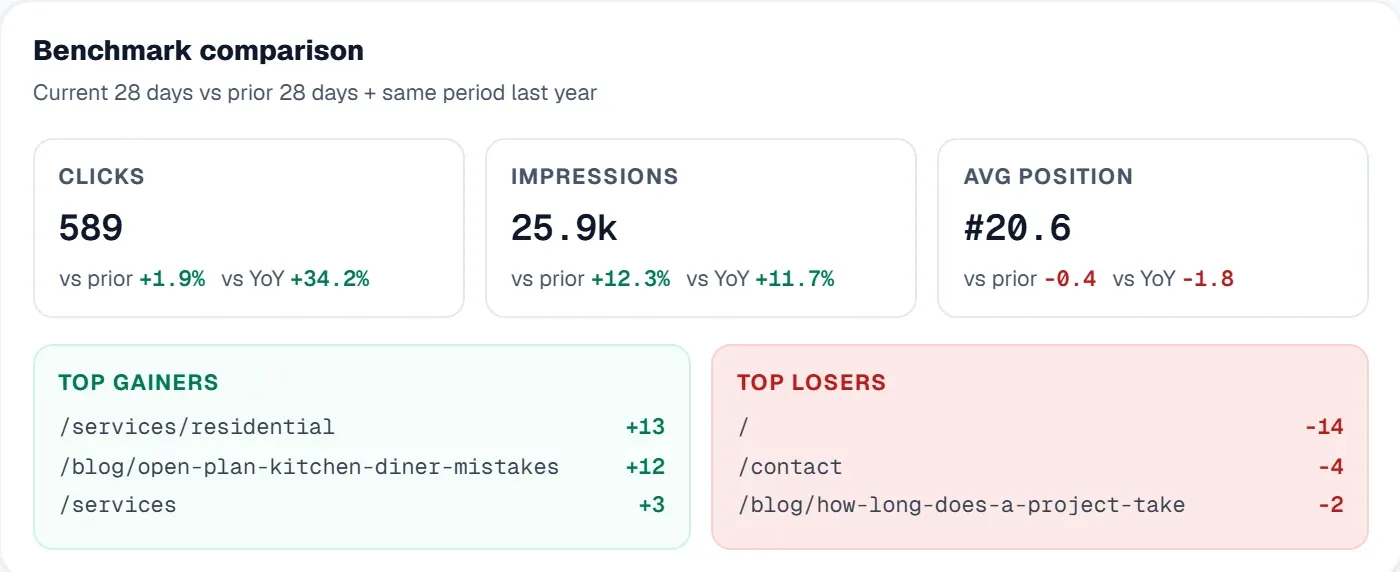 The UtilitySEO dashboard puts Search Console clicks, impressions, average position and click-through rate in one view, with the pages gaining and losing most.
Queries that drove impressions but no clicks
Filter the report for queries with high impressions and zero clicks. Each one is a query where Google thinks you are relevant enough to show but users do not click. The causes are usually one of: the search result snippet is unappealing, the search result is showing the wrong page, the query intent does not match your page format. Each of these is fixable once identified.
The impression growth report nobody runs
Compare the past 28 days of impressions to the previous 28 days, grouped by query. The queries with the largest impression growth are emerging opportunities. The queries with the largest impression loss are eroding positions. Both lists matter; most teams look only at the loss list and miss the growth opportunities.
Discovery vs traffic divergence
Some pages are indexed and discovered but receive little or no traffic from the index. Discovered-but-unclicked pages often indicate that the page is technically findable but not competitive, Google indexes it but does not rank it. These pages are candidates for either substantial improvement or retirement.
Time-based pattern recognition
Look at impressions, clicks, and CTR by day of week and time of day. Most sites have stable patterns, and changes in pattern signal something. A B2B site that suddenly gets weekend impressions might be entering a new market or attracting a different audience type. A consumer site that loses morning impressions might be losing visibility on mobile-heavy commute searches.
Country-level performance
Filter performance by country to identify markets where your site performs above or below the global average. Strong performance in unexpected countries is an opportunity, it usually indicates a topic you cover that is relevant to those markets, suggesting expansion potential. Weak performance in expected countries is a problem, usually localisation or hreflang configuration.
Coverage report deeper than "all valid"
The Coverage report's main number, valid indexed pages, is the headline but not the most actionable view. The interesting buckets are: "Crawled, currently not indexed" (Google decided not to index for content reasons), "Discovered, currently not indexed" (Google has not crawled yet, often crawl budget), "Indexed, though blocked by robots.txt" (configuration conflict). Each bucket points to a specific category of issue and a specific fix.
URL inspection over time
The URL inspection tool tells you the current state of a URL. By recording inspections at intervals, you build a per-URL timeline, when Google last crawled, when canonical decisions changed, when indexing status changed. Most teams use URL inspection only reactively, when investigating a problem. Using it proactively to monitor important URLs catches issues earlier.
Mobile vs desktop divergence
Filter performance by device to compare mobile and desktop performance. Most B2B sites do better on desktop; most consumer sites do better on mobile. Significant divergence from the expected pattern signals something, maybe the mobile site has UX problems, maybe the desktop site has technical issues unique to that view.
What the data does not show
Search Console has notable blind spots. It does not show competitive data. It does not show conversion data. It does not show user behaviour after the click. These have to come from other sources, competitive tools for the first, Analytics for the others.
Setting up the deeper workflow
The deeper Search Console workflow is mostly a question of looking at the data through different filters rather than running it through a different tool. The same Search Console interface produces these insights if you query it appropriately. A Search Console integration in a continuous audit tool brings the same data into one view alongside other metrics, which is the right shape for ongoing analysis. UtilitySEO and similar tools provide this integration as a standard feature.
Most teams use about 20% of Search Console's actual value. The remaining 80% is in the patterns described above, most of which take five minutes to surface once you know to look.
Frequently asked questions
Analyzing average position by query length in Google Search Console patterns reveals your site's ranking strengths, guiding content or link building efforts effectively.
- Group search performance queries by word count (e.g., 1-word, 2-word, long-tail).
- Strong long-tail performance suggests good informational content but potential authority gaps.
- This diagnosis often indicates a need for link building over more content.
Your site's actual click-through rate by position in Google Search Console patterns indicates the effectiveness of your title and description copy.
- Compare your site's CTR against standard curves for each ranking position.
- Above-average CTR suggests strong, compelling metadata engagement.
- Below-average CTR points to opportunities for improving titles and descriptions.
- Focus on top 100 queries with underperforming CTR for highest leverage.
When a page gets impressions but no clicks in Google Search Console patterns, users often find the snippet unappealing or the page doesn't match their intent.
- Filter reports for queries with high impressions and zero clicks.
- Causes include unappealing snippets, wrong page shown, or mismatched query intent.
- These issues are fixable by optimizing metadata or content alignment.
You can find new SEO opportunities by analyzing impression growth reports in Google Search Console patterns, comparing recent periods for emerging trends.
- Compare past 28 days of impressions to the previous 28, grouped by query.
- Queries with largest impression growth signify emerging opportunities.
- Actively look for growth areas, not just impression losses.
When a page is discovered but gets no traffic in Google Search Console patterns, it's often discoverable but lacks ranking competitiveness.
- Google indexes the page, but it doesn't attract user clicks.
- Such pages are candidates for substantial content improvement.
- Alternatively, consider retiring these underperforming pages.
Know what to fix next.
Scan your site for a clearer place to start.
About 30 seconds. No card needed.