
Zoekwoorden volgen met één klik: een tracking-set bouwen uit GSC-data

Bouw een sterke set gevolgde zoekwoorden direct uit Google Search Console-data, met focus op zoekopdrachten met veel impact en geautomatiseerde GSC-positietracking.
Begrijpen hoe je doelgroep je vindt is cruciaal voor elke SEO-strategie. Google Search Console (GSC) levert waardevolle data over de zoekopdrachten die bezoekers echt naar je site brengen. Die data vormt de basis voor effectieve zoekwoorden volgen met GSC. Als je systematisch een tracking-set opbouwt uit GSC-zoekwoorden, ga je verder dan algemeen zoekwoordonderzoek. Zo zie je de echte zoekintentie, vind je kansen met veel impact en maak je je rapportage eenvoudiger. Je inspanningen blijven altijd gericht op wat echt telt voor je organische zichtbaarheid.
De kracht van GSC-positietracking voor echte zoekopdrachten
Google Search Console geeft je een direct inkijkje in hoe je site presteert in de organische zoekresultaten. In tegenstelling tot tools van derden, die zoekvolume of posities schatten, levert GSC nauwkeurige data rechtstreeks van Google. Dat is essentieel voor effectieve GSC-positietracking. Je ziet precies welke zoekopdrachten vertoningen en klikken voor je pagina's opleverden. Die ruwe data is goud waard om zoekwoorden te vinden waarvoor je site al zichtbaar is, ook als je op pagina twee of drie staat.
GSC zelf biedt echter geen continue, dagelijkse positietracking voor een eigen set zoekwoorden. Het toont historische prestaties. Om dat gat te dichten is het belangrijk om GSC-data te combineren met een eigen ranktracking-systeem. Zo ontdek je niet-gevolgde zoekwoorden in GSC en zet je ze op een dagelijks trackingschema. Daarna volg je hun dagelijkse positiewijzigingen, beste-ooit-markeringen en sparklines voor trends.
Wat je wel en niet volgt
Niet elke zoekopdracht in GSC verdient een eigen automatisering van zoekwoordtracking. Een strategische aanpak is de sleutel.
Wat je volgt:
* Striking-distance-zoekwoorden: Zoekopdrachten waarvoor je pagina's op positie 11 tot 30 staan. Vaak is een kleine optimalisatie genoeg om naar de eerste pagina te springen.
* Zoekopdrachten met veel vertoningen en lage CTR: Zoekwoorden met veel vertoningen maar weinig klikken. Dat is een kans om je metatitel en beschrijving te verbeteren voor een hogere doorklikratio.
* Gerichte long-tail-zoekwoorden: Specifieke zinnen van meerdere woorden die op een sterke zoekintentie wijzen, ook als het zoekvolume lager is.
* Merkzoekwoorden: Belangrijk om de zichtbaarheid van je merk te volgen en je merkgerelateerde zoekresultaten te beschermen.
* Zoekwoorden van concurrenten: Zoekopdrachten waarvoor je concurrenten hoog staan maar jij niet verschijnt. Dat laat een contentgat zien.
Wat je niet volgt (of met lagere prioriteit):
* Zoekopdrachten met extreem weinig vertoningen: Zoekwoorden die één of twee keer verschijnen zonder klikken hebben waarschijnlijk weinig impact.
* Irrelevante of verkeerd gespelde zoekopdrachten: Zoekopdrachten die duidelijk niets met je bedrijf te maken hebben, of veelvoorkomende spelfouten die geen eigen targeting rechtvaardigen.
* Zeer wisselvallige zoekwoorden: Zoekopdrachten waarvan de positie zonder duidelijke reden sterk schommelt, vaak een teken dat Google twijfelt over het beste resultaat. Richt je eerst op stabielere termen.
Deze selectieve aanpak zorgt ervoor dat je tracking gericht blijft op de GSC-zoekwoorden met de meeste impact.
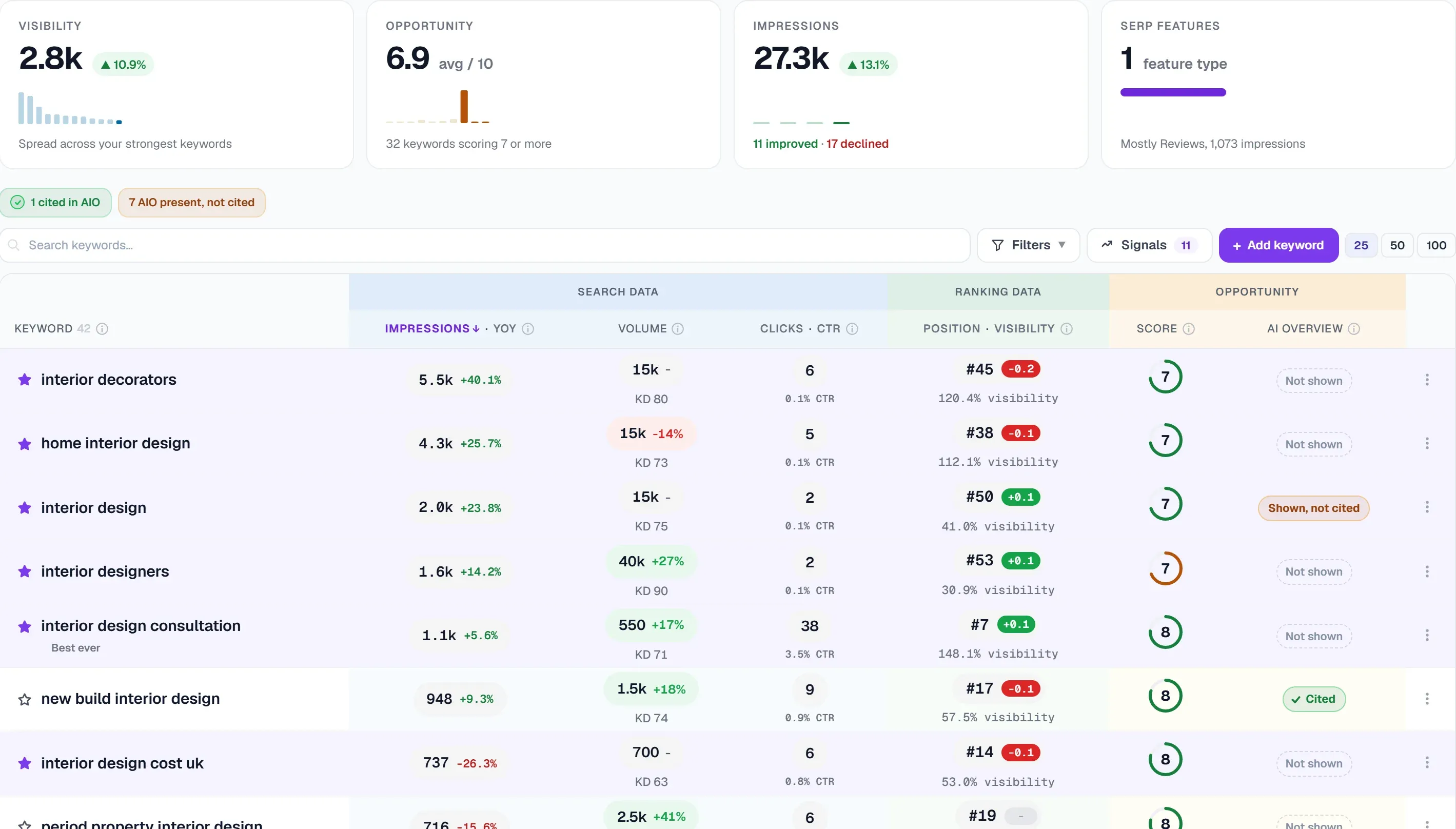
Zoekwoordtracking automatiseren met UtilitySEO
Handmatig door GSC-data zoeken naar zoekwoorden om te volgen kost veel tijd. Daar wordt automatisering van zoekwoordtracking onmisbaar. UtilitySEO is direct gekoppeld aan GSC en maakt dit proces eenvoudiger.
De GSC-koppeling van UtilitySEO haalt zoekwoorden, pagina's, posities, klikken, vertoningen en CTR binnen. Een opvallende functie is zoekwoorden volgen met één klik uit GSC-data. Je bekijkt je GSC-zoekopdrachten en voegt relevante termen met één klik direct toe aan je set gevolgde zoekwoorden. Zo hoef je niets handmatig in te voeren en sluit je tracking altijd aan op het echte zoekgedrag.
Naast simpel toevoegen helpt UtilitySEO je ook om je tracking-set te verfijnen. De ontdekking van niet-gevolgde zoekwoorden vindt GSC-zoekopdrachten die nu niet in je set zitten maar wel potentieel laten zien. Zo mis je geen opkomende kansen. Het platform biedt ook schattingen van zoekwoordmoeilijkheid en zoekwoordideeën plus zoekvolume via de Google Ads API, zodat je beter kunt prioriteren.
Voor doorlopende analyse toont UtilitySEO je ranktracking-data met dagelijkse posities, beste-ooit-markeringen en sparklines die trends zichtbaar maken. Met de overlay voor algoritme-updates koppel je dalingen in posities aan bevestigde Google-updatedata, zodat je veranderingen beter kunt plaatsen. Zo worden ruwe GSC-data bruikbare inzichten voor voortdurende verbetering.
Geavanceerde GSC-zoekwoordstrategieën
Wie verder gaat dan basisfilters, kan met geavanceerde strategieën voor zoekwoorden volgen met GSC flinke groei realiseren.
Segmenteren met reguliere expressies
GSC biedt filtermogelijkheden, maar voor diepere analyse is het krachtig om de data te combineren met tools die reguliere expressies (regex) ondersteunen. GSC zelf ondersteunt regex in de interface maar beperkt. Als je de data exporteert en verwerkt in een spreadsheet of een tool als UtilitySEO die geavanceerde filters aankan, zijn toch verfijnde segmentaties mogelijk. Zo kun je met regex alle zoekopdrachten vinden die bepaalde productcategorieën, plaatsnamen of intentiemodifiers (bijv. "kopen", "review", "beste") bevatten. Dat helpt om zoekintentie tot in detail te begrijpen en contentgaten te vinden.
Kannibalisatie herkennen
Een veelvoorkomend probleem dat GSC-data zichtbaar maakt is zoekwoordkannibalisatie, waarbij meerdere pagina's van je site strijden om dezelfde zoekopdracht. De functie kannibalisatiedetectie van UtilitySEO analyseert je GSC-data en wijst aan waar verschillende pagina's voor hetzelfde zoekwoord ranken, wat vaak leidt tot verwaterde autoriteit en lagere prestaties. Door kannibalisatie op te lossen, bijvoorbeeld door content samen te voegen of pagina's te optimaliseren voor verschillende zoekopdrachten, kunnen je posities en verkeer flink verbeteren.
Prioriteren op basis van bedrijfsdoelen
Niet alle hoog scorende zoekwoorden zijn even waardevol. Prioriteren moet aansluiten op je bedrijfsdoelen. Gebruik GSC-data om zoekwoorden te vinden die conversies opleveren, niet alleen verkeer. Combineer GSC-data met de GA4-koppeling voor sessies en conversies om het hele traject te begrijpen. Zoekwoorden met veel vertoningen en goede posities maar weinig conversies kunnen wijzen op een kloof tussen zoekintentie en de inhoud van de landingspagina, of op de noodzaak van betere calls-to-action.
Conclusie
Effectief zoekwoorden volgen met GSC is meer dan posities in de gaten houden: het gaat erom je doelgroep te begrijpen en te optimaliseren voor echt zoekgedrag. Door systematisch een tracking-set op te bouwen uit je GSC-data, je te richten op zoekopdrachten met veel impact en automatisering te gebruiken, kun je je SEO-inspanningen flink verbeteren. Functies van UtilitySEO zoals zoekwoorden volgen met één klik uit GSC-data en de ontdekking van niet-gevolgde zoekwoorden maken dit complexe proces eenvoudiger en veranderen ruwe data in een duidelijke routekaart voor organische groei. Ontdek wat UtilitySEO kan om je zoekwoordstrategie te stroomlijnen en echte resultaten te boeken. Bekijk onze prijzen om te beginnen.
Frequently asked questions
Hoe gebruik ik Google Search Console om zoekwoorden te volgen?
Je kunt Google Search Console (GSC) gebruiken om zoekwoorden te volgen door de echte zoekopdrachten te bepalen die bezoekers naar je site brengen en die data vervolgens te koppelen aan een eigen ranktracking-systeem. GSC levert nauwkeurige data over vertoningen en klikken.
- GSC toont zoekopdrachten die vertoningen en klikken opleveren.
- Het helpt zoekwoorden te vinden waarvoor je site al zichtbaar is.
- Koppel GSC-data aan een ranktracker voor dagelijkse monitoring.
- Richt je op striking-distance-zoekwoorden en zoekopdrachten met veel vertoningen en lage CTR.
Wat zijn de voordelen van GSC-positietracking voor mijn website?
GSC-positietracking geeft je nauwkeurige data rechtstreeks van Google over de organische prestaties van je site. Zo zie je de echte zoekintentie en vind je kansen met veel impact. Dat helpt je te focussen op wat echt telt voor organische zichtbaarheid.
- Toegang tot nauwkeurige data rechtstreeks van Google.
- De echte zoekintentie voor je content zien.
- Zoekwoordkansen met veel impact ontdekken.
- Rapportage vereenvoudigen en SEO-inspanningen richten.
Welke zoekwoorden moet ik volgen uit Google Search Console?
Bij zoekwoorden volgen met GSC geef je prioriteit aan 'striking distance'-zoekwoorden (posities 11 tot 30), zoekopdrachten met veel vertoningen en lage CTR, gerichte long-tail-zoekwoorden, merkzoekwoorden en zoekwoorden van concurrenten. Die bieden de grootste kansen op verbetering.
- Volg striking-distance-zoekwoorden voor snelle winst.
- Houd zoekopdrachten met veel vertoningen en lage CTR in de gaten om te optimaliseren.
- Neem gerichte long-tail-zoekwoorden op voor sterke intentie.
- Vergeet merk- en concurrentzoekwoorden niet.
Kan ik zoekwoorden volgen automatiseren met GSC-data?
Ja, je kunt het volgen van zoekwoorden uit GSC-data automatiseren met tools als UtilitySEO, die direct koppelen met Google Search Console en het vinden en toevoegen van zoekwoorden aan een dagelijks trackingschema eenvoudiger maken. Dat bespaart tijd en zorgt voor consistente monitoring.
- Gebruik speciale tools voor de GSC-koppeling.
- Automatiseer het vinden van zoekwoorden.
- Voeg zoekwoorden automatisch toe aan een trackingschema.
- Volg dagelijkse positiewijzigingen efficiënt.
Keep reading
See how your site actually scores
Free 30-second scan, real Google scores and a ranked fix list. No signup needed.
No credit card · Cancel anytime