

SEO
Mastering Google Search Console for Improved Website Visibility
Unlock the full potential of Google Search Console and see how UtilitySEO enhances its insights for superior SEO performance.
Google Search Console is an indispensable, free tool offered by Google that provides webmasters and SEO professionals with critical insights into their site's performance in Google Search. It serves as a direct communication channel from Google, highlighting indexing issues, ranking data, and potential improvements. Understanding and actively using Google Search Console is fundamental for any successful SEO strategy, enabling data driven decisions to enhance visibility and organic traffic. This post will explore its core functionalities, the benefits it offers, and how tools like UtilitySEO can amplify its power.
Understanding Google Search Console
At its heart, Google Search Console provides a window into how Google views your website. It allows you to monitor your site's presence in Google Search results, troubleshoot indexing problems, and receive alerts about critical errors. Key reports within the platform include the Performance report, which shows search traffic data like impressions, clicks, click through rate CTR, and average position. The Index Coverage report identifies which pages are indexed and any issues preventing others from appearing in search. Other vital sections cover sitemaps submission, mobile usability, core web vitals, and security issues. Effective use of Google Search Console helps ensure your site is discoverable and healthy. For more detailed insights, you can also explore Google Search Console: Get More from Your Data.
Key Benefits and Insights from Google Search Console
The data available within Google Search Console offers profound benefits for optimising a website. By reviewing the Performance report, you can identify high performing keywords and pages, understand user search queries, and spot trends over time. This data is crucial for content strategy and keyword research. The Index Coverage report helps diagnose technical SEO issues, such as pages excluded from the index or crawl errors, which directly impact search visibility. Furthermore, the Mobile Usability report highlights problems that could hinder a mobile user's experience, a critical ranking factor. Regularly checking your gsc dashboard empowers you to proactively address issues and capitalise on opportunities, ensuring your site remains competitive. Integrating this with GA4 for SEO provides a comprehensive view of user behaviour post click.
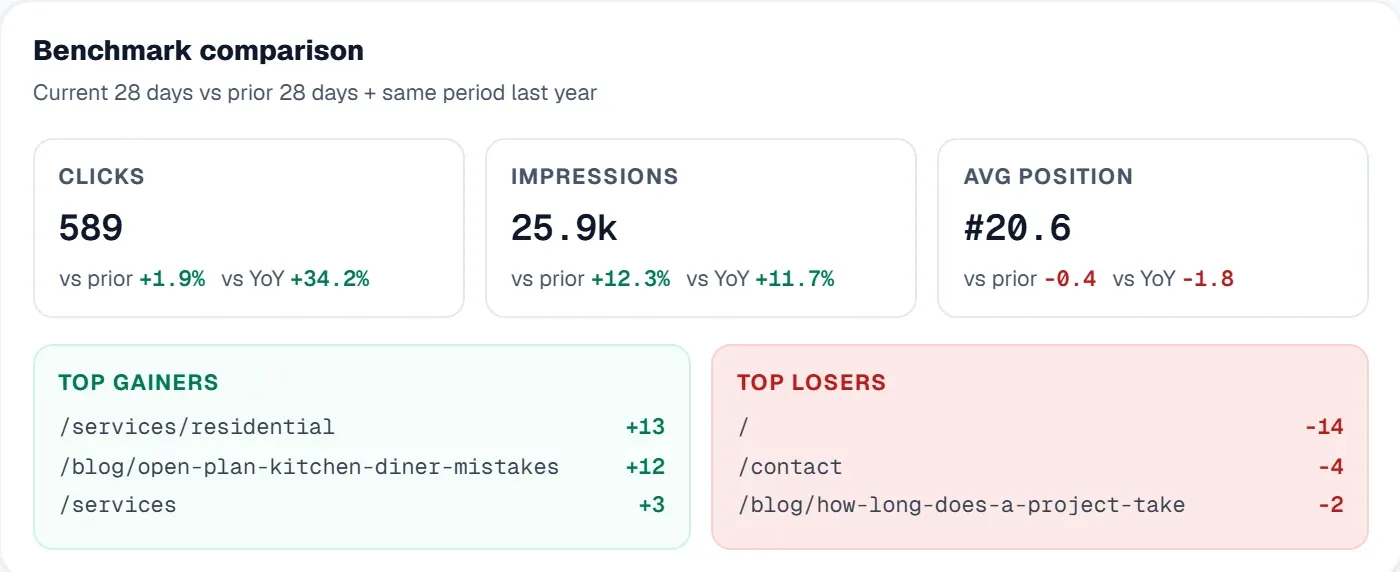
Leveraging UtilitySEO with Google Search Console Data
UtilitySEO seamlessly integrates with Google Search Console to provide a unified, powerful SEO platform. Our Keyword tracking feature directly pulls GSC powered rankings, impressions, and clicks, allowing you to group keywords and analyse performance with device and country breakdowns. This means you can see exactly how your target keywords are performing across different audiences without leaving the UtilitySEO platform. For a deeper dive, check out Mastering Keyword Tracking: Tips and Tools for SEO Success.
Our Pages tab offers detailed GSC page performance data, including inline URL inspection, index status, mobile usability, and canonical mismatch detection. This consolidates critical information, making it easier to identify and fix page specific issues. The Trends tab provides a clear view of your search performance over time, from three days up to two years, helping you spot seasonal shifts or the impact of SEO changes.
Beyond GSC data, UtilitySEO enhances your analytical capabilities. Our GA4 analytics integration brings organic traffic, sessions, conversions, and top pages into a single view, complementing your GSC insights. This allows you to connect search performance with on site user behaviour. You can easily view your GA4 dashboard alongside GSC metrics for a holistic understanding. The GSC URL inspection tool is available inline on the Pages tab, streamlining your workflow for diagnosing individual page issues. UtilitySEO acts as your central hub, transforming raw Google Search Console data into actionable insights, helping you to refine your SEO strategy efficiently.
Exploring Google Search Console Alternatives and Complementary Tools
While Google Search Console is the authoritative source for how Google interacts with your site, it is often complemented by other tools. There are various SEO platforms that offer features such as keyword research, site audits, and competitor analysis. However, it is important to note that direct "google search console alternatives" for Google's own indexing and performance data simply do not exist; GSC is the definitive source. Other tools might replicate some of its reporting or integrate its data, but they cannot replace its direct insights from Google. For more context, read When You Need More Than Google Search Console (And When You Don't).
UtilitySEO stands out by integrating GSC data with its own robust set of features, including full site scan for deep PageSpeed and SEO audits, backlinks and crawl analysis, and AI Insights for automated SEO recommendations. This comprehensive approach means you do not need to juggle multiple disparate tools. Instead, you get a centralised SEO results dashboard that combines your GSC data with other critical SEO metrics, offering a complete picture of your site's health and performance. For a broader look at tools, you might explore Essential SEO Power Tools for Scaling Your Business in 2026.
Conclusion
Google Search Console is an indispensable foundation for any SEO professional, offering unparalleled insights directly from Google. Its data is vital for understanding search performance, identifying technical issues, and guiding content strategy. By integrating Google Search Console with a powerful platform like UtilitySEO, you can elevate your SEO efforts. UtilitySEO consolidates GSC data with comprehensive analytics, scanning, and AI driven tools, providing a single, intuitive gsc dashboard and full suite of features to streamline your workflow and maximise your organic visibility. Explore UtilitySEO today to transform your Google Search Console data into actionable SEO success.
Preguntas frecuentes
Google Search Console is a free Google tool that provides webmasters and SEO professionals with critical insights into their site's performance in Google Search.
- Monitors your site's presence in Google Search results.
- Troubleshoots indexing problems and errors.
- Offers a direct communication channel from Google.
- Essential for any successful SEO strategy.
You can use Google Search Console to enhance website visibility by identifying high-performing keywords, diagnosing technical SEO issues, and optimising user experience.
- Review Performance reports for keyword and page insights.
- Check Index Coverage to fix crawl errors.
- Address mobile usability issues for better ranking.
- Proactively fix security and Core Web Vitals problems.
Google Search Console is fundamental for SEO because it offers crucial data and direct communication from Google about your site's search performance and health.
- Provides insights into search traffic, clicks, and impressions.
- Helps diagnose indexing and crawlability issues.
- Highlights mobile usability and security concerns.
- Enables data-driven decisions for better visibility.
In Google Search Console, you can find various reports like Performance, Index Coverage, Mobile Usability, and Core Web Vitals, among others.
- Performance report shows search traffic data and queries.
- Index Coverage identifies indexed pages and errors.
- Mobile Usability highlights issues affecting mobile users.
- Core Web Vitals assesses page experience metrics.
Yes, Google Search Console is specifically designed to help you identify and resolve website indexing problems, ensuring your pages appear in search results.
- The Index Coverage report pinpoints non-indexed pages.
- It shows reasons for exclusion or crawl errors.
- You can submit sitemaps for better crawling.
- Allows URL inspection for specific page status.
Sabe qué arreglar a continuación.
Analiza tu sitio y ten más claro por dónde empezar.
Unos 30 segundos. Sin tarjeta.