

SEO
GA4 for SEO: The Reports Actually Worth Watching
Go beyond standard GA4 reports to uncover crucial SEO insights using custom explorations, predictive metrics, and BigQuery export.
Understanding user behaviour after they click through to your site is critical for effective SEO. While Google Search Console provides invaluable pre click data, GA4 for SEO offers deep insights into what happens next. The default GA4 reports often fall short for detailed SEO analysis. Instead, building custom explorations allows you to uncover truly meaningful patterns. This post will guide you through leveraging GA4's advanced features, including predictive metrics and BigQuery export, to refine your SEO strategy and optimise content for specific user segments.
Beyond Standard Reports: Building GA4 Explorations for SEO
The standard GA4 reports offer a high level overview, but granular SEO analysis demands more. Custom explorations provide the flexibility to slice and dice data in ways that reveal hidden opportunities. When focusing on GA4 for search, you need to understand user journeys, not just page views.
For example, a Funnel Exploration can map the exact path users take from an organic landing page to a key conversion event. This highlights drop off points and allows you to identify pages needing optimisation. A Path Exploration can reveal unexpected user flows, showing how visitors navigate your site after an organic entry. This uncovers content gaps or areas where internal linking could be improved. You can also use Segment Overlap to understand how different organic traffic segments interact with each other.
These ga4 seo reports move beyond simple traffic numbers, offering a qualitative view of user engagement. They help pinpoint where organic traffic might be encountering friction or where content successfully guides users towards conversion goals.
Leveraging Predictive Metrics for Proactive SEO
GA4's predictive metrics offer a significant advantage for proactive SEO strategies. These metrics include churn probability and purchase probability, allowing you to anticipate user behaviour. Understanding churn probability for organic users helps identify content or user experience issues that might lead visitors to leave without converting. If a segment of organic traffic consistently shows high churn probability, it signals a need to re evaluate the content or calls to action on those landing pages.
Similarly, purchase probability for specific organic segments can inform content prioritisation. If users arriving from particular keywords or landing pages exhibit a high purchase probability, you can focus SEO efforts on enhancing those pathways. This might involve optimising product pages, refining internal links to high converting content, or even creating new content clusters around those successful keywords. These insights allow for a more strategic allocation of SEO resources, moving beyond reactive fixes to predictive optimisation.
Deep Dive with BigQuery Export for Advanced GA4 Organic Traffic Analysis
For those requiring even deeper analysis of GA4 organic traffic, the BigQuery export feature is indispensable. While GA4's interface is powerful, BigQuery provides raw, unsampled data, enabling highly complex queries and custom reporting. This is particularly useful for large websites with vast amounts of organic traffic data.
With BigQuery, you can join GA4 data with other datasets, such as your CRM or sales data, for a truly holistic view of the customer lifecycle. For instance, you could analyse the long term value of organic users from specific channels, or track the lifetime journey of users who first arrived via a particular long tail keyword. This level of detail is impossible within the standard GA4 interface and provides unparalleled opportunities for advanced ga4 explorations seo. It allows for custom attribution models, identifying the true impact of SEO on conversions beyond the last click.
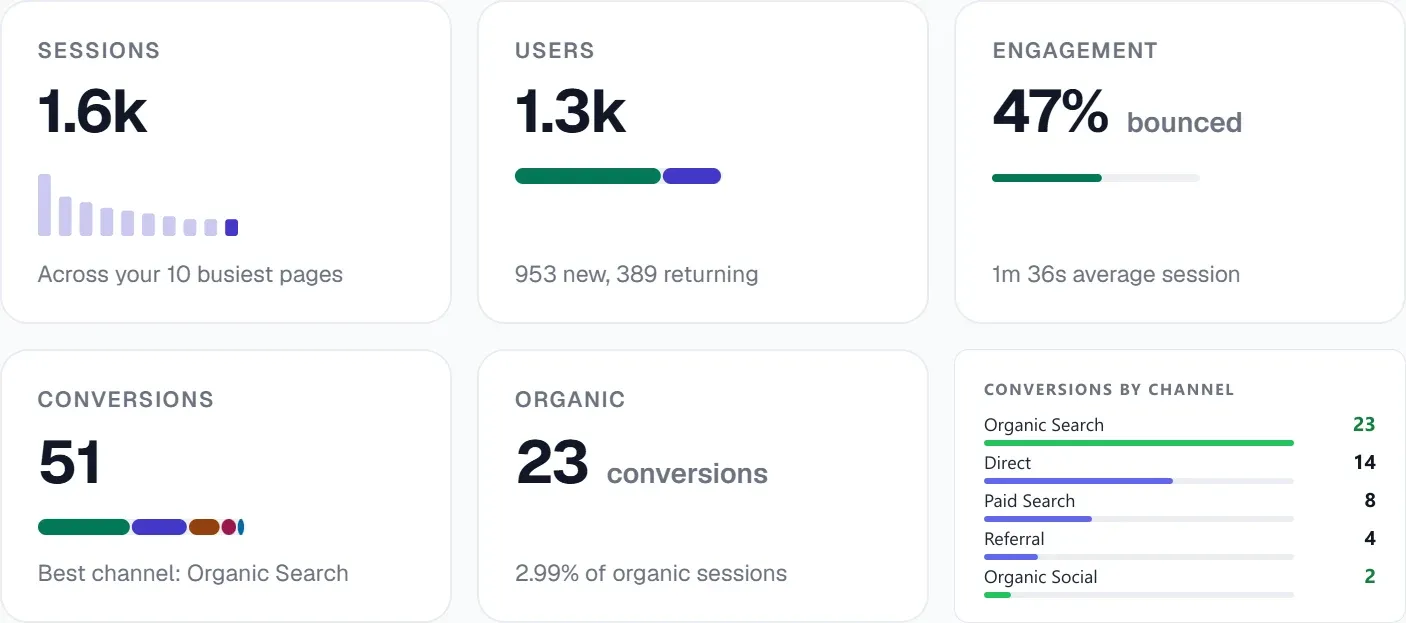
UtilitySEO integrates with GA4, pulling in data for sessions, conversions, and geography. Our platform also tracks AI referral traffic, allowing you to differentiate between traditional organic visits and those originating from AI answer engines. This distinction is crucial for understanding the evolving search landscape.
UtilitySEO: Integrating GA4 Insights with Comprehensive SEO Tools
UtilitySEO provides a unified platform to connect your GA4 insights with a full suite of SEO tools. While GA4 shows you what users do on your site, UtilitySEO helps you understand why and how to improve. Our platform's GSC integration complements GA4 data by providing crucial pre click information such as keywords, pages, positions, and impressions. Combining GSC's "before the click" data with GA4's "after the click" engagement metrics offers a complete picture of your organic performance.
For example, GA4 might show low engagement on a specific landing page for organic traffic. UtilitySEO's Single page scan can then analyse that page against over 100 ranking factors, providing a health score and plain English fixes. If GA4 reveals a high churn probability for users landing on a particular product category, our Content audit can assess the quality signals per page, identifying thin content or areas needing improvement.
Furthermore, UtilitySEO's Traffic drop diagnostic can correlate GA4 reported traffic declines with potential causes, while our Algorithm update overlay helps identify if a drop aligns with a confirmed Google update date. This integrated approach ensures that GA4 insights are translated into actionable SEO tasks. Our SEO to dos feature turns audit findings into assignable tickets, streamlining your workflow. You can also use our Internal link recommender to improve site structure, guiding users more effectively through your site based on GA4 path explorations. This comprehensive approach ensures that every GA4 insight leads to a tangible improvement in your SEO strategy.
Conclusion
GA4 offers powerful capabilities for SEO professionals, particularly through its custom explorations and predictive metrics. Moving beyond default reports allows for a deeper understanding of user behaviour, enabling proactive and data driven SEO decisions. Integrating these GA4 insights with comprehensive tools like UtilitySEO provides a complete ecosystem for identifying issues, diagnosing causes, and implementing effective solutions. Explore how UtilitySEO can help you connect your GA4 data with actionable SEO strategies by visiting our workflow page.
Preguntas frecuentes
You can effectively use GA4 for SEO to identify content gaps by building custom Path Explorations, which reveal unexpected user flows after an organic entry.
- Path Explorations show how visitors navigate your site.
- They highlight areas where internal linking could be improved.
- Unexpected paths can signal missing content users are searching for.
- This helps refine your content strategy.
The best GA4 for SEO reports for understanding user journeys from organic search are custom Funnel and Path Explorations, which go beyond standard traffic numbers to offer a qualitative view of engagement.
- Funnel Explorations map user paths to conversions.
- Path Explorations reveal how users navigate your site.
- These insights pinpoint friction points or successful content flows.
- They provide a deeper understanding than basic page views.
Yes, GA4's predictive metrics, such as churn probability and purchase probability, significantly enhance proactive GA4 for SEO strategies by anticipating user behavior.
- Churn probability identifies content issues leading to exits.
- Purchase probability informs content prioritization for high-value users.
- These insights allow for more strategic SEO resource allocation.
- They shift focus from reactive fixes to predictive optimization.
BigQuery export is indispensable for advanced GA4 for SEO organic traffic analysis because it provides raw, unsampled data, enabling highly complex queries and custom reporting beyond the standard interface.
- It allows joining GA4 data with other datasets like CRM.
- You can analyze the long-term value of specific organic users.
- BigQuery offers a truly holistic view of the customer lifecycle.
- It's crucial for large websites with vast organic traffic data.
To find drop-off points in the user journey using GA4 for SEO, you should build a custom Funnel Exploration, which maps the exact path users take from an organic landing page to a key conversion event.
- Funnel Explorations highlight where users abandon their journey.
- This helps identify pages needing optimization.
- You can see specific steps where users leave.
- It provides clear data for improving conversion funnels.
Sabe qué arreglar a continuación.
Analiza tu sitio y ten más claro por dónde empezar.
Unos 30 segundos. Sin tarjeta.