

SEO
GA4 AI Referral Traffic: Building the Report That Isolates It
Learn to build GA4 reports for AI referral traffic, attribute visits from platforms like ChatGPT, and optimise your content for the evolving AI landscape.
The emergence of AI search tools has introduced a new dimension to digital analytics. Understanding ga4 ai referral traffic is now crucial for marketers aiming to track visitor origins from platforms like ChatGPT and Perplexity. This blog post will guide you through building a GA4 report to isolate and analyse these AI driven referrals. We will explore the mechanisms for identifying ai visitor ga4 data, delve into advanced attribution strategies, and present real world examples of how businesses are leveraging this new traffic source. Pinpointing these distinct traffic segments provides invaluable insights into user behaviour and content effectiveness within the evolving AI landscape.
Identifying and Isolating GA4 AI Referral Traffic
Tracking ga4 chatgpt traffic and other AI sources requires a specific approach within Google Analytics 4. While GA4 may eventually introduce a dedicated "AI Assistant" channel, currently we need to configure custom reports. The core challenge lies in differentiating these visits from general referral traffic. AI referral traffic encompasses visits from platforms such as ChatGPT, Perplexity AI, Claude, Google AI Overview, Microsoft Copilot, Waldo, You.com, and Brave Search. Each of these presents a unique source medium identifier.
To build an initial report, navigate to Reports > Acquisition > Traffic acquisition. From here, you will need to add a filter. Select Source medium as your dimension. For the exact filters, you will use "matches regex" and input the following:
^(chatgpt\.com|perplexity\.ai|claude\.ai|copilot\.microsoft\.com|you\.com|brave\.com|waldo\.com)This regex will capture traffic specifically from these identified AI platforms. You can then save this as a custom report or an exploration for ongoing monitoring. This method allows you to see the aggregate performance of your ai visitor ga4 data.
Advanced Attribution and Custom Channel Grouping
Differentiating various types of AI referrals, beyond a simple source medium match, offers deeper insights. For instance, a direct click from a ChatGPT response differs from a link embedded in an AI generated summary on a third party site. While GA4's default attribution models apply, custom channel grouping provides more granular control over how ga4 ai overview traffic is categorised.
To create a custom channel group:
- Go to Admin > Data Settings > Channel Groups.
- Create a new channel group.
- Define new channels for each specific AI platform or a consolidated "AI Referral" channel.
- Set rules based on the
Sourcedimension, using "contains" or "matches regex" for domain names. For example, for ChatGPT, the rule would beSource contains chatgpt.com. - Crucially, ensure these custom channels have a higher priority than the default "Referral" channel. This prevents GA4 from lumping AI traffic into the generic referral bucket.
This approach helps in understanding the nuances of attribution. If a user interacts with multiple AI tools or a combination of AI and traditional search before converting, the last non direct click model in GA4 will assign credit. However, by segmenting your ai referral report with custom channels, you gain a clearer picture of which AI touchpoints contribute most effectively to conversions. This level of detail is critical for optimising content for specific AI platforms.
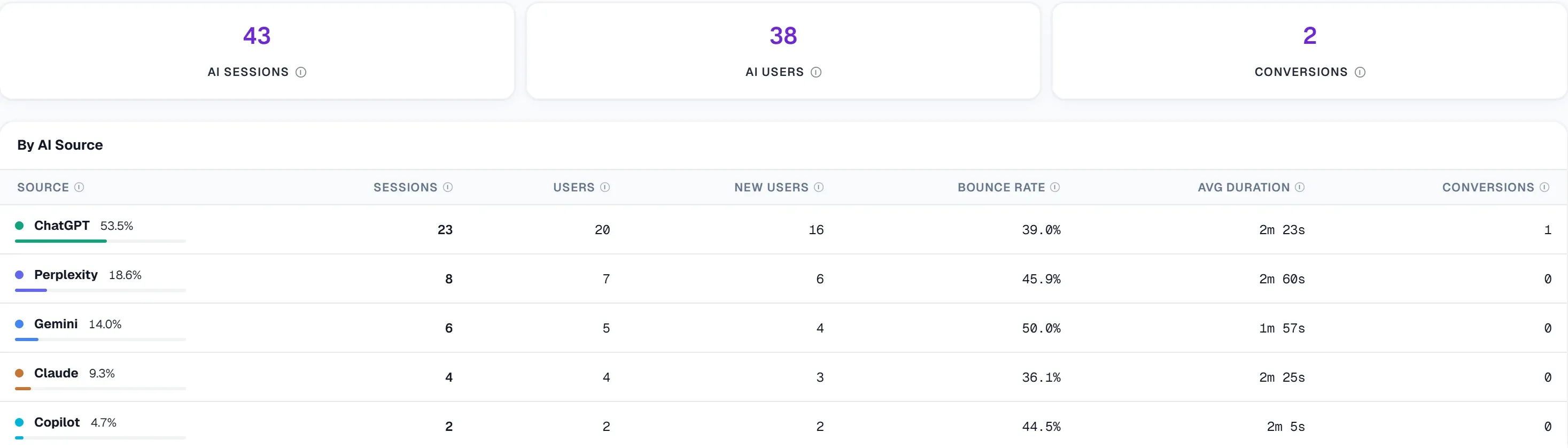 UtilitySEO reads AI referral sessions from GA4 and splits them by assistant, so visits from ChatGPT, Perplexity, Gemini, Claude and Copilot are counted apart from organic search.
UtilitySEO's Role in AI Visibility and Traffic Analysis
UtilitySEO offers tools designed to help you navigate the complexities of AI driven traffic and content optimisation. Our platform includes specific features for AI referral traffic tracking, identifying visitors from platforms like ChatGPT and Perplexity directly within your GA4 integration. This provides a consolidated view of your ga4 ai referral data alongside other key metrics.
Beyond tracking, UtilitySEO's AI Visibility suite offers Brand Tracking, monitoring your mention rate across ChatGPT, Gemini, Perplexity, and Claude. This helps you understand your brand's presence in AI answers. Our Sentiment analysis on brand mentions further refines this understanding, showing how your brand is perceived. The AI prompt suggester assists in designing intent mapped prompts, which can indirectly influence the likelihood of AI platforms referencing your content.
For content optimisation, our Content Opportunities feature identifies pages with striking distance rankings or low CTR, helping you prioritise what to improve. This is vital when considering how AI platforms might summarise or link to your content. Our Sitemap audit ensures your content is discoverable, a foundational step for any AI indexing. By integrating GA4 data directly, UtilitySEO connects the dots between your AI visibility efforts and actual website traffic, providing a holistic view of your digital performance.
The Future of AI Referral Traffic and Optimisation
The long term trends for ga4 ai overview traffic suggest continued growth and an evolving role in the digital marketing landscape. As AI platforms become more integrated into daily information seeking, their influence on website traffic will only increase. Differentiating between various types of AI referrals, such as a direct click from an AI chatbot versus a link embedded in an AI generated summary, will become increasingly important for nuanced analysis. This distinction matters for understanding user intent and the specific value proposition of each AI platform.
Best practices for optimising content specifically for AI platforms go beyond general SEO advice. It involves structuring content for clarity and conciseness, providing direct answers to common questions, and ensuring factual accuracy. High quality, authoritative content is crucial, as AI models are trained on vast datasets and tend to prioritise trustworthy sources. Regularly reviewing your ai referral report will inform your content strategy, helping you identify what resonates most with AI users.
UtilitySEO's platform, with its AI referral traffic tracking and AI prompt suggester, positions you to capitalise on these trends. Understanding where your traffic comes from and how your brand is perceived in AI environments allows for proactive content adjustments. This ensures your site remains a valuable resource as the AI ecosystem matures, securing your position in future search and information retrieval.
Perguntas frequentes
You can track GA4 AI referral traffic by building custom reports in Google Analytics 4, filtering for specific AI platform domains as the source.
- Navigate to Reports > Acquisition > Traffic acquisition.
- Add a filter for 'Source medium' using 'matches regex'.
- Input a regex string containing known AI platform domains.
You can track AI platforms like ChatGPT, Perplexity AI, Claude, Google AI Overview, Microsoft Copilot, You.com, Brave Search, and Waldo within GA4.
- Each platform has a unique `source medium` identifier.
- Use a regex filter to capture traffic from these specific domains.
- This allows for isolation of AI-driven visits.
Yes, you can create a custom channel group in GA4 to specifically categorise and prioritise your GA4 AI referral traffic.
- Go to Admin > Data Settings > Channel Groups.
- Define new channels based on the `Source` dimension.
- Set rules using 'contains' or 'matches regex' for AI domain names.
- Ensure custom AI channels have higher priority than the default 'Referral' channel.
Isolating GA4 AI referral traffic is crucial for understanding how AI tools drive visitors to your site and for optimising content for the evolving AI landscape.
- Provides insights into user behavior originating from AI platforms.
- Helps attribute conversions more accurately.
- Informs content strategy for specific AI interactions.
Custom channel grouping improves AI traffic analysis in GA4 by providing more granular control over how AI-driven visits are categorised, enhancing attribution insights.
- Differentiates various types of AI referrals.
- Prevents AI traffic from being lumped into generic referral buckets.
- Offers a clearer picture of which AI touchpoints contribute most to conversions.
Saiba o que corrigir a seguir.
Analise o seu site e saiba melhor por onde começar.
Cerca de 30 segundos. Sem cartão.