

SEO
GA4 For SEO: The Reports Worth Watching
Leverage GA4's event based data and advanced explorations to uncover specific SEO opportunities and directly inform your content strategy.
Understanding user behaviour is crucial for effective SEO. GA4 for SEO offers a powerful, event based data model that provides deeper insights than previous analytics platforms. This shift allows SEO professionals to move beyond simple page views, focusing instead on user engagement, conversions, and the complete customer journey. This blog will explore the key GA4 organic reports that are most valuable for optimising your search performance, revealing how to translate data into direct SEO strategy adjustments.
Unpacking GA4's Core SEO Reports
GA4's event based architecture transforms how we analyse SEO performance. Instead of session centric data, GA4 tracks user interactions as discrete events, offering a more granular view of how visitors engage with your content.
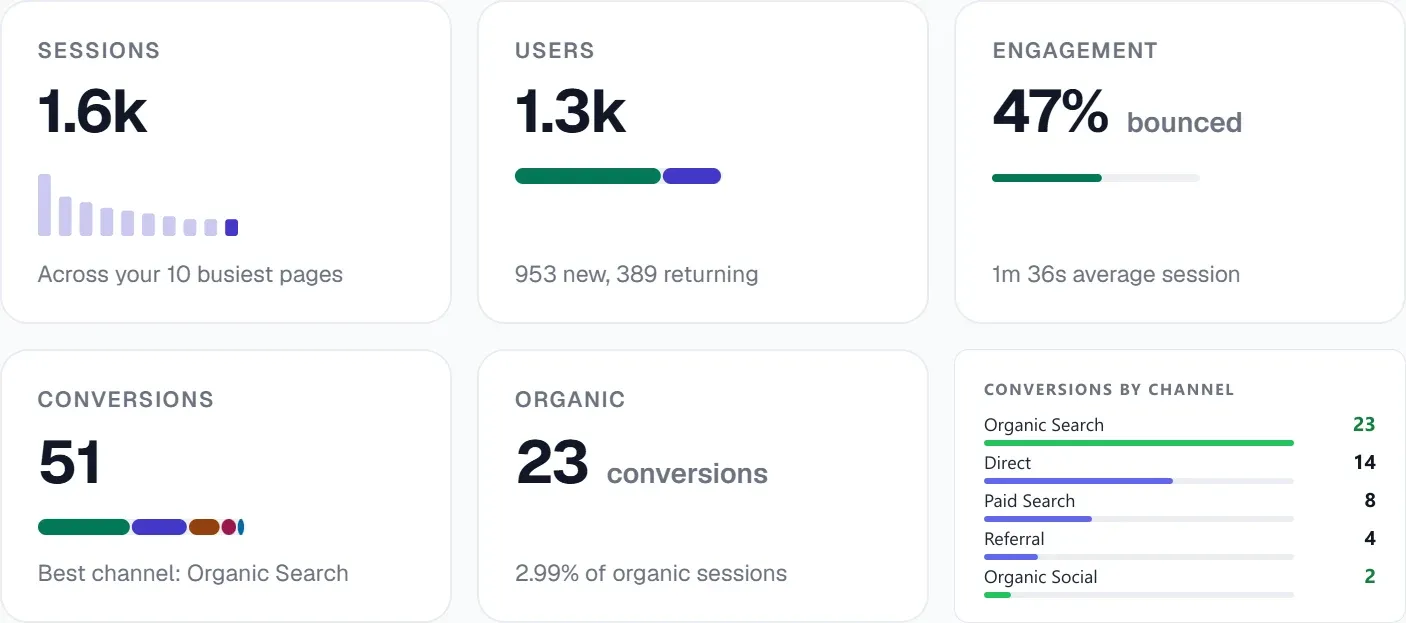
The Traffic Acquisition report is a fundamental starting point. Navigate to Reports > Acquisition > Traffic Acquisition. Filter by "Organic Search" as the default channel grouping. This report shows key metrics like "Engaged Sessions," "Engagement Rate," and "Conversions" for your organic traffic. A low engagement rate on specific landing pages might indicate content misalignment with search intent, prompting a content audit or optimisation. For example, if a blog post ranking for "best running shoes" shows high bounce rates and low engagement, the content might not be addressing the nuances of what users expect after clicking that search result. This insight directly informs a content refresh strategy, aiming to deepen the content or add interactive elements.
The Pages and Screens report (Reports > Engagement > Pages and Screens) provides page specific performance data. When filtered for organic traffic, this report helps identify high performing content and areas needing improvement. For instance, pages with strong organic traffic but low conversion rates might benefit from clearer calls to action or improved internal linking to relevant conversion pages. UtilitySEO's content audit feature can then analyse the quality signals per page, helping diagnose why engagement might be low despite traffic.
Advanced Insights with GA4 Explorations for SEO
GA4 explorations seo tools are where the platform truly shines for advanced SEO analysis, allowing you to build custom reports and visualise data in unique ways.
Funnel Exploration helps visualise the steps users take on your site, from landing page to conversion. For SEO, this means setting up a funnel that mirrors a typical organic user journey. For example, you could track: Organic Landing Page > Product Category Page > Product Page > Add to Cart > Purchase. Identifying drop off points in this funnel directly informs optimisation efforts. If a significant number of users abandon after the "Product Category Page," it suggests issues with product categorisation, filtering, or internal linking. This could prompt an internal link recommender review, ensuring relevant products are easily discoverable from category pages. UtilitySEO's internal link recommender pinpoints the exact phrase, source page, and target for optimal linking.
Path Exploration provides a visual representation of user flow, showing the sequence of events users trigger. This is invaluable for uncovering unexpected user journeys or identifying content gaps. For instance, if many organic users frequently navigate from a specific blog post to a seemingly unrelated service page, it indicates an unaddressed user need or a potential new content opportunity. This insight can lead to the creation of new content that bridges this gap, or a re evaluation of existing content to better serve this emergent user path. UtilitySEO's content opportunities feature can then rank these new content ideas by their real upside based on striking distance and low CTR.
Tracking AI Referral Traffic and ChatGPT Traffic
The rise of AI chatbots like ChatGPT and Perplexity has introduced a new dimension to referral traffic. GA4 can help differentiate between traditional organic search and GA4 AI referral traffic.
Within your Traffic Acquisition reports, carefully examine your "Source/Medium" dimensions. While direct AI referral traffic might not always be explicitly labelled "AI," you can often spot patterns. Look for referral sources that are not traditional search engines or known social media platforms. By setting up custom dimensions and events, you can specifically track interactions originating from AI tools if you have control over how your content is surfaced there. UtilitySEO provides AI referral traffic tracking for visitors from ChatGPT and Perplexity, offering specific insights into this emerging traffic source. This allows you to monitor how your content performs in AI answer environments and adjust your content strategy accordingly, perhaps by optimising for question answering formats or specific snippets.
Understanding GA4 ChatGPT traffic involves a similar approach. While direct attribution can be challenging, observing changes in engagement metrics and specific landing page performance after your content has been referenced by AI models can provide clues. UtilitySEO's brand tracking feature monitors your mention rate across ChatGPT, Gemini, Perplexity, and Claude, alongside sentiment analysis. This gives you a holistic view of your brand's presence in the AI ecosystem, informing your strategy for optimising content for AI consumption.
UtilitySEO: Integrating GA4 for Holistic SEO Performance
UtilitySEO offers robust integration with GA4, streamlining your data analysis and turning insights into actionable tasks. Our platform pulls in key metrics like sessions, conversions, and geography directly from GA4. This integration allows you to cross reference GA4's user behaviour data with our extensive SEO auditing capabilities.
For example, if GA4 reports a low engagement rate on specific pages receiving high organic traffic, our single page scan can then analyse over 100 ranking factors, provide a health score, and suggest plain English fixes. This might reveal technical issues like slow loading times, which can be diagnosed further using our INP Optimisation: The Fix Patterns That Move the Score guide, or content quality problems identified by our content audit.
Furthermore, UtilitySEO's traffic drop diagnostic can correlate drops in organic traffic reported by GA4 with confirmed algorithm update dates, giving you context for performance changes. Our crawl comparison feature can diff two site snapshots to isolate changes that might have impacted GA4 metrics. This comprehensive approach ensures you are not just seeing the 'what' in GA4, but also understanding the 'why' through UtilitySEO's detailed auditing and diagnostic tools.
By combining GA4's rich user behaviour data with UtilitySEO's technical and content auditing, you gain a powerful, integrated view of your SEO performance. This synergy allows for precise identification of issues and targeted implementation of fixes, ultimately driving better organic results.
Preguntas frecuentes
You can effectively use GA4 for SEO by leveraging its event-based data model to gain deeper insights into user engagement, conversions, and the complete customer journey, informing direct strategy adjustments.
- Focus on the Traffic Acquisition report for overall organic performance.
- Utilise the Pages and Screens report for page-specific insights.
- Employ Funnel and Path Explorations for advanced user journey analysis.
- Identify content gaps and optimisation opportunities through engagement metrics.
The most important GA4 reports for SEO professionals to monitor include the Traffic Acquisition report, the Pages and Screens report, and advanced explorations like Funnel and Path Exploration.
- Traffic Acquisition shows key metrics for organic traffic.
- Pages and Screens provides performance data for individual pages.
- Funnel Exploration visualises user steps towards conversion.
- Path Exploration reveals user flow and content interaction sequences.
Yes, GA4's event data can help you understand user intent from organic search by tracking specific interactions and engagement metrics post-click, allowing you to infer what users are looking for.
- Low engagement on a landing page might signal content misalignment.
- High bounce rates can indicate content not meeting search expectations.
- Analysing user paths reveals common information-seeking patterns.
- Conversion events directly reflect fulfilled user intent.
You can identify content gaps using GA4 for SEO analysis by observing user behaviour in reports like Path Exploration and Pages and Screens, looking for unexpected journeys or low engagement on key topics.
- Path Exploration shows if users are frequently searching for unaddressed topics.
- Pages and Screens highlights pages with high traffic but poor engagement.
- Funnel Exploration can reveal drop-off points suggesting missing information.
- Low conversion rates on relevant pages might indicate content deficiencies.
Sabe qué arreglar a continuación.
Analiza tu sitio y ten más claro por dónde empezar.
Unos 30 segundos. Sin tarjeta.